cancel
Showing results for 
Search instead for 
Did you mean: 

The Power BI Data Visualization World Championships is back! It's time to submit your entry. Live now!

Reply
tlenzmeier
Helper II
Helper II

Forecasting Revenue


Hello,


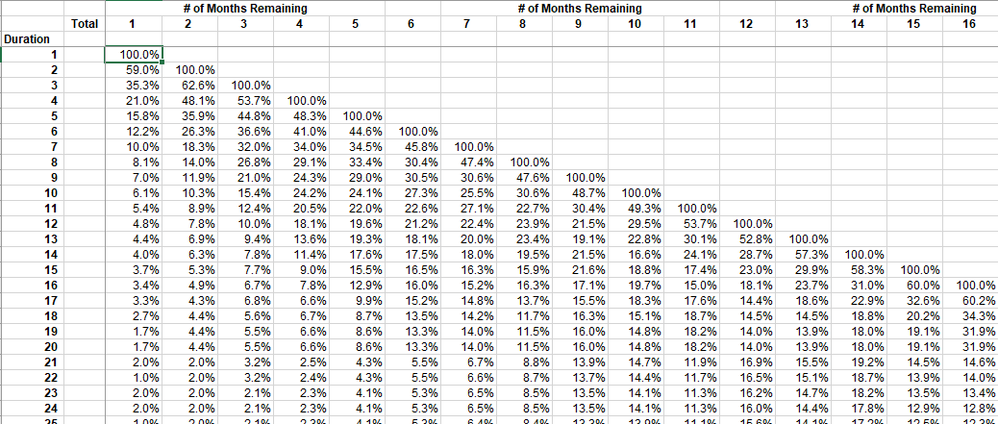
I am looking for ideas on how best to tackle my problem/challenge. I have a project, for example, for a $100,000. It's going to take six months to complete, and I need to forecast the revenue for each period based on the grid below. I thought I should insert a derived column into my projects table that defines the duration. The number of months remaining seems to be a simple matter of a DATEDIFF between the start date and the reporting date. In the second photo, I have an unpivoted table that has the same information. The only difference is the "remaining" column, and that is used to calculate the ending balance. Is this a case of simply using a lookup function in DAX?


Excel - Burn RateExcel - Burn RateUnpivoted TableUnpivoted Table


2 REPLIES 2
v-piga-msft
Resident Rockstar
Resident Rockstar

Hi @tlenzmeier


I'm very clear about your requirement. Could you describe your scenario in more details?


If it is convenient, could you share a dummy pbix file which can reproduce the scenario and your desired output, so that we can help further investigate on it? You can upload it to OneDrive or Dropbox and post the link here. Do mask sensitive data before uploading.)


Best Regards,

Cherry

Community Support Team _ Cherry Gao
If this post helps, then please consider Accept it as the solution to help the other members find it more quickly.

Thank you for your response. To illustrate, let's say we have a project for $100,000. It's going to take three months to complete. In the construction world, we compute revenue by the percentage of completion method. So we are assuming that we will record revenue over three months. The first month we recognize 35%, 40% in the second month, and 35% in the third ($35k, $40k, $25k).


I'm not sure how best to dynamically capture the various rates.


If I were doing an Excel-type lookup, you'd search on the duration (number of months), then the current position; e.g., month 3, 4, 6, whatever, and where they match, you'd multiply the rate by the contract amount.

Helpful resources

Announcements
Power BI DataViz World Championships

Power BI Dataviz World Championships

The Power BI Data Visualization World Championships is back! It's time to submit your entry.

January Power BI Update Carousel

Power BI Monthly Update - January 2026

Check out the January 2026 Power BI update to learn about new features.

FabCon Atlanta 2026 carousel

FabCon Atlanta 2026

Join us at FabCon Atlanta, March 16-20, for the ultimate Fabric, Power BI, AI and SQL community-led event. Save $200 with code FABCOMM.