Hi everyone, i am struggling to calculate a forecast and i was hoping someone here could help me.
I Have the dates for the entire month, the plan (S&OP) for the month (daily) and the accumulated plan . I also have the measures per day and the accumulated measures per day.
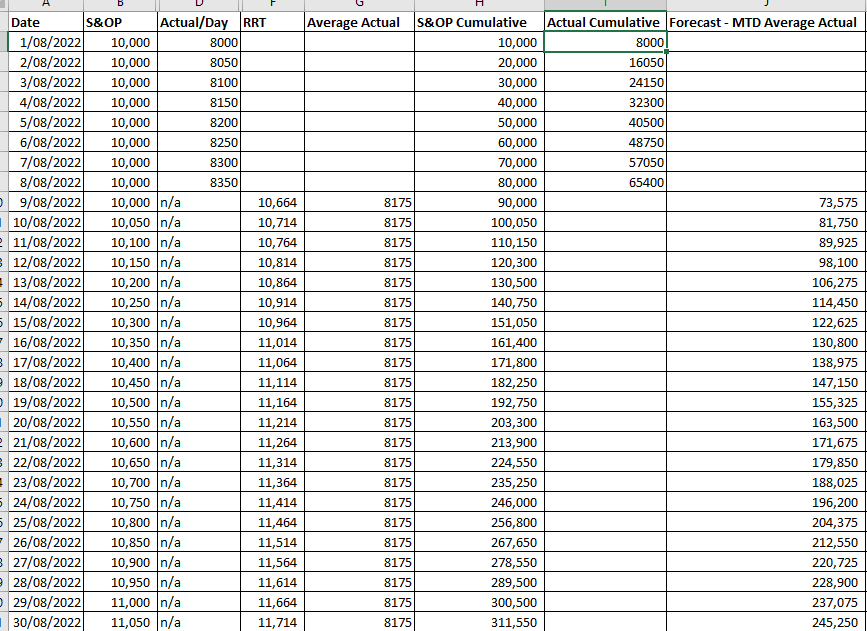
I was required to create two forecast, the first one i was able to do it , as the logic is based on the average of the daily actual, would be something like:
Forecast Case 1 Average:
- Day 1: Actual accumulated + Average
- Day 2 = Day 1 + Average -= Actual + 2*Average
- Day3 = Day2 + Average = Actual + 3* Average
- Etc.
And I used the datediff to get the column of numbers 1,2,3,4 etc. until the end of the month, and the dax i used is:

So i calculated different variables for the end of the month, the production day ( the current day of the month), etc
and then i used the logic to apply : "Actual + Average*daydiff
My problem is the forecast 2, for the S&OP when the S&OP changes, as would be:
- Day1: Actual + S&OP1
- Day2: Day1+ S&OP2 = Actual+S&OP1+S&OP2
- Day3: Day2+S&OP3 = Actual +S&OP1+S&OP2+S&OP3
- Etc.
As in this case the S&OP is different everyday, cannot apply the logic as in the case 1, and I would need to iterate/for loop in each row… and I have trying to check that for few hours and I am getting a bit stuck..


