FabCon is coming to Atlanta
Join us at FabCon Atlanta from March 16 - 20, 2026, for the ultimate Fabric, Power BI, AI and SQL community-led event. Save $200 with code FABCOMM.
Register now!- Power BI forums
- Get Help with Power BI
- Desktop
- Service
- Report Server
- Power Query
- Mobile Apps
- Developer
- DAX Commands and Tips
- Custom Visuals Development Discussion
- Health and Life Sciences
- Power BI Spanish forums
- Translated Spanish Desktop
- Training and Consulting
- Instructor Led Training
- Dashboard in a Day for Women, by Women
- Galleries
- Data Stories Gallery
- Themes Gallery
- Contests Gallery
- QuickViz Gallery
- Quick Measures Gallery
- Visual Calculations Gallery
- Notebook Gallery
- Translytical Task Flow Gallery
- TMDL Gallery
- R Script Showcase
- Webinars and Video Gallery
- Ideas
- Custom Visuals Ideas (read-only)
- Issues
- Issues
- Events
- Upcoming Events
Get Fabric Certified for FREE during Fabric Data Days. Don't miss your chance! Request now
- Power BI forums
- Forums
- Get Help with Power BI
- Desktop
- Re: Force displaying of measure
- Subscribe to RSS Feed
- Mark Topic as New
- Mark Topic as Read
- Float this Topic for Current User
- Bookmark
- Subscribe
- Printer Friendly Page


- Mark as New
- Bookmark
- Subscribe
- Mute
- Subscribe to RSS Feed
- Permalink
- Report Inappropriate Content
Force displaying of measure
Hi there,
We have the following simplified scenario (see file attached):
Table1
| Row | Col | Res |
| R1 | C1 | 1 |
| R2 | C2 | 2 |
| R3 | C3 | 3 |
| R4 | C4 | 4 |
and the measure:
Measure_Constant = 100
Now, we set Table1[Row] in rows and Table1[Col] in columns of a matrix visual and [Measure_Constant] in values. The result is the following:
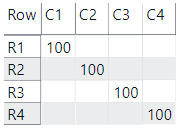
As you can see, the measure, although it's a constant, is not displayed in all the cells.
How can we force that it gets displayed everywhere?
Thanks very much

- Mark as New
- Bookmark
- Subscribe
- Mute
- Subscribe to RSS Feed
- Permalink
- Report Inappropriate Content
Hi @AlB -
If the requirements are to keep the original structure and use a Matrix visual, I think it's impossible.
@smpa01 and @Anonymous have good suggestions for alternatives.
Why do I think it's impossible - besides the fact that none of us have figure it out? 😉
Here is the evaluation of the first variable in DAX Studio:
Note that only 4 combinations are returned. The other combinations are not evaluated.

Cheers,
Nathan
- Mark as New
- Bookmark
- Subscribe
- Mute
- Subscribe to RSS Feed
- Permalink
- Report Inappropriate Content
@Anonymous , I was thinking the same thing. I tried all sorts of crossjoins, intersect, excepts, etc.. but I think the main issue was that the filter context was coming from a table where only those certain combinations existed. I'm sure there's a way ( maybe ) to do it purely in DAX, but with tools like Power Query and Data Modeling, why force it?


- Mark as New
- Bookmark
- Subscribe
- Mute
- Subscribe to RSS Feed
- Permalink
- Report Inappropriate Content
@Anonymous @Anonymous
When @AlB created the first table where he/she could not replicate what he/she had in mind. It means the with the structure of the table, the measures are stored as a vertical value in the memory at the table. So the table needs to be altered to catered to AIB's requirement. But AIB does not want that table to be altered and that is understandable. Therefore, I thought of two other Swiss army knives Power BI curently has which are R and Python. Each of them has full editors in the viz window. That gives the user the ability to alter the table only for the sake of viz and that is what I tried to apply.
- Mark as New
- Bookmark
- Subscribe
- Mute
- Subscribe to RSS Feed
- Permalink
- Report Inappropriate Content
Cooool
@smpa01 , @Anonymous , @Anonymous
Thanks very much for your great answers. thought this would be solved quickly by 'change this on that menu' but I see it's gone pretty deep now. R, Python, Dax Studio, M, data model changes?? Well, well  I'll take a more detailed look later and get back to you.
Thank you
- Mark as New
- Bookmark
- Subscribe
- Mute
- Subscribe to RSS Feed
- Permalink
- Report Inappropriate Content
Hello @AlB
I have DAX solution to your problem that does not need
altering data set
or
using other languages at all.
Not sure if you already figured this out by yourself or still interested. But I thought of sharing this as I found out myself. @Anonymous @Anonymous guys I am tagging you here if you are still interested in this just in case.

Measure =
VAR _1 = CROSSJOIN(DISTINCT(Table1[Row]),DISTINCT(Table1[Col]))
VAR _2 = ADDCOLUMNS(_1,"@constant",100)
VAR _3 = SUMX(_2,[@constant])
RETURN _3


- Mark as New
- Bookmark
- Subscribe
- Mute
- Subscribe to RSS Feed
- Permalink
- Report Inappropriate Content
- Mark as New
- Bookmark
- Subscribe
- Mute
- Subscribe to RSS Feed
- Permalink
- Report Inappropriate Content
@Anonymous - I was thinking the same - "There must be a way". But...
Whatever code you put into a measure doesn't matter. When the matrix applies Summarize columns, it eliminates all other combinations.
If row and column come from 2 different tables, a constant measure would force all combinations (cartesian product) to be displayed.
But, since the row and column come from the same table, there is no cartesian product - Those combinations simply don't exist.
- Mark as New
- Bookmark
- Subscribe
- Mute
- Subscribe to RSS Feed
- Permalink
- Report Inappropriate Content
Hello @AlB
If you change the basic structure of your table to following, you can have the constant measure featured in every cell

let
    Source = Table.FromRows(Json.Document(Binary.Decompress(Binary.FromText("i45WCjJU0lFyBhGGSrE6QL4RiA8ijCB8YxAfRBhD+CYgPogwUYqNBQA=", BinaryEncoding.Base64), Compression.Deflate)), let _t = ((type text) meta [Serialized.Text = true]) in type table [Row = _t, Col = _t, Res = _t]),
    #"Changed Type" = Table.TransformColumnTypes(Source,{{"Row", type text}, {"Col", type text}, {"Res", Int64.Type}}),
    #"Removed Other Columns" = Table.SelectColumns(#"Changed Type",{"Row", "Res"}),
    Custom1 = Table.SelectColumns(#"Changed Type",{"Col"}),
    Col = Custom1[Col],
    Custom2 = Table.AddColumn(#"Removed Other Columns", "Custom", each Col),
    #"Expanded Custom" = Table.ExpandListColumn(Custom2, "Custom")
in
    #"Expanded Custom"
- Mark as New
- Bookmark
- Subscribe
- Mute
- Subscribe to RSS Feed
- Permalink
- Report Inappropriate Content
Hi @smpa01
Thanks for your reply.
I am interested in forcing it to display without modifying the table structure.
- Mark as New
- Bookmark
- Subscribe
- Mute
- Subscribe to RSS Feed
- Permalink
- Report Inappropriate Content
@AlB I may have what you need. In this way, the basic structure of the table (Query1) remains unchanged and transformation for the sake of visualistaion can take place in R editor and the transformed output becomes the visual output that you expect to display to your audience.

# The following code to create a dataframe and remove duplicated rows is always executed and acts as a preamble for your script:

# dataset <- data.frame(Col, Row)
# dataset <- unique(dataset)

# Paste or type your script code here:
output<-dataset
output$Measure<-print(100)
a<-output
library(tidyr)
x<-spread(a,Col,Measure, fill=100)
y<-data.frame(x)
y
library(gridExtra)
library(grid)
d <- head(y[,1:5])
grid.table(d)
- Mark as New
- Bookmark
- Subscribe
- Mute
- Subscribe to RSS Feed
- Permalink
- Report Inappropriate Content
@AlB ,
@smpa01 had a great way to handle this, but understandable if you dont want to change the table structure. But how about changing the data model a tad? Couple ways to go about this I belive.
1) Simple CROSSJOIN to create a new table. Easy, not a huge fan of creating a whole new table for possible one calculation. So passed on that one.
2) Create 2 Dimension Tables, one for Row and one for Col and related them to your main table. Easily done in PowerQuery and the original table structure is still in place. And chances are in real life these dimension might already exists. And this is what we want to use as filters. Really really dont every wnat to use columns from fact tables as filters.

Then we can just create a simple measure: ( I used the sum of the Res column to show the differences):
Total Res =
IF(
     ISBLANK(
            MAX( Table1[Res])
        ),
        "No Data", //can be anything
        [Constant]
)
Small change the data model and good to go. That's my goal really. I dont want to build complex DAX unless I have to. And I'd much prefer not to 
Helpful resources

Power BI Monthly Update - November 2025
Check out the November 2025 Power BI update to learn about new features.

Fabric Data Days
Advance your Data & AI career with 50 days of live learning, contests, hands-on challenges, study groups & certifications and more!

FabCon Atlanta 2026
Join us at FabCon Atlanta, March 16-20, for the ultimate Fabric, Power BI, AI and SQL community-led event. Save $200 with code FABCOMM.


