cancel
Showing results for 
Search instead for 
Did you mean: 

The Power BI Data Visualization World Championships is back! Get ahead of the game and start preparing now! Learn more

Reply
aicms
Frequent Visitor

Force an item in a TOP table

Hi all,


I have a simple table which currently is set to show me the TOP 10 markets according to annual sales.

However, I would like to force the inclusion of a specific market (example: Russia) that does never appear on that TOP 10, regardless of the year.

Is there anyway that I can always show the TOP according to a value and ALWAYS force the inclusion of this specific market? 


Thank you!

5 REPLIES 5
v-juanli-msft
Community Support
Community Support

Hi @aicms 

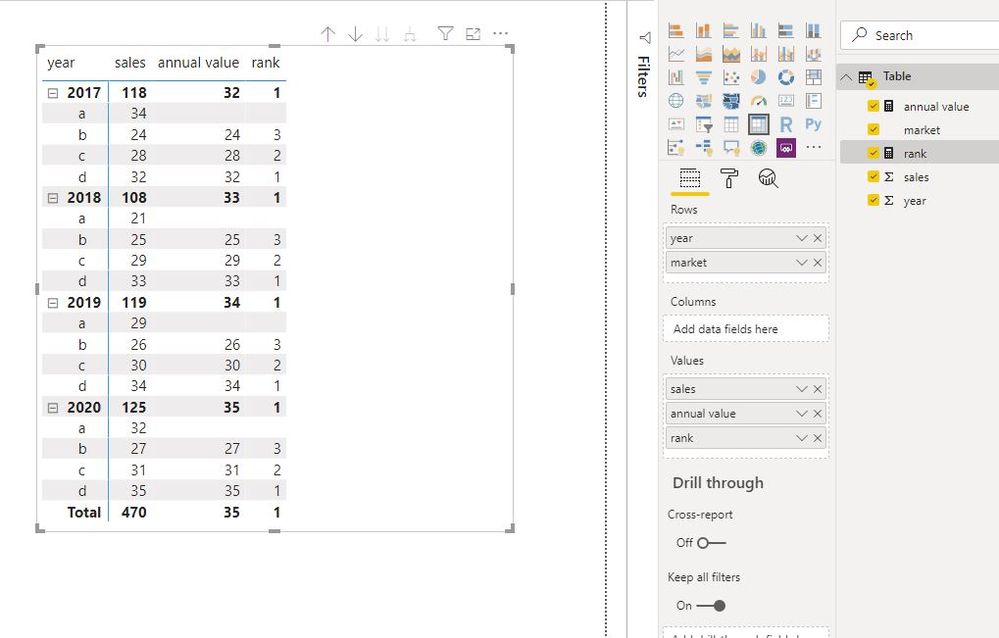
Create measures to exclude the specific market.

annual value =
CALCULATE (
    SUM ( 'Table'[sales] ),
    FILTER (
        ALLSELECTED ( 'Table' ),
        'Table'[market] <> "a"
            && 'Table'[year]
                = MAX ( 'Table'[year] )
            && 'Table'[market]
                = MAX ( 'Table'[market] )
    )
)

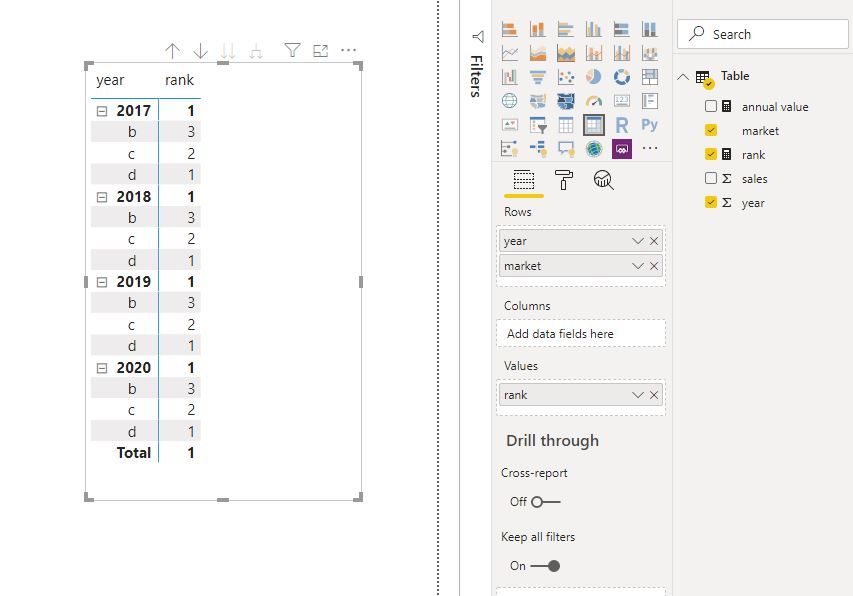
rank = IF([annual value]<>BLANK(),RANKX(ALL('Table'[market]),[annual value],,DESC,Dense))

Capture3.JPGCapture4.JPG

Best Regards
Maggie
Community Support Team _ Maggie Li
If this post helps, then please consider Accept it as the solution to help the other members find it more quickly.

Hi @v-juanli-msft,


Thank you very much for your kind help! I did not try your solution because it is designed to "exclude" a specific market and I really wanted to "force"/include always. 

Hi @aicms 

Have a look at my example, do you want to include one specific market or exclude?

You can provide an example and give your desired result based on my example.


Best Regards

Maggie

amitchandak
Super User
Super User

@aicms , Try a  measure like

CALCULATE([sales], filter(Table,[Rank]<=10 && Table[Country] = "Russia"))

Share with Power BI Enthusiasts: Full Power BI Video (20 Hours) YouTube
Microsoft Fabric Series 60+ Videos YouTube
Microsoft Fabric Hindi End to End YouTube

Hi @amitchandak ,

Thank you for your help!


It's not working but it must be something that I'm doing wrong (I am kinda new at this). I am using the following formula (excluding Russia for now):


= CALCULATE([Euros_Sales]; filter(Geography; [Euros_Rank {Geography}] <= 10))


where

Euros_Sales = sum(Data[Euros])
[Euros_Rank {Geography}] = RANKX(ALLSELECTED(Geography);CALCULATE([Euros_Sales]))
 
But it does not retrieve any ranked table.. 

Helpful resources

Announcements
Power BI DataViz World Championships

Power BI Dataviz World Championships

The Power BI Data Visualization World Championships is back! Get ahead of the game and start preparing now!

December 2025 Power BI Update Carousel

Power BI Monthly Update - December 2025

Check out the December 2025 Power BI Holiday Recap!

FabCon Atlanta 2026 carousel

FabCon Atlanta 2026

Join us at FabCon Atlanta, March 16-20, for the ultimate Fabric, Power BI, AI and SQL community-led event. Save $200 with code FABCOMM.