Join us at FabCon Atlanta from March 16 - 20, 2026, for the ultimate Fabric, Power BI, AI and SQL community-led event. Save $200 with code FABCOMM.
Register now!The Power BI Data Visualization World Championships is back! Get ahead of the game and start preparing now! Learn more
I have extracted data from my CRM with PowerBI and I have the following relationships between tables Leads an Users:
LEADS: USERS
CreatedBy (Userid) *--1 Id
ModifiedBy (Userid) *--1 Id
Owner (Userid) *--1 Id
I want to create a vizualization that shows the number of Leads / Owner NAME.
But If I create a new column in the Leads table with the formula OwnerName = concatenate(related(User[FirstName]),concatenate(" ",related(User[LastName]))) and I use OwnerName as axis it takes into consideration the first relationship (based on CreatedBy column. How do I get it to take into consideration the Owner column?
Thanks
Solved! Go to Solution.
Hi @adriansuteu,
According to your description, you want to get the related user name based on owner, right?
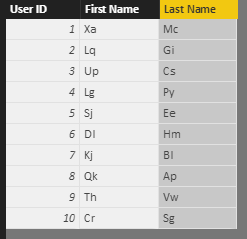
If this is a case, you can refer to below formulas to get related user name.
Calculate column:
USERELATIONSHIP Function: Owner Name = CALCULATE(CALCULATE(VALUES(User[Last Name])&" "&VALUES(User[First Name]),LEADS),USERELATIONSHIP(LEADS[Owner],User[User ID]),ALL(User)) LOOKUPVALUE Function: Owen Name 2 = LOOKUPVALUE(User[Last Name],User[User ID],LEADS[Owner])&" "& LOOKUPVALUE(User[First Name],User[User ID],LEADS[Owner])
Result:
Regards,
Xiaoxin Sheng
Hi @adriansuteu,
According to your description, you want to get the related user name based on owner, right?
If this is a case, you can refer to below formulas to get related user name.
Calculate column:
USERELATIONSHIP Function: Owner Name = CALCULATE(CALCULATE(VALUES(User[Last Name])&" "&VALUES(User[First Name]),LEADS),USERELATIONSHIP(LEADS[Owner],User[User ID]),ALL(User)) LOOKUPVALUE Function: Owen Name 2 = LOOKUPVALUE(User[Last Name],User[User ID],LEADS[Owner])&" "& LOOKUPVALUE(User[First Name],User[User ID],LEADS[Owner])
Result:
Regards,
Xiaoxin Sheng
The Power BI Data Visualization World Championships is back! Get ahead of the game and start preparing now!
| User | Count |
|---|---|
| 41 | |
| 38 | |
| 36 | |
| 30 | |
| 28 |
| User | Count |
|---|---|
| 128 | |
| 88 | |
| 79 | |
| 67 | |
| 62 |