Join us at FabCon Atlanta from March 16 - 20, 2026, for the ultimate Fabric, Power BI, AI and SQL community-led event. Save $200 with code FABCOMM.
Register now!The Power BI Data Visualization World Championships is back! Get ahead of the game and start preparing now! Learn more
Hi,
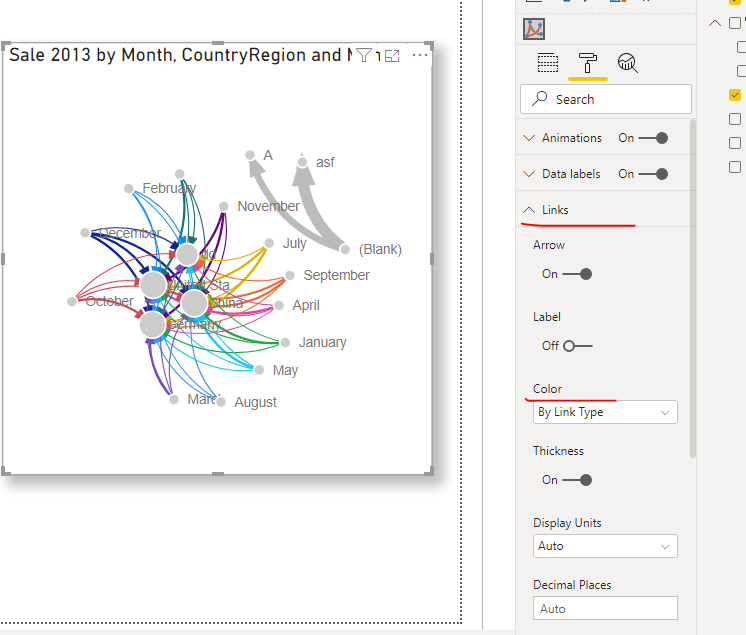
I have a Force Directed Graph which uses Link Type for determine line colours. Is there a way to display the colour assigned to each value (ie a colour key)?
Solved! Go to Solution.
Hi @ianf123 ,
There are only three options for the color of links in this visual. You can't even customize colors for the links.
Best regards,
Lionel Chen
If this post helps, then please consider Accept it as the solution to help the other members find it more quickly.
I have colour coded links achieved by selecting "By Link Type" in the Links options (Colour).
My "Link Type" field is FUNCTION.
I have 4 different functions which are correctly being colour coded - ie the links appear a different colour depending on FUNCTION.
I would like to see the possible values displayed with an indicator of the colour assigned to each possible valu
Is there a way to show a "colour key chart" ?
eg as follows
If my 4 possible functions are :
APPLES
BANANAS
ORANGES
STRAWBERRIES
I would like to see on the screen:
APPLES (displayed in same colour as assigned to the APPLES links by the visual, or with a line in the same colour as the colour assigned)
BANANAS (displayed in same colour as assigned to the BANANAS links by the visual or with a line in the same colour as the colour assigned)
ORANGES (displayed in same colour as assigned to the ORANGES links by the visual or with a line in the same colour as the colour assigned)
STRAWBERRIES (displayed in same colour as assigned to the STRAWBERRIES links by the visual or with a line in the same colour as the colour assigned)
Hi @ianf123 ,
There are only three options for the color of links in this visual. You can't even customize colors for the links.
Best regards,
Lionel Chen
If this post helps, then please consider Accept it as the solution to help the other members find it more quickly.
The Power BI Data Visualization World Championships is back! Get ahead of the game and start preparing now!
| User | Count |
|---|---|
| 40 | |
| 36 | |
| 34 | |
| 31 | |
| 27 |
| User | Count |
|---|---|
| 136 | |
| 103 | |
| 66 | |
| 65 | |
| 56 |