Join us at FabCon Atlanta from March 16 - 20, 2026, for the ultimate Fabric, Power BI, AI and SQL community-led event. Save $200 with code FABCOMM.
Register now!The Power BI Data Visualization World Championships is back! Get ahead of the game and start preparing now! Learn more
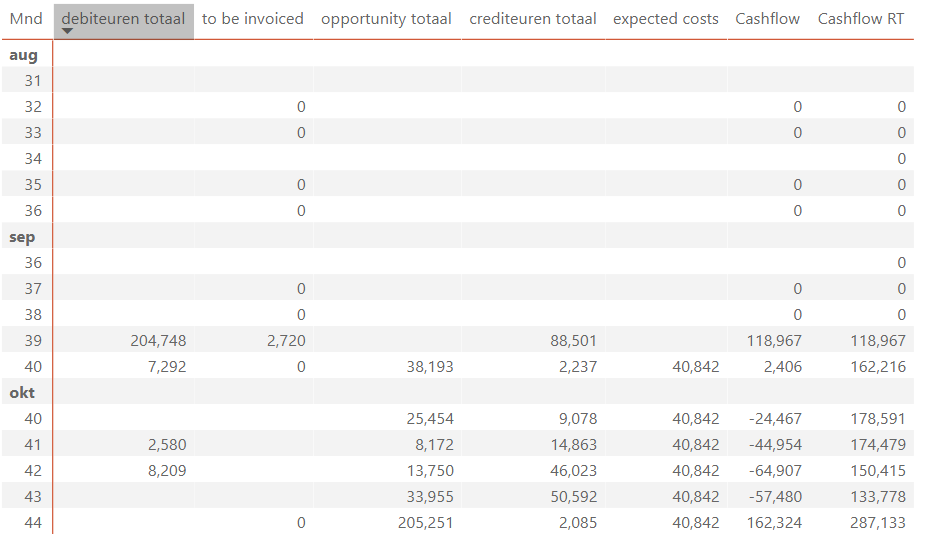
I would like to forecast my costs, based on the average cost in de last 6 months. The outcome of the measure should be presented for al future weeks/months, starting 30 days after today. This is to predict future payables. I will use this forecast in my cashflow prediction, which is a running total of payables, receivables and opportunities.
I created:
Something is going wrong in de running total of my cashflow. I think the date filtering in my expected costs is the reason, but i'm not sure.
The measure Cashflow is calculating the correct amounts in my opinion.
@Oomsen , As you already using a time filter, running total might not work well
Can you share sample data and sample output in table format? Or a sample pbix after removing sensitive data.
or try like
CALCULATE(SUMx(values(Date[Date]),[payables average weekly ] ) ,filter(allselected('Date'),'Date'[date] <=max('Date'[date])))
@amitchandak below same sample data.
receivables are from my ERP
payables are from my ERP
costs are historical from GL payables (ERP)
expected are average costs last 6 months
cashflow is receivables - payables - expected
running total is sum of cashflow
| Month | Week | receivables | Payables | Costs | Expected | Cashflow | Running total |
| jan | 1 | 50 | |||||
| 2 | 100 | ||||||
| 3 | 50 | ||||||
| 4 | 25 | ||||||
| 5 | 75 | ||||||
| feb | 6 | 50 | |||||
| 7 | 100 | ||||||
| 8 | 50 | ||||||
| 9 | 100 | ||||||
| mrt | 10 | 50 | |||||
| 11 | 25 | ||||||
| 12 | 75 | ||||||
| 13 | 50 | ||||||
| apr | 14 | 100 | |||||
| 15 | 50 | ||||||
| 16 | 100 | ||||||
| 17 | 50 | ||||||
| may | 18 | 25 | |||||
| 19 | 75 | ||||||
| 20 | 50 | ||||||
| 21 | 100 | ||||||
| 22 | 50 | ||||||
| jun | 23 | 100 | |||||
| 24 | 50 | ||||||
| 25 | 25 | ||||||
| 26 | 75 | ||||||
| jul | 27 | 50 | |||||
| 28 | 100 | ||||||
| 29 | 50 | ||||||
| 30 | 100 | ||||||
| aug | 31 | 50 | |||||
| 32 | 25 | ||||||
| 33 | 75 | ||||||
| 34 | 50 | ||||||
| 35 | 100 | ||||||
| sep | 36 | 60 | 10 | 50 | 50 | ||
| 37 | 100 | 40 | 60 | 110,00 | |||
| 38 | 40 | 30 | 10 | 120,00 | |||
| 39 | 25 | 20 | 5 | 125,00 | |||
| 40 | 50 | 15 | 35 | 160,00 | |||
| okt | 41 | 63,46 | -63,46 | 96,54 | |||
| 42 | 63,46 | -63,46 | 33,08 | ||||
| 43 | 63,46 | -63,46 | -30,38 | ||||
| 44 | 63,46 | -63,46 | -93,85 | ||||
| nov | 45 | 63,46 | -63,46 | -157,31 | |||
| 46 | 63,46 | -63,46 | -220,77 | ||||
| 47 | 63,46 | -63,46 | -284,23 | ||||
| 48 | 63,46 | -63,46 | -347,69 | ||||
| dec | 49 | 63,46 | -63,46 | -411,15 | |||
| 50 | 63,46 | -63,46 | -474,62 | ||||
| 51 | 63,46 | -63,46 | -538,08 | ||||
| 52 | 63,46 | -63,46 | -601,54 | ||||
Any suggestions?
The Power BI Data Visualization World Championships is back! Get ahead of the game and start preparing now!
| User | Count |
|---|---|
| 39 | |
| 38 | |
| 38 | |
| 28 | |
| 27 |
| User | Count |
|---|---|
| 124 | |
| 88 | |
| 73 | |
| 66 | |
| 65 |