cancel
Showing results for 
Search instead for 
Did you mean: 

We've captured the moments from FabCon & SQLCon that everyone is talking about, and we are bringing them to the community, live and on-demand. Starts on April 14th. Register now

Reply
Saxon10
Post Prodigy
Post Prodigy

Font changes for visualisation

How to choose the different font for details label, legend of Tornado, Aster Plot, Advance Pie and Dount etc...

Is there any option so I can choose the different font?

1 ACCEPTED SOLUTION

Hi, @Saxon10 


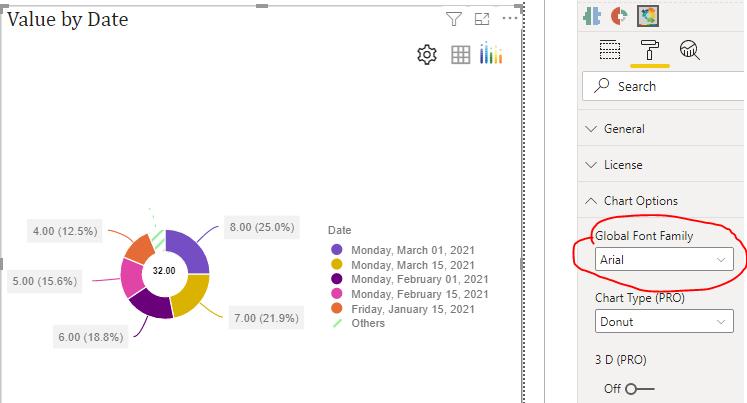
After testing, Advance Pie can change the font formatting with the options shown in the figure.

vzhangti_0-1639534471338.png


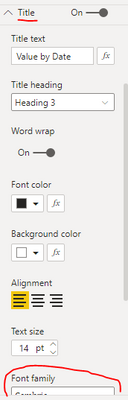
Both Tornado and Aster Plot's Title can modify the font.

vzhangti_1-1639534736189.png


There is no option to modify the rest of the fonts for now. Unfortunately, this is by design. power BI is now unable to achieve what you need . You can submit an idea for it at https://ideas.powerbi.com/forums and wait for users with the same needs as you to vote for you to help make it happen as soon as possible.


Best Regards,

Community Support Team _Charlotte

If this post helps, then please consider Accept it as the solution to help the other members find it more quickly.

View solution in original post

4 REPLIES 4
v-zhangti
Community Support
Community Support

Hi, @Saxon10 


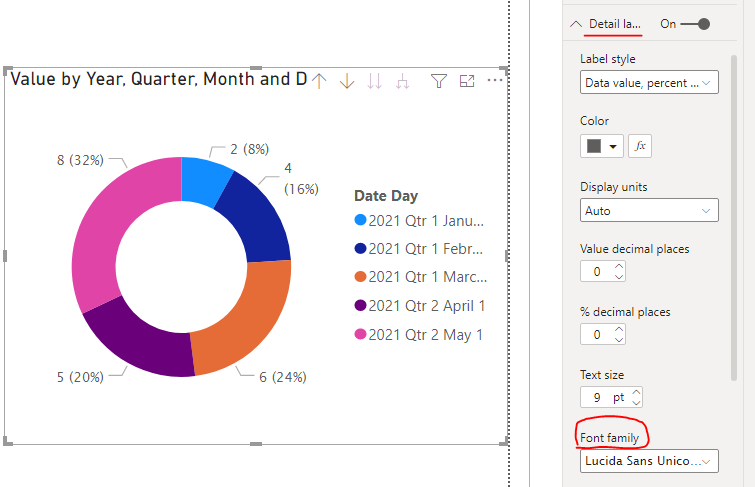
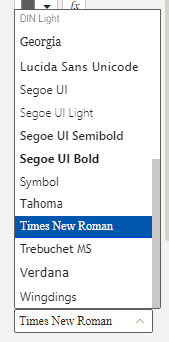
Of course, take Dount chart as an example. You can modify different fonts in Font family in Details label.

vzhangti_0-1639466450647.png

vzhangti_1-1639466521519.png


Best Regards,

Community Support Team _Charlotte

If this post helps, then please consider Accept it as the solution to help the other members find it more quickly.

@v-zhangti,

Thanks for your reply and example.


Apart from the Dount chart unable to change the font for the following chart types Tornado, Aster Plot, Advance Pie. Could you please confirm and advice is there any option to change the font. 

Hi, @Saxon10 


After testing, Advance Pie can change the font formatting with the options shown in the figure.

vzhangti_0-1639534471338.png


Both Tornado and Aster Plot's Title can modify the font.

vzhangti_1-1639534736189.png


There is no option to modify the rest of the fonts for now. Unfortunately, this is by design. power BI is now unable to achieve what you need . You can submit an idea for it at https://ideas.powerbi.com/forums and wait for users with the same needs as you to vote for you to help make it happen as soon as possible.


Best Regards,

Community Support Team _Charlotte

If this post helps, then please consider Accept it as the solution to help the other members find it more quickly.

@v-zhangti,


Thanks for your reply. If we get the font option in future that would be great. All the charts in same font in visualisation instead off different font of each reports. 

Helpful resources

Announcements
New to Fabric survey Carousel

New to Fabric Survey

If you have recently started exploring Fabric, we'd love to hear how it's going. Your feedback can help with product improvements.

Power BI DataViz World Championships carousel

Power BI DataViz World Championships - June 2026

A new Power BI DataViz World Championship is coming this June! Don't miss out on submitting your entry.

Join our Fabric User Panel

Join our Fabric User Panel

Share feedback directly with Fabric product managers, participate in targeted research studies and influence the Fabric roadmap.

March Power BI Update Carousel

Power BI Community Update - March 2026

Check out the March 2026 Power BI update to learn about new features.