cancel
Showing results for 
Search instead for 
Did you mean: 

The Power BI Data Visualization World Championships is back! Get ahead of the game and start preparing now! Learn more

Reply
Anonymous
Not applicable

Flow map Lines Disappear when zooming in

Hi Everyone, 


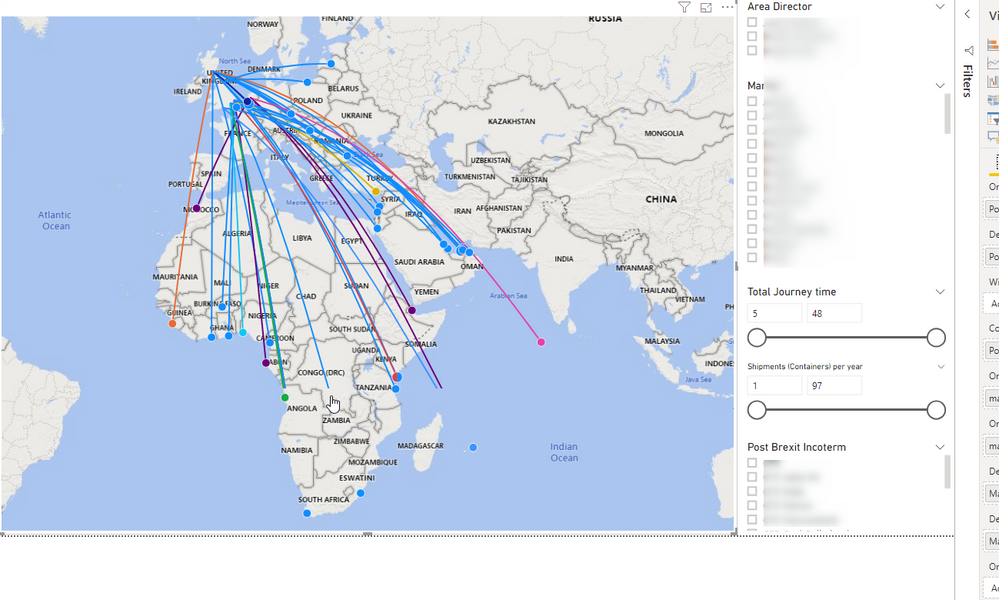
I m trying to make a flow map that shows the routes and flows for some markets (to do that I m using the visual made by Weiwei Cui). The problem is that when I zoom in in the map, parts of some lines seem to disappear (see pictures below). Is that because of the visual cannot handle the amount of data (as when I reduce the lines by filtering they seem to work fine), or can I do something for it?


zoom out.png

zoom in.png

Thanks 

1 ACCEPTED SOLUTION
dax
Community Support
Community Support

Hi @Anonymous , 

I am not sure which cuase this problem, color , data or map? If you don't set color field, will this work well? I test this in my environment by data from this site(https://github.com/weiweicui/PowerBI-Flowmap/blob/master/dist/sample.xlsx), which work well and I can't reproduce this problem. You could try to refreh the page to see whether it work or not. Or submit this problem in site which you download from (https://appsource.microsoft.com/en-us/product/power-bi-visuals/WA104380901?tab=Reviews).

Best Regards,
Zoe Zhi

If this post helps, then please consider Accept it as the solution to help the other members find it more quickly.

View solution in original post

1 REPLY 1
dax
Community Support
Community Support

Hi @Anonymous , 

I am not sure which cuase this problem, color , data or map? If you don't set color field, will this work well? I test this in my environment by data from this site(https://github.com/weiweicui/PowerBI-Flowmap/blob/master/dist/sample.xlsx), which work well and I can't reproduce this problem. You could try to refreh the page to see whether it work or not. Or submit this problem in site which you download from (https://appsource.microsoft.com/en-us/product/power-bi-visuals/WA104380901?tab=Reviews).

Best Regards,
Zoe Zhi

If this post helps, then please consider Accept it as the solution to help the other members find it more quickly.

Helpful resources

Announcements
November Power BI Update Carousel

Power BI Monthly Update - November 2025

Check out the November 2025 Power BI update to learn about new features.

Fabric Data Days Carousel

Fabric Data Days

Advance your Data & AI career with 50 days of live learning, contests, hands-on challenges, study groups & certifications and more!

FabCon Atlanta 2026 carousel

FabCon Atlanta 2026

Join us at FabCon Atlanta, March 16-20, for the ultimate Fabric, Power BI, AI and SQL community-led event. Save $200 with code FABCOMM.

Top Solution Authors
Top Kudoed Authors