cancel
Showing results for 
Search instead for 
Did you mean: 

Vote for your favorite vizzies from the Power BI Dataviz World Championship submissions. Vote now!

Reply
Anonymous
Not applicable

Flip a horizontal bar chart so it goes from left to write?

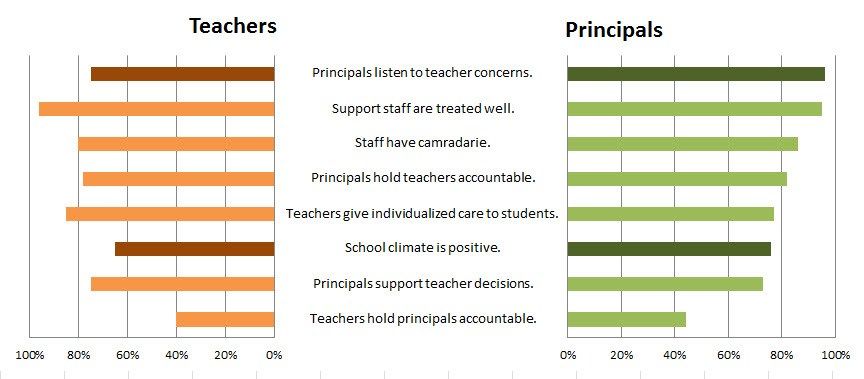
Hi all, is it possible to do this or come up with some hack that allows this? If I multiply all values with "-1" then the required affect is achieved. However, obviously all numbers show up as negative which is not what I want.


The chart on the right is the standard Power BI implementation and I'd like to achieve the chart on the left please.

backtoback11.jpg

1 ACCEPTED SOLUTION
MFelix
Super User
Super User

Hi  @Anonymous ,


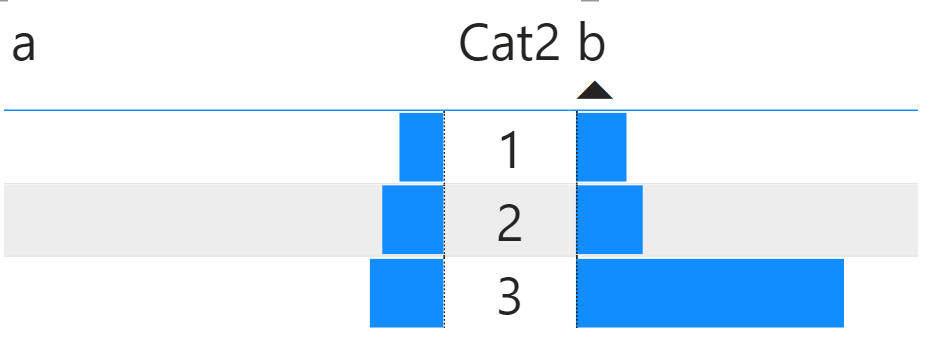
You can use a table alongside with custom formatting with bars and two measures:


Check the PBIX file attach for bar_chart.png


If you want to have more complex categorization you can use more measure to make the split for every other 20% or try to have a more advance visualization using the table formatting.


Other option is to create the chart to your fit using charticulator a tool to create custom visualizations without coding. hope this helps.


Regards

Miguel Félix


Did I answer your question? Mark my post as a solution!

Proud to be a Super User!

Check out my blog: Power BI em Português


View solution in original post

4 REPLIES 4
Anonymous
Not applicable

HI @Anonymous,

MFelix's solution seems well, you can also try to use R or python visual to plot a similar effect based on code/script:
Using Python libraries to plot two horizontal bar charts sharing same y axis 

Regards,

Xiaoxin Sheng

Anonymous
Not applicable

Click on the chart to see Chart Tools on the Ribbon.
Select the Format tab.
Go to the Chart Elements drop down list and pick Vertical (Value) Axis.
Click the Format Selection button to see the Format Axis window.
On the Format Axis window tick the Values in reverse order checkbox.

Hi  @Anonymous ,


The options you are giving is for Excel they don't exist on PBI for now unfortunalty.


Regards

Miguel Félix


Did I answer your question? Mark my post as a solution!

Proud to be a Super User!

Check out my blog: Power BI em Português


MFelix
Super User
Super User

Hi  @Anonymous ,


You can use a table alongside with custom formatting with bars and two measures:


Check the PBIX file attach for bar_chart.png


If you want to have more complex categorization you can use more measure to make the split for every other 20% or try to have a more advance visualization using the table formatting.


Other option is to create the chart to your fit using charticulator a tool to create custom visualizations without coding. hope this helps.


Regards

Miguel Félix


Did I answer your question? Mark my post as a solution!

Proud to be a Super User!

Check out my blog: Power BI em Português


Helpful resources

Announcements
Power BI DataViz World Championships

Power BI Dataviz World Championships

Vote for your favorite vizzies from the Power BI World Championship submissions!

Sticker Challenge 2026 Carousel

Join our Community Sticker Challenge 2026

If you love stickers, then you will definitely want to check out our Community Sticker Challenge!

January Power BI Update Carousel

Power BI Monthly Update - January 2026

Check out the January 2026 Power BI update to learn about new features.

FabCon Atlanta 2026 carousel

FabCon Atlanta 2026

Join us at FabCon Atlanta, March 16-20, for the ultimate Fabric, Power BI, AI and SQL community-led event. Save $200 with code FABCOMM.