Join us at FabCon Atlanta from March 16 - 20, 2026, for the ultimate Fabric, Power BI, AI and SQL community-led event. Save $200 with code FABCOMM.
Register now!The Power BI Data Visualization World Championships is back! Get ahead of the game and start preparing now! Learn more
All,
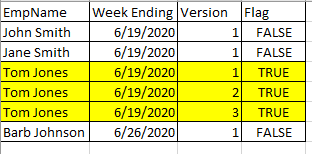
I need to create a filter to display only records that meet the below criteria. If an employee has adjusted their timecard for a week ending date, I only want to see the records for those employees who've made changes. Below is visual of what I'd like to achieve.
Thank you.
Solved! Go to Solution.
@mvgust -
Flag Column =
VAR __Name = [EmpName]
VAR __Week = [WeekEnding]
RETURN
IF(MAXX(FILTER(ALL('Table'),[EmpName]=__Name && [WeekEnding]=__Week),[Version])>1,TRUE(),FALSE())
Flag Measure =
VAR __Name = MAX([EmpName])
VAR __Week = MAX([WeekEnding])
RETURN
IF(MAXX(FILTER(ALL('Table'),[EmpName]=__Name && [WeekEnding]=__Week),[Version])>1,TRUE(),FALSE())
@mvgust -
Flag Column =
VAR __Name = [EmpName]
VAR __Week = [WeekEnding]
RETURN
IF(MAXX(FILTER(ALL('Table'),[EmpName]=__Name && [WeekEnding]=__Week),[Version])>1,TRUE(),FALSE())
Flag Measure =
VAR __Name = MAX([EmpName])
VAR __Week = MAX([WeekEnding])
RETURN
IF(MAXX(FILTER(ALL('Table'),[EmpName]=__Name && [WeekEnding]=__Week),[Version])>1,TRUE(),FALSE())
Thank you @Greg_Deckler for providing me 2 different options, the column is going to work better for my scenario and it worked perfectly!
I've been struggling to learn DAX - do you have any resources to suggest? I'm ok at very simple DAX functions but what you provided I would have never even thought of.
Thank you!
@mvgust - There's an Introduction to DAX section here: https://docs.microsoft.com/en-us/power-bi/guided-learning/
Radacad has some great stuff. https://radacad.com/
If you are coming from SQL, @Phil_Seamark 's DAX book is great. I think he has a new one Pro DAX too. I haven't read that one yet but if it's from Phil, it's gold.
@MattAllington has some great DAX books
@marcorusso 's Definitive Guide to DAX is, well, it's the gold standard. Maybe a bit theory heavy but unbeatable in terms of coverage of the DAX language.
I like my book, DAX Cookbook, as a more practical guide, not nearly so much theory as just straight-up practical DAX implementation strategies for metics, KPI's, etc. to solve real world problems.
Another great resource is the Quick Measures Gallery: https://community.powerbi.com/t5/Quick-Measures-Gallery/bd-p/QuickMeasuresGallery?sortby=kudos
A lot of my stuff ends up in there. Lots of crazy inventive DAX.
Very much depends what you are into, how you learn, etc.
The Power BI Data Visualization World Championships is back! Get ahead of the game and start preparing now!
Check out the November 2025 Power BI update to learn about new features.
| User | Count |
|---|---|
| 59 | |
| 43 | |
| 42 | |
| 23 | |
| 17 |
| User | Count |
|---|---|
| 190 | |
| 122 | |
| 96 | |
| 66 | |
| 47 |