
Join us at FabCon Atlanta from March 16 - 20, 2026, for the ultimate Fabric, Power BI, AI and SQL community-led event. Save $200 with code FABCOMM.
Register now!Learn from the best! Meet the four finalists headed to the FINALS of the Power BI Dataviz World Championships! Register now
Hello,
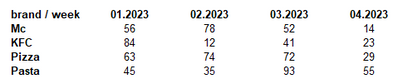
I have table visual like this:
The column width is fixed, using this help:
When the new week column comes to my table, the table looks like this:
The last column (05.2023) has not the same width as the previous columns. Why? How can I fix this? How can I have the same width also for new added column to the table?
("auto size column width" is off in the table)
Thank you
Marek
@marenecaCZ Well, it's a hack to begin with so you'll likely have to repeat the same hack each time you add a column.
Share feedback directly with Fabric product managers, participate in targeted research studies and influence the Fabric roadmap.
Check out the February 2026 Power BI update to learn about new features.
| User | Count |
|---|---|
| 67 | |
| 59 | |
| 45 | |
| 19 | |
| 15 |