cancel
Showing results for 
Search instead for 
Did you mean: 

The Power BI Data Visualization World Championships is back! Get ahead of the game and start preparing now! Learn more

Reply
JGG
Helper I
Helper I

Fixed Measure

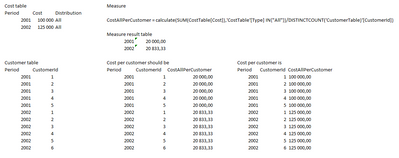
Hi, I have some overhead cost on monthly basis that should be equaly distributed per customer based on the number of customers for each period.
My measure looks good, but it fails used in a table view for each customer shown in the figure. I do think there must be something wrong with my use of DISTINCCOUNT. It is not fixed and most likely gives just 1 for each customer in the table view.
So how can I force the use of total number of customers for each period?


JGG_0-1602162755668.png


1 ACCEPTED SOLUTION
v-jingzhang
Community Support
Community Support

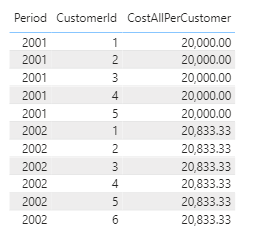
@JGG , change your measure like below then you will get the result you want.

CostAllPerCustomer = CALCULATE(SUM(CostTable[Cost]),CostTable[Type] IN {"All"})/CALCULATE(DISTINCTCOUNT(CustomerTable[CustomerId]),ALLEXCEPT(CustomerTable,CustomerTable[Period]))
v-jingzhang_0-1602575145540.png

Best Regards,

Community Support Team _ Jing Zhang

If this post helps, please consider Accept it as the solution to help other members find it.

View solution in original post

4 REPLIES 4
v-jingzhang
Community Support
Community Support

@JGG , change your measure like below then you will get the result you want.

CostAllPerCustomer = CALCULATE(SUM(CostTable[Cost]),CostTable[Type] IN {"All"})/CALCULATE(DISTINCTCOUNT(CustomerTable[CustomerId]),ALLEXCEPT(CustomerTable,CustomerTable[Period]))

v-jingzhang_0-1602575145540.png

Best Regards,

Community Support Team _ Jing Zhang

If this post helps, please consider Accept it as the solution to help other members find it.

DataInsights
Super User
Super User

@JGG,


Try this measure. The Customer table appears to have one row per period and customer, so I believe a row count by period will work.


Cost All Per Customer = 
VAR vPeriod =
    MAX ( Customer[Period] )
VAR vCostRow =
    FILTER ( ALL ( Cost ), Cost[Period] = vPeriod && Cost[Distribution] = "All" )
VAR vNumerator =
    MAXX ( vCostRow, Cost[Cost] )
VAR vCustomers =
    FILTER ( ALL ( Customer ), Customer[Period] = vPeriod )
VAR vDenominator =
    COUNTROWS ( vCustomers )
VAR vResult =
    DIVIDE ( vNumerator, vDenominator )
RETURN
    vResult


DataInsights_0-1602194655333.png


Did I answer your question? Mark my post as a solution!

Proud to be a Super User!


Thanks. This seems to be a correct approach but I do have several rows per customer per periode. So I guess there would be a need to adjust according to that. The calculation however is extremely time consuming.

lbendlin
Super User
Super User

For both CALCULATE and DISCTINCTCOUNT you'll want to indiate the context. Currently you only remove the Type filter,  you likely want to expand that context a bit more.  You can do that by adding ALLSELECTED, for example.

Helpful resources

Announcements
Power BI DataViz World Championships

Power BI Dataviz World Championships

The Power BI Data Visualization World Championships is back! Get ahead of the game and start preparing now!

December 2025 Power BI Update Carousel

Power BI Monthly Update - December 2025

Check out the December 2025 Power BI Holiday Recap!

FabCon Atlanta 2026 carousel

FabCon Atlanta 2026

Join us at FabCon Atlanta, March 16-20, for the ultimate Fabric, Power BI, AI and SQL community-led event. Save $200 with code FABCOMM.