cancel
Showing results for 
Search instead for 
Did you mean: 

July 7 - July 17 | Round 2 of the Power BI Dataviz World Championships. Don't miss your chance! Learn more

Reply
harrinho
Helper III
Helper III

Fiscal period sorting

Dear community,


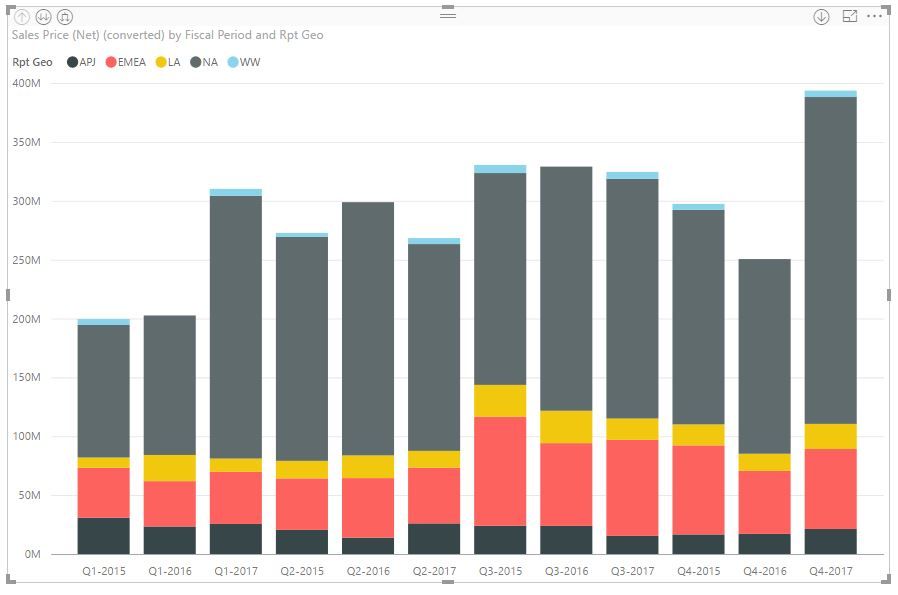
I'm trying to create a barchart as per below to show the history of sales. How can I sort the bars like q1-2015, q2+2015, q3-2015 etc?


sorting.JPG


Any ideas please, would be much appreciated

1 ACCEPTED SOLUTION
MFelix
Super User
Super User

Hi @harrinho,


Can imagine that the Q1-2015 is based on a column for a calendar/date just select the Modeling tab and choose the fiscal period and choose sort by column, then select the date column.


Regards,

MFelix


Regards

Miguel Félix


Did I answer your question? Mark my post as a solution!

Proud to be a Super User!

Check out my blog: Power BI em Português


View solution in original post

2 REPLIES 2
MFelix
Super User
Super User

Hi @harrinho,


Can imagine that the Q1-2015 is based on a column for a calendar/date just select the Modeling tab and choose the fiscal period and choose sort by column, then select the date column.


Regards,

MFelix


Regards

Miguel Félix


Did I answer your question? Mark my post as a solution!

Proud to be a Super User!

Check out my blog: Power BI em Português


Thank you Felix! Worked! 

Helpful resources

Announcements
FabCon and SQLCon Barcelona 2026

FabCon & SQLCon – Barcelona 2026

Join us in Barcelona for FabCon and SQLCon, the Fabric, Power BI, SQL, and AI community event. Save €200 with code FABCMTY200.

60 days of Data Days Carousel

Data Days 2026

Join Fabric Data Days 2026: 60 days of free live/on-demand sessions, challenges, study groups, and certification opportunities.

Power BI DataViz World Championships carousel

Power BI DataViz World Championships - June 2026

A new Power BI DataViz World Championship is coming this June! Don't miss out on submitting your entry.