Get Fabric or SQL Certified for Free.
Get certified for free when you join Fabric Data Days 2026 and dive into Fabric, Power BI, SQL, AI, and other essential data skills.
Join now- Power BI forums
- Get Help with Power BI
- Desktop
- Service
- Report Server
- Power Query
- Mobile Apps
- Developer
- DAX Commands and Tips
- Custom Visuals Development Discussion
- Health and Life Sciences
- Power BI Spanish forums
- Translated Spanish Desktop
- Training and Consulting
- Instructor Led Training
- Dashboard in a Day for Women, by Women
- Galleries
- Data Stories Gallery
- Themes Gallery
- Contests Gallery
- QuickViz Gallery
- Quick Measures Gallery
- Visual Calculations Gallery
- Notebook Gallery
- Translytical Task Flow Gallery
- TMDL Gallery
- R Script Showcase
- Webinars and Video Gallery
- Ideas
- Custom Visuals Ideas (read-only)
- Issues
- Issues
- Events
- Upcoming Events
July 7 - July 17 | Round 2 of the Power BI Dataviz World Championships. Don't miss your chance! Learn more
- Power BI forums
- Forums
- Get Help with Power BI
- Desktop
- Fiscal Week Calendar Help
- Subscribe to RSS Feed
- Mark Topic as New
- Mark Topic as Read
- Float this Topic for Current User
- Bookmark
- Subscribe
- Printer Friendly Page

- Mark as New
- Bookmark
- Subscribe
- Mute
- Subscribe to RSS Feed
- Permalink
- Report Inappropriate Content
Fiscal Week Calendar Help
Hello,
I want to calculate WEEKNUM but from the date I provide.
Table 1:
Date: 25/07/2019
Table 2:
Date of Sign Up: 29/07/2019
Date of Sign Up: 02/08/2019
Date of Sign Up: 24/12/2019
I would like to create a column in Table 2 with WEEKNUM using the date in Table 1.
How would I go about doing this.
- Mark as New
- Bookmark
- Subscribe
- Mute
- Subscribe to RSS Feed
- Permalink
- Report Inappropriate Content
Hi @Anonymous
What is the logic to be applied to put the weeknum in Table 2 based on Table 1 Value.
Will Table 1 will have only one value always ?
Cheers
CheenuSing
- Mark as New
- Bookmark
- Subscribe
- Mute
- Subscribe to RSS Feed
- Permalink
- Report Inappropriate Content
Hi @Anonymous
Table 1: is the selection of people who were sent communications. Every one was sent the communication on the same day so the date will be static.
Table 2: Is the sign ups with amount paid and othe related financial information
Both tables are tables in SQL Server.
Thanks
- Mark as New
- Bookmark
- Subscribe
- Mute
- Subscribe to RSS Feed
- Permalink
- Report Inappropriate Content
Hi @Anonymous
Try this
ByWhichWeek = Calculate(     WEEKNUM(MIN([SignUp]))
                                  - WEEKNUM( MAX(Table1[Date]))
                      )
This assumes there is only one row in Table 1 and many rows in Table1 and both are not related.
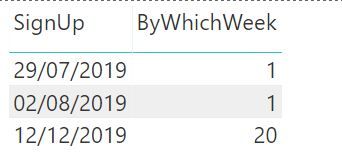
Is this what you expected.
Cheers
CheenuSing
- Mark as New
- Bookmark
- Subscribe
- Mute
- Subscribe to RSS Feed
- Permalink
- Report Inappropriate Content
Hi @Anonymous
Here's a question for you. There are a few rows, around 5 that exist in table 2 but not table 1. This causes the calculation to be wrong. Is there a way to use a fixed date if (Table 1)[Date] does not exist.
Otherwise I was thinking to add a column in the table 2 for Date as it will be static and use the below formula however the 40 is static.
- Mark as New
- Bookmark
- Subscribe
- Mute
- Subscribe to RSS Feed
- Permalink
- Report Inappropriate Content
Hi @Anonymous ,
Can you please upload some data for Table1 and Table2 and the output expected on Goodlge / One Drive and share the link here to find the right solution.
Cheers
CheenuSing
- Mark as New
- Bookmark
- Subscribe
- Mute
- Subscribe to RSS Feed
- Permalink
- Report Inappropriate Content
@Anonymous wrote:Hi @Anonymous ,
Can you please upload some data for Table1 and Table2 and the output expected on Goodlge / One Drive and share the link here to find the right solution.
Cheers
CheenuSing
Hi @Anonymous
So there are two options, I can either use two tables or I can append a column of Date Sent into a single table, now called Table 3, then I do not need to use Table 1 or Table 2.
- Mark as New
- Bookmark
- Subscribe
- Mute
- Subscribe to RSS Feed
- Permalink
- Report Inappropriate Content
hi @Anonymous ,
Yes you have two options as mentioned.
You don't need to create Table3, if yo so wish.
The Table 2 can be populated with a calculated column using
C_ByWhichWeek =
VAR _dateSent =
    LOOKUPVALUE ( Table1[Date Sent], Table1[ID], Table2[ID] )
RETURN
    DATEDIFF ( _dateSent, Table2[Sign Up], WEEK )
Or with the relationship establised between Table1 and Table2 on ID you can create a measure
M_ByWhichWeek =
VAR _curSignup =
    SELECTEDVALUE ( Table2[Sign Up] )
VAR _curID =
    SELECTEDVALUE ( Table2[ID] )
VAR _dateSent =
    LOOKUPVALUE ( Table1[Date Sent], Table1[ID], _curID )
RETURN
    DATEDIFF ( _dateSent, _curSignup, WEEK )
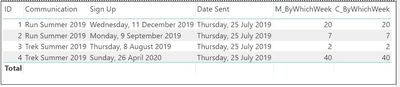
Sample output using the data.
If this is what you expected, please accept it as a solution.
Cheers
CheenuSing
- Mark as New
- Bookmark
- Subscribe
- Mute
- Subscribe to RSS Feed
- Permalink
- Report Inappropriate Content
@Anonymous wrote:hi @Anonymous ,
Yes you have two options as mentioned.
You don't need to create Table3, if yo so wish.
The Table 2 can be populated with a calculated column using
C_ByWhichWeek =
VAR _dateSent =
    LOOKUPVALUE ( Table1[Date Sent], Table1[ID], Table2[ID] )
RETURN
    DATEDIFF ( _dateSent, Table2[Sign Up], WEEK )
Or with the relationship establised between Table1 and Table2 on ID you can create a measure
M_ByWhichWeek =
VAR _curSignup =
    SELECTEDVALUE ( Table2[Sign Up] )
VAR _curID =
    SELECTEDVALUE ( Table2[ID] )
VAR _dateSent =
    LOOKUPVALUE ( Table1[Date Sent], Table1[ID], _curID )
RETURN
    DATEDIFF ( _dateSent, _curSignup, WEEK )
Sample output using the data.
If this is what you expected, please accept it as a solution.
Cheers
CheenuSing
Hi @Anonymous This does not work because there may be individuals in Table 2 that do not exist in Table 1 and that's where the DAX code is failing.
So I have a ID in Table 2 with a Sign up date, this ID does not exist in Table 1. So upon applying Dax, it either calculates the wrong number, or leaves the cell blank.
What I am trying to do is use a fallback value when the DAX formula is calculating. I hope you understand what I am saying.
- Mark as New
- Bookmark
- Subscribe
- Mute
- Subscribe to RSS Feed
- Permalink
- Report Inappropriate Content
Hi @Anonymous ,
For those unmatched ID values of Table2, what is the default value you want to set for SentDate ?
Cheers
CheenuSing
- Mark as New
- Bookmark
- Subscribe
- Mute
- Subscribe to RSS Feed
- Permalink
- Report Inappropriate Content
@Anonymous wrote:Hi @Anonymous ,
For those unmatched ID values of Table2, what is the default value you want to set for SentDate ?
Cheers
CheenuSing
HI @Anonymous , 25/07/2019
The reason why I created Table 3 is because based on the communication, I can create a column that ouputs the Date Sent and then we have Date Sign up and Date Sent in one table. I just thought maybe this method would be easier as we would not need to pass a default value.
Thanks for all your help sir.
- Mark as New
- Bookmark
- Subscribe
- Mute
- Subscribe to RSS Feed
- Permalink
- Report Inappropriate Content
@Anonymous wrote:Hi @Anonymous
Try this
ByWhichWeek = Calculate(     WEEKNUM(MIN([SignUp]))
                                  - WEEKNUM( MAX(Table1[Date]))
                      )
This assumes there is only one row in Table 1 and many rows in Table1 and both are not related.
Is this what you expected.
Cheers
CheenuSing
Hi @Anonymous This seems to do the trick, thanks.
FYI: not sure if the below will make a difference to the code as it seems to work perfectly.
There is more than one row and more than one column in Table 1, but the Date in Table 1 is static. Table 1 is communication Selection so includes what type of Comms they received, Customer ID
Date in table 2 is dynamic.
Table 1 and Table 2 have a relationship based on Customer ID.
Helpful resources

FabCon & SQLCon – Barcelona 2026
Join us in Barcelona for FabCon and SQLCon, the Fabric, Power BI, SQL, and AI community event. Save €200 with code FABCMTY200.

Data Days 2026
Join Data Days 2026: 60 days of free live/on-demand sessions, challenges, study groups, and certification opportunities.

Power BI DataViz World Championships - June 2026
A new Power BI DataViz World Championship is coming this June! Don't miss out on submitting your entry.

| User | Count |
|---|---|
| 28 | |
| 27 | |
| 25 | |
| 22 | |
| 18 |


| User | Count |
|---|---|
| 52 | |
| 49 | |
| 43 | |
| 36 | |
| 36 |


