Don't miss your chance to take the Fabric Data Engineer (DP-700) exam on us!
Learn moreNext up in the FabCon + SQLCon recap series: The roadmap for Microsoft SQL and Maximizing Developer experiences in Fabric. All sessions are available on-demand after the live show. Register now
Here's a firstnonblank() question again.
This was probably answered before however I cannot find the rigth answer in all the power bi blog.
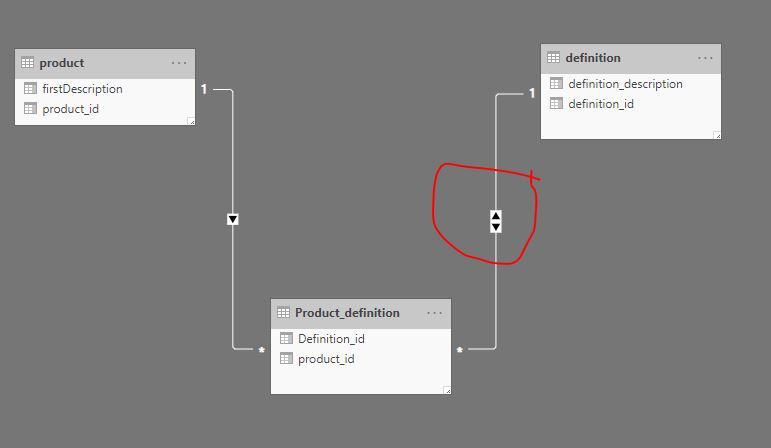
I have three tables structured this way.
Product table
product_id
Product_definition
Product_id
Definition_id
Definition table
definition_id
definition_description
My links are done correctly in my data model.
So product table to product definition is a one to many.
And Definition table to product definition is also a one to many.
I want the first definition description from a product
I thought that
firstDescription = Firstnonblank(Definition table[definition_description),0)
I always gets me the first of the entire production defintion.
When I put a filter on it then I get the message that I need to add an aggregation (min,max....).
Thanks for the help
Solved! Go to Solution.
HI, @Anonymous
You may need to change the cross filter direction from "Single" to "Both" between Definition table to product definition, then your formula may work well
Best Regards,
Lin
HI, @Anonymous
You may need to change the cross filter direction from "Single" to "Both" between Definition table to product definition, then your formula may work well
Best Regards,
Lin
Hi @Anonymous
I am guessing a bit, as you havent provided any sample data.
Try using LOOKUPVALUE() function. Something like:
LOOKUPVALUE( Firstnonblank(Definition table[definition_description),0), Definition table[product_id], Product Table[product_id])
OR use the relevant IDs from relevant tables.
Thanks!
A
If you have recently started exploring Fabric, we'd love to hear how it's going. Your feedback can help with product improvements.
A new Power BI DataViz World Championship is coming this June! Don't miss out on submitting your entry.
Share feedback directly with Fabric product managers, participate in targeted research studies and influence the Fabric roadmap.
| User | Count |
|---|---|
| 48 | |
| 45 | |
| 41 | |
| 19 | |
| 18 |
| User | Count |
|---|---|
| 68 | |
| 67 | |
| 33 | |
| 31 | |
| 29 |