Join us at FabCon Atlanta from March 16 - 20, 2026, for the ultimate Fabric, Power BI, AI and SQL community-led event. Save $200 with code FABCOMM.
Register now!The Power BI Data Visualization World Championships is back! Get ahead of the game and start preparing now! Learn more
Hello everyone,
I would like to ask for some help with something I couldn't manage to do or find in this forum, even if it looks like a very simple thing.
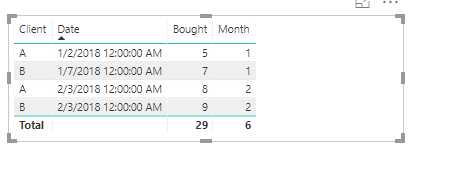
I have a table with [Client], [Date] and [$Bought]. What I want is to create a table that only contains the rows of the first [Date] of each month that the [Client] appear (which means the client bought something).
The following image represents the original table and the one I want to create:
(The table is pretty big so I can't just remove specific rows in the Query Editor)
I couldn't manage to do this either as a calculated table or as a filter in the Query Editor...
Thanks in advance!
Solved! Go to Solution.
Hi @aryszpic,
We can create a calculated column based on your original table.
Column =
IF (
'Table'[Date]
= CALCULATE (
MIN ( 'Table'[Date] ),
FILTER (
ALLEXCEPT ( 'Table', 'Table'[Client] ),
'Table'[Month] = EARLIER ( 'Table'[Month] )
)
),
1,
0
)
Then create a new calculated table based on the original one.
Table1 = CALCULATETABLE('Table',FILTER('Table','Table'[Column]=1))
For more details, please check the pbix as attached.
Regards,
Frank
Hello everyone,
I would like to ask for some help with something I couldn't manage to do or find in this forum, even if it looks like a very simple thing.
I have a table with [Client], [Date] and [$Bought]. What I want is to create a table that only contains the rows of the first [Date] of each month that the [Client] appear (which means the client bought something).
The following image represents the original table and the one I want to create:
I couldn't manage to do this either as a calculated table or as a filter in the Query Editor...
Thanks in advance!
Hi @aryszpic,
We can create a calculated column based on your original table.
Column =
IF (
'Table'[Date]
= CALCULATE (
MIN ( 'Table'[Date] ),
FILTER (
ALLEXCEPT ( 'Table', 'Table'[Client] ),
'Table'[Month] = EARLIER ( 'Table'[Month] )
)
),
1,
0
)
Then create a new calculated table based on the original one.
Table1 = CALCULATETABLE('Table',FILTER('Table','Table'[Column]=1))
For more details, please check the pbix as attached.
Regards,
Frank
Worked wonderfully, thanks!
Measure = MIN([Date])
If you want an actual calculated table and not just the above in a table visualization along with client and month, then:
Table = SUMMARIZE(Table,[Client],[Month],"_MinDate",MIN([Date]))
That last one might need tweaked or you might have to do it with a GROUPBY, I didn't test it.
The Power BI Data Visualization World Championships is back! Get ahead of the game and start preparing now!
Check out the November 2025 Power BI update to learn about new features.
| User | Count |
|---|---|
| 59 | |
| 43 | |
| 42 | |
| 23 | |
| 17 |
| User | Count |
|---|---|
| 190 | |
| 122 | |
| 96 | |
| 66 | |
| 47 |