cancel
Showing results for 
Search instead for 
Did you mean: 

Get Fabric Certified for FREE during AI Skills Fest. This week only. Secure your voucher now.

Reply
Mister_T
Advocate I
Advocate I

Finding the maximum value of two measures across various categories

Hi community,

I have searched for a solution here in the forum and on the web, came a couple of times close but ultimately wasn't able to solve my problem.

I have a matrix visual similar to this example:

‘Table’ [Category]   

[Measure Sum X]   

[Measure Sum Y]   

A

3

75

B

23

34

C

1

103

D

112

9

E

63

73

F

28

87

Now, I want to create a measure givng me the overall maximum value in this matrix. In this case "112".


I have tried


Value Max = MAX('Measures'[Measure Sum X], 'Measures'[Measure Sum Y])


but this only gives me the maximum value per category and not the desired overall maximum value.

Finally, I want to use this measure to standardize all values in the matrix to a percentage between 0% and 100%, with 100% representing the maximum value. 

All help welcome. Thank you very much!

1 ACCEPTED SOLUTION
jdbuchanan71
Super User
Super User

@Mister_T 

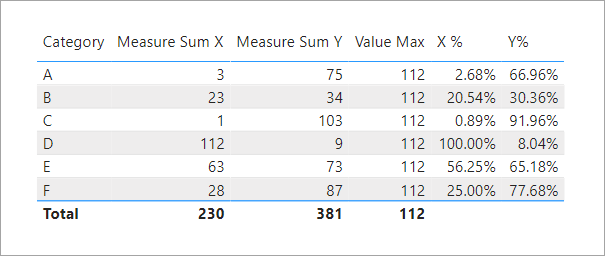
Try it like this.

Value Max = 
CALCULATE (
    MAXX ( VALUES ( 'Table'[Category] ), MAX ( [Measure Sum X], [Measure Sum Y] ) ),
    ALLSELECTED ( 'Table' )
)
X % = 
IF (
    HASONEVALUE ( 'Table'[Category] ),
    DIVIDE ( [Measure Sum X], [Value Max] )
)
Y% = 
IF (
    HASONEVALUE ( 'Table'[Category] ),
    DIVIDE ( [Measure Sum Y], [Value Max] )
)

jdbuchanan71_0-1652457307702.png


View solution in original post

4 REPLIES 4
jdbuchanan71
Super User
Super User

@Mister_T 

Try it like this.

Value Max = 
CALCULATE (
    MAXX ( VALUES ( 'Table'[Category] ), MAX ( [Measure Sum X], [Measure Sum Y] ) ),
    ALLSELECTED ( 'Table' )
)
X % = 
IF (
    HASONEVALUE ( 'Table'[Category] ),
    DIVIDE ( [Measure Sum X], [Value Max] )
)
Y% = 
IF (
    HASONEVALUE ( 'Table'[Category] ),
    DIVIDE ( [Measure Sum Y], [Value Max] )
)

jdbuchanan71_0-1652457307702.png


Thank you very much for your help @jdbuchanan71 ! Works like a charm! 🙂

Have a great week!

Anonymous
Not applicable

 Hi

Try this ==>

Value Max = calculate(MAX('Measures'[Measure Sum X], 'Measures'[Measure Sum Y]),removefilter())


Thank you very much @Anonymous !

For other people trying your formula, just the hint that the 's' for "REMOVEFILTERS" is missing.

Value Max = calculate(MAX('Measures'[Measure Sum X], 'Measures'[Measure Sum Y]), REMOVEFILTERS())

 
Nevertheless this formula unfortunately did not give me the expected values. Therfore I will go with the solution from @jdbuchanan71 . But thanks so much for your efforts!

Have a great week!

Helpful resources

Announcements
May Power BI Update Carousel

Power BI Monthly Update - May 2026

Check out the May 2026 Power BI update to learn about new features.

Fabric SQL PBI Data Days

Data Days 2026 coming soon!

Sign up to receive a private message when registration opens and key events begin.

New to Fabric survey Carousel

New to Fabric Survey

If you have recently started exploring Fabric, we'd love to hear how it's going. Your feedback can help with product improvements.

Power BI DataViz World Championships carousel

Power BI DataViz World Championships - June 2026

A new Power BI DataViz World Championship is coming this June! Don't miss out on submitting your entry.