FabCon is coming to Atlanta
Join us at FabCon Atlanta from March 16 - 20, 2026, for the ultimate Fabric, Power BI, AI and SQL community-led event. Save $200 with code FABCOMM.
Register now!- Power BI forums
- Get Help with Power BI
- Desktop
- Service
- Report Server
- Power Query
- Mobile Apps
- Developer
- DAX Commands and Tips
- Custom Visuals Development Discussion
- Health and Life Sciences
- Power BI Spanish forums
- Translated Spanish Desktop
- Training and Consulting
- Instructor Led Training
- Dashboard in a Day for Women, by Women
- Galleries
- Data Stories Gallery
- Themes Gallery
- Contests Gallery
- QuickViz Gallery
- Quick Measures Gallery
- Visual Calculations Gallery
- Notebook Gallery
- Translytical Task Flow Gallery
- TMDL Gallery
- R Script Showcase
- Webinars and Video Gallery
- Ideas
- Custom Visuals Ideas (read-only)
- Issues
- Issues
- Events
- Upcoming Events
Get Fabric Certified for FREE during Fabric Data Days. Don't miss your chance! Request now
- Power BI forums
- Forums
- Get Help with Power BI
- Desktop
- Re: Finding the highest Date in a record
- Subscribe to RSS Feed
- Mark Topic as New
- Mark Topic as Read
- Float this Topic for Current User
- Bookmark
- Subscribe
- Printer Friendly Page

- Mark as New
- Bookmark
- Subscribe
- Mute
- Subscribe to RSS Feed
- Permalink
- Report Inappropriate Content
Finding the highest Date in a record
Community,
I'm stumped on this one. I have a series of projects that have 4 date records associated with them. I need to create a measurement that computes the number of days between the activcation date and one of the 3 previous dates, but always selecting the highest date of the 3 values. If the measurement is under 5 days it is a bonus for sales. Sometimes there are missing values in some of the dates.
How can I do this without creating a massive IF nested loop calculation?
Ex Date
Sold Date Advised Date Quoted date Activation Date # of days to Activation
10/1/2017 10/5/2017 10/3/2017 10/10/2017 5
11/1/2017 11/6/2017 11/10/2017 4 (Bonus)
11/1/2017 11/16/2017 11/2/2017 11/10/2017 8 (advised is past the activation)
Thanks for the help,
Scott
Solved! Go to Solution.


- Mark as New
- Bookmark
- Subscribe
- Mute
- Subscribe to RSS Feed
- Permalink
- Report Inappropriate Content
How abou this calculated column
=
DATEDIFF (
    MAXX (
        FILTER (
            UNION (
                ROW ( "MyDates", CALCULATE ( VALUES ( Table1[Sold Date] ) ) ),
                ROW ( "MyDates", CALCULATE ( VALUES ( Table1[Advised Date] ) ) ),
                ROW ( "MyDates", CALCULATE ( VALUES ( Table1[Quoted date] ) ) )
            ),
            [MyDates] <= Table1[Activation Date]
        ),
        [MyDates]
    ),
    Table1[Activation Date],
    DAY
)
Regards
Zubair
Please try my custom visuals
- Mark as New
- Bookmark
- Subscribe
- Mute
- Subscribe to RSS Feed
- Permalink
- Report Inappropriate Content
Hi @sdaniels
One of the ways. Add this Calculated Column
=
ABS (
    MAX ( MAX ( Table1[Sold Date], Table1[Advised Date] ), Table1[Quoted date] )
        - Table1[Activation Date]
)
Regards
Zubair
Please try my custom visuals


- Mark as New
- Bookmark
- Subscribe
- Mute
- Subscribe to RSS Feed
- Permalink
- Report Inappropriate Content
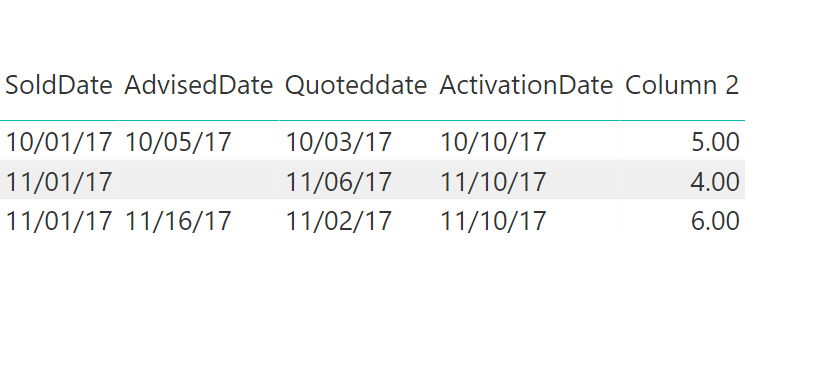
Just to add up some information, the solution you had given is working fine but when you look at @sdaniels 's data example,
3rd row difference needs to be 8. But according to your solution it gives 6. By default it is taking max date but it should take max date which is less than ActivationDate. So it should be 11/10/2017 - 11/2/2017 which is 8. As per the above data example.
I have a similar kind of issue. This might help me.
- Mark as New
- Bookmark
- Subscribe
- Mute
- Subscribe to RSS Feed
- Permalink
- Report Inappropriate Content
Thanks. I had missed this point
Regards
Zubair
Please try my custom visuals
- Mark as New
- Bookmark
- Subscribe
- Mute
- Subscribe to RSS Feed
- Permalink
- Report Inappropriate Content
How abou this calculated column
=
DATEDIFF (
    MAXX (
        FILTER (
            UNION (
                ROW ( "MyDates", CALCULATE ( VALUES ( Table1[Sold Date] ) ) ),
                ROW ( "MyDates", CALCULATE ( VALUES ( Table1[Advised Date] ) ) ),
                ROW ( "MyDates", CALCULATE ( VALUES ( Table1[Quoted date] ) ) )
            ),
            [MyDates] <= Table1[Activation Date]
        ),
        [MyDates]
    ),
    Table1[Activation Date],
    DAY
)
Regards
Zubair
Please try my custom visuals
- Mark as New
- Bookmark
- Subscribe
- Mute
- Subscribe to RSS Feed
- Permalink
- Report Inappropriate Content
Thank you very much, this worked great for computing the proper number of days. How would a column or measure be changed to record this new date as a displayable field? I tried to reverse engineer the formula to give me the findings of the 'MyDates' but to no avail.
Scott
- Mark as New
- Bookmark
- Subscribe
- Mute
- Subscribe to RSS Feed
- Permalink
- Report Inappropriate Content
Hi @sdaniels
Please could you illustrate what you are trying to achieve?
Regards
Zubair
Please try my custom visuals
- Mark as New
- Bookmark
- Subscribe
- Mute
- Subscribe to RSS Feed
- Permalink
- Report Inappropriate Content
The formula you supplied worked great for computing the number of days. But now the team is asking for to display which date was used to show the start date, along side the new # of days. So I was wondering if its easy to tweak the new formula to not only show the number of days, but also the date it was determining was the highest of the 3.
Thank you - Scott
- Mark as New
- Bookmark
- Subscribe
- Mute
- Subscribe to RSS Feed
- Permalink
- Report Inappropriate Content
From @Zubair_Muhammad post
try doing this to get max date of the first three columns.
MAXX (
FILTER ( UNION ( ROW ( "MyDates", CALCULATE ( VALUES ( Table1[Sold Date] ) ) ),
ROW ( "MyDates", CALCULATE ( VALUES ( Table1[Advised Date] ) ) ),
ROW ( "MyDates", CALCULATE ( VALUES ( Table1[Quoted date] ) ) )
),
[MyDates] <= Table1[Activation Date]
),
[MyDates]
)
- Mark as New
- Bookmark
- Subscribe
- Mute
- Subscribe to RSS Feed
- Permalink
- Report Inappropriate Content
- Mark as New
- Bookmark
- Subscribe
- Mute
- Subscribe to RSS Feed
- Permalink
- Report Inappropriate Content
Hi @sdaniels
Another way.
This is so convenient if you have many columns
1) Go to Query Editor>> Select the "Date Columns" whose Maximum is to be determined
2)Go to Add Column>>> Date >>>> Latest

Regards
Zubair
Please try my custom visuals

Helpful resources

Power BI Monthly Update - November 2025
Check out the November 2025 Power BI update to learn about new features.

Fabric Data Days
Advance your Data & AI career with 50 days of live learning, contests, hands-on challenges, study groups & certifications and more!

FabCon Atlanta 2026
Join us at FabCon Atlanta, March 16-20, for the ultimate Fabric, Power BI, AI and SQL community-led event. Save $200 with code FABCOMM.


