cancel
Showing results for 
Search instead for 
Did you mean: 

The Power BI Data Visualization World Championships is back! It's time to submit your entry. Live now!

Reply
tmillerch
Frequent Visitor

Finding active users

Hello Power BI community,


I am struggling to find the solution that would work best for my problem.  I essentially have two tables I am working with, one has the start and end dates, the other contains the month of which certain events are occurring.  I basically need to write a statement along the lines of:

"If start date <= X month <= end date then "Present"
else "Absent""


I've tried to write this statement but to no avail.  I am unsure if I need to join the tables together, or if there is a way I can go about doing it without joining them together?  Any help would be fantastic.

1 ACCEPTED SOLUTION
Jihwan_Kim
Super User
Super User

Hi,

I am not sure how your datamodel looks like, but I tried to create a sample pbix file like below.

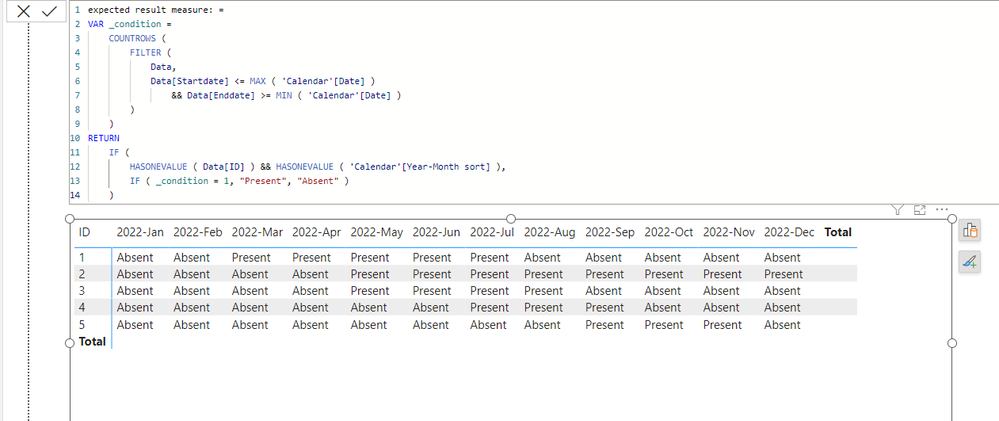
Please check the below picture and the attached pbix file.

I hope the below can provide some ideas on how to create a solution for your datamodel.


Jihwan_Kim_0-1680025230487.png


Jihwan_Kim_1-1680025428478.png


expected result measure: =
VAR _condition =
    COUNTROWS (
        FILTER (
            Data,
            Data[Startdate] <= MAX ( 'Calendar'[Date] )
                && Data[Enddate] >= MIN ( 'Calendar'[Date] )
        )
    )
RETURN
    IF (
        HASONEVALUE ( Data[ID] ) && HASONEVALUE ( 'Calendar'[Year-Month sort] ),
        IF ( _condition = 1, "Present", "Absent" )
    )


If this post helps, then please consider accepting it as the solution to help other members find it faster, and give a big thumbs up.


Click here to visit my LinkedIn page

View solution in original post

1 REPLY 1
Jihwan_Kim
Super User
Super User

Hi,

I am not sure how your datamodel looks like, but I tried to create a sample pbix file like below.

Please check the below picture and the attached pbix file.

I hope the below can provide some ideas on how to create a solution for your datamodel.


Jihwan_Kim_0-1680025230487.png


Jihwan_Kim_1-1680025428478.png


expected result measure: =
VAR _condition =
    COUNTROWS (
        FILTER (
            Data,
            Data[Startdate] <= MAX ( 'Calendar'[Date] )
                && Data[Enddate] >= MIN ( 'Calendar'[Date] )
        )
    )
RETURN
    IF (
        HASONEVALUE ( Data[ID] ) && HASONEVALUE ( 'Calendar'[Year-Month sort] ),
        IF ( _condition = 1, "Present", "Absent" )
    )


If this post helps, then please consider accepting it as the solution to help other members find it faster, and give a big thumbs up.


Click here to visit my LinkedIn page

Helpful resources

Announcements
Power BI DataViz World Championships

Power BI Dataviz World Championships

The Power BI Data Visualization World Championships is back! It's time to submit your entry.

January Power BI Update Carousel

Power BI Monthly Update - January 2026

Check out the January 2026 Power BI update to learn about new features.

FabCon Atlanta 2026 carousel

FabCon Atlanta 2026

Join us at FabCon Atlanta, March 16-20, for the ultimate Fabric, Power BI, AI and SQL community-led event. Save $200 with code FABCOMM.