Join us at FabCon Atlanta from March 16 - 20, 2026, for the ultimate Fabric, Power BI, AI and SQL community-led event. Save $200 with code FABCOMM.
Register now!The Power BI Data Visualization World Championships is back! It's time to submit your entry. Live now!
Dear All,
I need help for a requirement in my work.
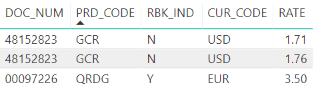
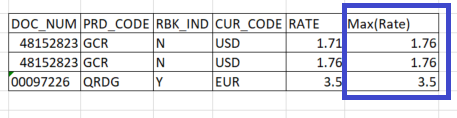
I want to add a new column 'Max(Rate)' in the below table, which should display the max value of the 'Rate' column for particular DOC_NUM. Is there any provision for the same in Power BI without writing a sub query?.
Expected result is:
Thanks in advance!!
Solved! Go to Solution.
Try with following
Max Rate =
CALCULATE (
MAX ( TableName[Rate] ),
ALLEXCEPT ( TableName, TableName[Doc_No] )
)
Try with following
Max Rate =
CALCULATE (
MAX ( TableName[Rate] ),
ALLEXCEPT ( TableName, TableName[Doc_No] )
)
Hi Zubair,
On what basis we decide the column after "ALLEXCEPT"? So for example in your DAX you wrote column "Doc_No", how we decide it?
Thank you in advance!
This little bit of code helped me solve a problem. Thanks a stack!!
Dear Zubair,
Perfect. It works. Thanks a lot!!!!!!
Regards,
Shahin K
| User | Count |
|---|---|
| 49 | |
| 37 | |
| 33 | |
| 22 | |
| 18 |
| User | Count |
|---|---|
| 132 | |
| 99 | |
| 56 | |
| 37 | |
| 37 |