Get Fabric certified for FREE!
Don't miss your chance to take the Fabric Data Engineer (DP-700) exam on us!
Learn more- Power BI forums
- Get Help with Power BI
- Desktop
- Service
- Report Server
- Power Query
- Mobile Apps
- Developer
- DAX Commands and Tips
- Custom Visuals Development Discussion
- Health and Life Sciences
- Power BI Spanish forums
- Translated Spanish Desktop
- Training and Consulting
- Instructor Led Training
- Dashboard in a Day for Women, by Women
- Galleries
- Data Stories Gallery
- Themes Gallery
- Contests Gallery
- QuickViz Gallery
- Quick Measures Gallery
- Visual Calculations Gallery
- Notebook Gallery
- Translytical Task Flow Gallery
- TMDL Gallery
- R Script Showcase
- Webinars and Video Gallery
- Ideas
- Custom Visuals Ideas (read-only)
- Issues
- Issues
- Events
- Upcoming Events
The FabCon + SQLCon recap series starts April 14th at 8am Pacific. If you’re tracking where AI is going inside Fabric, this first session is a can't miss. Register now
- Power BI forums
- Forums
- Get Help with Power BI
- Desktop
- Re: Finding Duplicate Names with Different Status
- Subscribe to RSS Feed
- Mark Topic as New
- Mark Topic as Read
- Float this Topic for Current User
- Bookmark
- Subscribe
- Printer Friendly Page

- Mark as New
- Bookmark
- Subscribe
- Mute
- Subscribe to RSS Feed
- Permalink
- Report Inappropriate Content
Finding Duplicate Names with Different Status
Hi,
I have a requirement to showcase on a table employees who went from contractor to full time.
How can I achieve this? Is there a DAX to create a count or highlight those names which converted?
| Name | Hire Date | Status |
| Mary Jane | 1/1/2019 | Contractor |
| Mary Jane | 1/1/2020 | FTE |
| Gary Smith | 11/1/2018 | Contractor |
| Bob Ferguson | 12/1/2016 | Contractor |
| Bob Ferguson | 06/01/2018 | FTE |
Solved! Go to Solution.
- Mark as New
- Bookmark
- Subscribe
- Mute
- Subscribe to RSS Feed
- Permalink
- Report Inappropriate Content
Hi @Anonymous ,
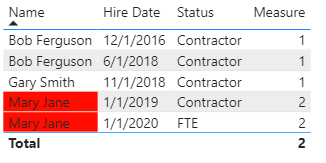
Create a measure like below and add it to visual filter then configure the condition formatting like below.
Measure = CALCULATE(DISTINCTCOUNT('Table'[Status]),ALLEXCEPT('Table','Table'[Name]))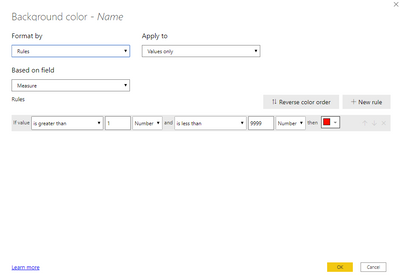
Result would be shown as below.
Best Regards,
Jay
Community Support Team _ Jay Wang
If this post helps, then please consider Accept it as the solution to help the other members find it more quickly.
- Mark as New
- Bookmark
- Subscribe
- Mute
- Subscribe to RSS Feed
- Permalink
- Report Inappropriate Content
Hi @Anonymous ,
Create a measure like below and add it to visual filter then configure the condition formatting like below.
Measure = CALCULATE(DISTINCTCOUNT('Table'[Status]),ALLEXCEPT('Table','Table'[Name]))Result would be shown as below.
Best Regards,
Jay
Community Support Team _ Jay Wang
If this post helps, then please consider Accept it as the solution to help the other members find it more quickly.


- Mark as New
- Bookmark
- Subscribe
- Mute
- Subscribe to RSS Feed
- Permalink
- Report Inappropriate Content
Hi @Anonymous
You can create a new table:
Converted =
FILTER (
    DISTINCT ( Table1[Name] );
    VAR LastDate_ =
        CALCULATE ( MAX ( Table1[Hire Date] ) )
    VAR IsFTEOnLastDate_ =
        CALCULATE (
            COUNT ( Table1[Hire Date] );
            Table1[Hire Date] = LastDate_;
            Table1[Status] = "FTE"
        ) > 0
    VAR WasPreviouslyContractor_ =
        CALCULATE (
            COUNT ( Table1[Hire Date] );
            Table1[Hire Date] <= LastDate_;
            Table1[Status] = "Contractor"
        ) > 0
    RETURN
        AND ( IsFTEOnLastDate_; WasPreviouslyContractor_ )
)
where Table1 is the table you show
Please mark the question solved when done and consider giving kudos if posts are helpful.
Cheers

- Mark as New
- Bookmark
- Subscribe
- Mute
- Subscribe to RSS Feed
- Permalink
- Report Inappropriate Content
- Mark as New
- Bookmark
- Subscribe
- Mute
- Subscribe to RSS Feed
- Permalink
- Report Inappropriate Content
You need to use the name of your table in lieu of Table1 and perhaps commas instead of ";" depending on your locale
Please mark the question solved when done and consider giving kudos if posts are helpful.
Cheers

- Mark as New
- Bookmark
- Subscribe
- Mute
- Subscribe to RSS Feed
- Permalink
- Report Inappropriate Content


- Mark as New
- Bookmark
- Subscribe
- Mute
- Subscribe to RSS Feed
- Permalink
- Report Inappropriate Content
@Anonymous
Try this measure
contractortofulltime =
var _isContractor= CALCULATE(COUNT('Table'[Status]),'Table'[Status]="Contractor")
var _isFulltime= CALCULATE(COUNT('Table'[Status]),'Table'[Status]="Full Time")
var _contractortofulltime = IF(_isContractor>0&&_isFulltime>0,"Yes","No")
return _contractortofulltime
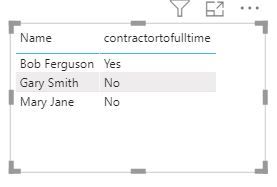
Now you can apply this measure in visual level filter ( is Yes ).
Did I answer your question? Mark my post as a solution!
Appreciate with a kudos 🙂
Regards,
Nandu Krishna
- Mark as New
- Bookmark
- Subscribe
- Mute
- Subscribe to RSS Feed
- Permalink
- Report Inappropriate Content
@Anonymous is it not working?
Regards,
Nandu Krishna
Helpful resources

New to Fabric Survey
If you have recently started exploring Fabric, we'd love to hear how it's going. Your feedback can help with product improvements.

Power BI DataViz World Championships - June 2026
A new Power BI DataViz World Championship is coming this June! Don't miss out on submitting your entry.

Join our Fabric User Panel
Share feedback directly with Fabric product managers, participate in targeted research studies and influence the Fabric roadmap.

Power BI Community Update - March 2026
Check out the March 2026 Power BI update to learn about new features.

| User | Count |
|---|---|
| 53 | |
| 40 | |
| 38 | |
| 19 | |
| 18 |


| User | Count |
|---|---|
| 70 | |
| 69 | |
| 34 | |
| 33 | |
| 30 |


