FabCon is coming to Atlanta
Join us at FabCon Atlanta from March 16 - 20, 2026, for the ultimate Fabric, Power BI, AI and SQL community-led event. Save $200 with code FABCOMM.
Register now!- Power BI forums
- Get Help with Power BI
- Desktop
- Service
- Report Server
- Power Query
- Mobile Apps
- Developer
- DAX Commands and Tips
- Custom Visuals Development Discussion
- Health and Life Sciences
- Power BI Spanish forums
- Translated Spanish Desktop
- Training and Consulting
- Instructor Led Training
- Dashboard in a Day for Women, by Women
- Galleries
- Data Stories Gallery
- Themes Gallery
- Contests Gallery
- QuickViz Gallery
- Quick Measures Gallery
- Visual Calculations Gallery
- Notebook Gallery
- Translytical Task Flow Gallery
- TMDL Gallery
- R Script Showcase
- Webinars and Video Gallery
- Ideas
- Custom Visuals Ideas (read-only)
- Issues
- Issues
- Events
- Upcoming Events
Vote for your favorite vizzies from the Power BI Dataviz World Championship submissions. Vote now!
- Power BI forums
- Forums
- Get Help with Power BI
- Desktop
- Finding Delta
- Subscribe to RSS Feed
- Mark Topic as New
- Mark Topic as Read
- Float this Topic for Current User
- Bookmark
- Subscribe
- Printer Friendly Page

- Mark as New
- Bookmark
- Subscribe
- Mute
- Subscribe to RSS Feed
- Permalink
- Report Inappropriate Content
Finding Delta
Hello all I have a table
With Columns:
| ID | platform | status |
| 1 | a | active |
| 2 | a | active |
| 3 | a | Inactive |
| 4 | b | active |
| 5 | b | active |
| 6 | b | Inactive |
| 7 | c | active |
| 8 | c | active |
| 9 | c | active |
Another table with columns:
| ID | Product | platform |
| 1 | x | a |
| 2 | x | a |
| 4 | y | b |
| 5 | y | b |
| 7 | y | c |
| 8 | y | c |
| 9 | y | c |
Now the product x is only for ID 1 & 2 so other ID do not have product 1 & 2 so If I have a bar plot with
x - axis product
y- axis count
and if I drill thorough I need to get the delta so, for product x it is 4, 5, 7 8, 9 has they are active and do not have have product x
I would use SQL NOT EXISTS and get the delta but Here I would like to have filter and drill through functionality so, not understanding what to use particularly.
Thank you for your time and help.
Solved! Go to Solution.
- Mark as New
- Bookmark
- Subscribe
- Mute
- Subscribe to RSS Feed
- Permalink
- Report Inappropriate Content
- Mark as New
- Bookmark
- Subscribe
- Mute
- Subscribe to RSS Feed
- Permalink
- Report Inappropriate Content


- Mark as New
- Bookmark
- Subscribe
- Mute
- Subscribe to RSS Feed
- Permalink
- Report Inappropriate Content
If I understand this correctly, I think you want my Inverse Aggregator Quick Measure:
https://community.powerbi.com/t5/Quick-Measures-Gallery/Inverse-Aggregator/m-p/342266
Follow on LinkedIn
@ me in replies or I'll lose your thread!!!
Instead of a Kudo, please vote for this idea
Become an expert!: Enterprise DNA
External Tools: MSHGQM
YouTube Channel!: Microsoft Hates Greg
Latest book!: DAX For Humans
DAX is easy, CALCULATE makes DAX hard...
- Mark as New
- Bookmark
- Subscribe
- Mute
- Subscribe to RSS Feed
- Permalink
- Report Inappropriate Content
I have created a measure that is giving me the count
CALCULATE(COUNT(TABLE1[ID]), TABLE1[Status] = 'Active') - DISTINCTCOUNT(TABLE2[ID])
BUT Instead of Numbers I want to display the actual ID @Greg_Deckler
- Mark as New
- Bookmark
- Subscribe
- Mute
- Subscribe to RSS Feed
- Permalink
- Report Inappropriate Content
Here I am trying to display all the IDs that are not present instead of sum!
so ouput we be something like
| ID |
| 4 |
| 5 |
| 7 |
| 8 |
| 9 |
- Mark as New
- Bookmark
- Subscribe
- Mute
- Subscribe to RSS Feed
- Permalink
- Report Inappropriate Content
It's really pretty much the same thing:
Measure 14 =
VAR __ids = SELECTCOLUMNS('Table19',"__id",[ID])
VAR __allIds = ALL('Table18'[ID])
VAR __otherIds = EXCEPT(__allIds,__ids)
RETURN
CONCATENATEX(__otherIds,[ID],", ")
See Page 6, Tables 18 and 19.
Follow on LinkedIn
@ me in replies or I'll lose your thread!!!
Instead of a Kudo, please vote for this idea
Become an expert!: Enterprise DNA
External Tools: MSHGQM
YouTube Channel!: Microsoft Hates Greg
Latest book!: DAX For Humans
DAX is easy, CALCULATE makes DAX hard...
- Mark as New
- Bookmark
- Subscribe
- Mute
- Subscribe to RSS Feed
- Permalink
- Report Inappropriate Content
@Greg_Deckler Thanks a lot for this,
But What I really want is output as table, As I would Have 1000's of Id and I would like to link those ID's to other table and extract some other information.
I tried Figuring it out! But Can't get it to work.
- Mark as New
- Bookmark
- Subscribe
- Mute
- Subscribe to RSS Feed
- Permalink
- Report Inappropriate Content
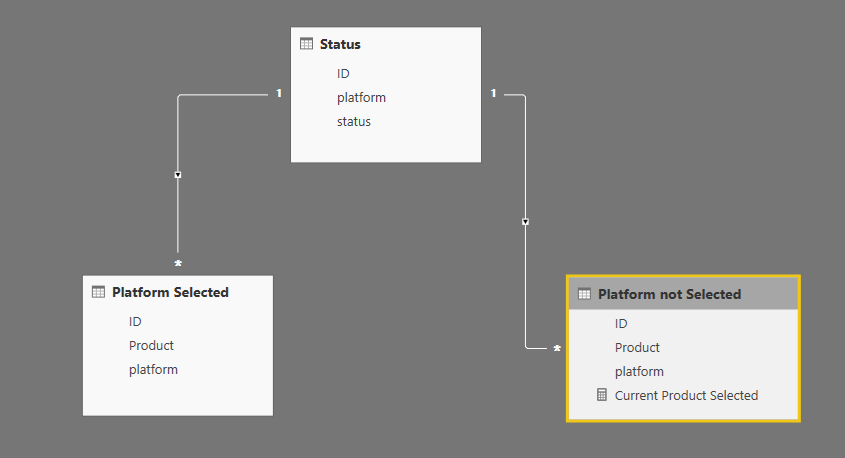
Hope no one minds, but decided to take crack at this one. Since the end goal is a table which then can be related to other tables, I used Power Query.
- Loaded your two tables from above (Named one Status and Platform)
- Duplicated the Platform table and names Platform Selected. Renamed the original platform Table as Platform Not Selected
- Created a unique list of Products
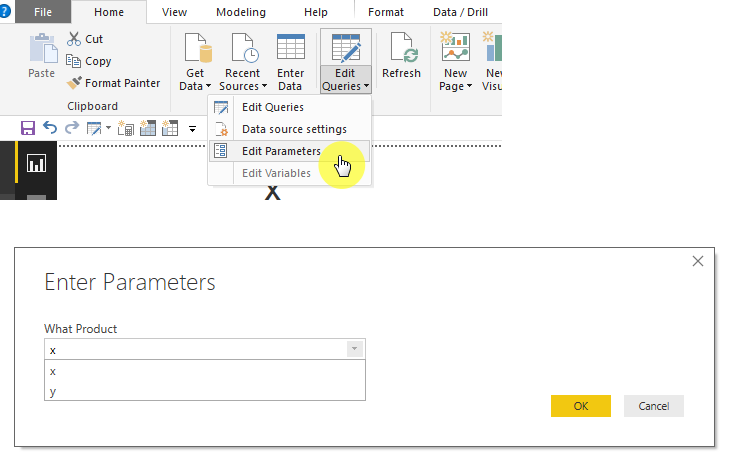
- Created a parameter using that unique list to choose from
- I used that selection to filter the "Platform Selected" table
- Then did a left anti join between Platform Not Selected and Platform Selecte
- this results in all the products that were not selected
- Loaded all three tables ( though probably only need the platform selected table)
So you get this data model, which can use the new left anti join table to relate to other tables
Here's what the matrix looks like:
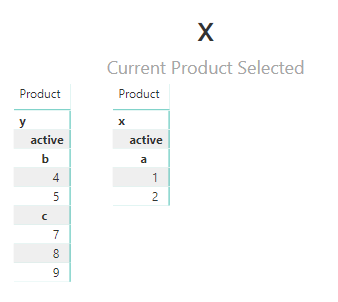
Then to update ( little more cumbersom than just a slicer.. but)
Just another way of looking at it I guess, not sure it's what you had in mind though. Below you will find the PBIX file if you are so inclined:
- Mark as New
- Bookmark
- Subscribe
- Mute
- Subscribe to RSS Feed
- Permalink
- Report Inappropriate Content
@Anonymous Thank you for showing me an other solution.
Helpful resources

Power BI Dataviz World Championships
Vote for your favorite vizzies from the Power BI World Championship submissions!

Join our Community Sticker Challenge 2026
If you love stickers, then you will definitely want to check out our Community Sticker Challenge!

Power BI Monthly Update - January 2026
Check out the January 2026 Power BI update to learn about new features.

FabCon Atlanta 2026
Join us at FabCon Atlanta, March 16-20, for the ultimate Fabric, Power BI, AI and SQL community-led event. Save $200 with code FABCOMM.

| User | Count |
|---|---|
| 56 | |
| 52 | |
| 45 | |
| 17 | |
| 16 |


| User | Count |
|---|---|
| 108 | |
| 106 | |
| 39 | |
| 33 | |
| 25 |


