Join us at FabCon Atlanta from March 16 - 20, 2026, for the ultimate Fabric, Power BI, AI and SQL community-led event. Save $200 with code FABCOMM.
Register now!The Power BI Data Visualization World Championships is back! Get ahead of the game and start preparing now! Learn more
Hi, I have below two tables and required output.
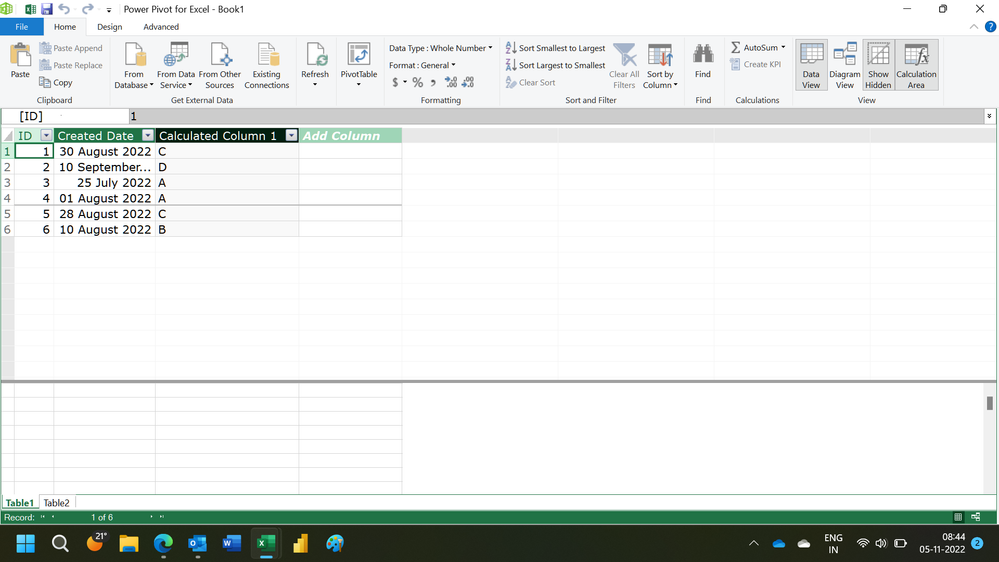
If date from Table1 fall between Table2 START and END Dates, then i need name from Table2.
Any leads will really help.
| Table 1 | Table2 | ||||
| ID | Created Date | Name | Start Date | End Date | |
| 1 | 6/30/2022 | A | 7/20/2022 | 8/2/2022 | |
| 2 | 5/15/2022 | B | 8/3/2022 | 8/16/2022 | |
| 3 | 7/25/2022 | C | 8/17/2022 | 8/30/2022 | |
| 4 | 8/1/2022 | D | 8/31/2022 | 9/20/2022 | |
| 5 | 7/10/2022 | ||||
| 6 | 8/10/2022 | ||||
| Output | |||||
| ID | Created Date | Name | |||
| 1 | 8/30/2022 | C | |||
| 2 | 9/10/2022 | D | |||
| 3 | 7/25/2022 | A | |||
| 4 | 8/1/2022 | A | |||
| 5 | 8/28/2022 | C | |||
| 6 | 8/10/2022 | B |
Thanks
Solved! Go to Solution.
@Anonymous Try:
Column =
VAR __Date = 'Table 1'[Created Date]
VAR __Name = MAXX(FILTER('Table2',__Date >= [Start Date] && __Date <= [End Date]),[Name])
RETURN
__Name
Measure =
VAR __Date = MAX('Table 1'[Created Date])
VAR __Name = MAXX(FILTER('Table2',__Date >= [Start Date] && __Date <= [End Date]),[Name])
RETURN
__Name
Hi,
Try this calculated column formula in Table1
=CALCULATE(MAX(Table2[Name]),FILTER(Table2,Table2[Start Date]<=EARLIER(Table1[Created Date])&&Table2[End Date]>=EARLIER(Table1[Created Date])))
Hope this helps.
Hi,
Try this calculated column formula in Table1
=CALCULATE(MAX(Table2[Name]),FILTER(Table2,Table2[Start Date]<=EARLIER(Table1[Created Date])&&Table2[End Date]>=EARLIER(Table1[Created Date])))
Hope this helps.
@Anonymous Try:
Column =
VAR __Date = 'Table 1'[Created Date]
VAR __Name = MAXX(FILTER('Table2',__Date >= [Start Date] && __Date <= [End Date]),[Name])
RETURN
__Name
Measure =
VAR __Date = MAX('Table 1'[Created Date])
VAR __Name = MAXX(FILTER('Table2',__Date >= [Start Date] && __Date <= [End Date]),[Name])
RETURN
__Name
The Power BI Data Visualization World Championships is back! Get ahead of the game and start preparing now!
| User | Count |
|---|---|
| 39 | |
| 37 | |
| 33 | |
| 32 | |
| 29 |
| User | Count |
|---|---|
| 132 | |
| 88 | |
| 82 | |
| 68 | |
| 64 |