cancel
Showing results for 
Search instead for 
Did you mean: 

The Power BI Data Visualization World Championships is back! Get ahead of the game and start preparing now! Learn more

Reply
ask
Helper III
Helper III

Find the matching date

i have 2 tables. I need to find the matching event date from Event date and create another column in Date table as Event date, and calculate how many days between date and event date,  for example: Event Date is 5/27/2017,  All the Date from Date table =< 5/27/2017 and >5/6/2017(which is next event date in the past) will be 5/27/2017 in the new column of Even Date in Date table. I have output result attached in the end. Any advice ? Thanks.


Event Date
4/29/2017
5/6/2017
5/27/2017


Date
5/18/2017
5/17/2017
5/16/2017
5/15/2017
5/15/2017
5/14/2017
5/6/2017
5/5/2017
5/4/2017
5/3/2017
5/2/2017
5/1/2017
4/30/2017
4/29/2017
4/28/2017
4/27/2017


output table:


DateEvent DateDays
5/18/20175/27/2017-9
5/17/20175/27/2017-10
5/16/20175/27/2017-11
5/15/20175/27/2017-12
5/15/20175/27/2017-12
5/14/20175/27/2017-13
5/6/20175/6/20170
5/5/20175/6/2017-1
5/4/20175/6/2017-2
5/3/20175/6/2017-3
5/2/20175/6/2017-4
5/1/20175/6/2017-5
4/30/20175/6/2017-6
4/29/20174/29/20170
4/28/20174/29/2017-1
4/27/20174/29/2017-2
1 ACCEPTED SOLUTION
Anonymous
Not applicable

Hi @ask,


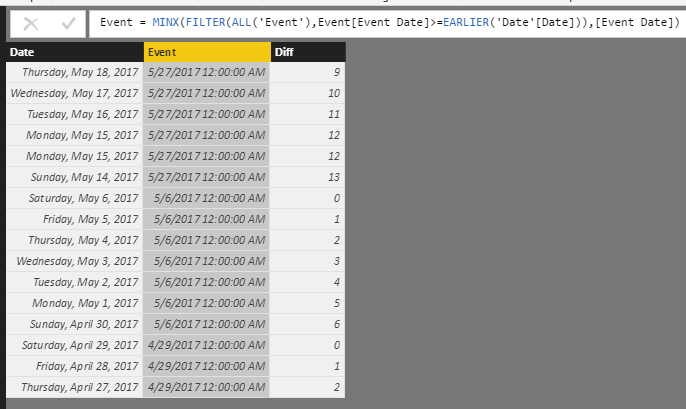
You can add calculate column with minx function to get the specific event date, below is the sample:


Logic: get all "event date" which large the current date, use minx function to get the min date.

Event = MINX(FILTER(ALL('Event'),Event[Event Date]>=EARLIER('Date'[Date])),[Event Date])


Diff = DATEDIFF([Date],[Event],DAY)

6.PNG


Regards,

Xiaoxin Sheng

View solution in original post

4 REPLIES 4
ask
Helper III
Helper III

waiting ............. 


can anyone help me out?

Anonymous
Not applicable

Hi @ask,


You can add calculate column with minx function to get the specific event date, below is the sample:


Logic: get all "event date" which large the current date, use minx function to get the min date.

Event = MINX(FILTER(ALL('Event'),Event[Event Date]>=EARLIER('Date'[Date])),[Event Date])


Diff = DATEDIFF([Date],[Event],DAY)

6.PNG


Regards,

Xiaoxin Sheng

Thank you @Anonymous. Super helpful

I have 2 tables, one event table, another table containing the date as well. I need to find the matching date from event date. For example, 5/18/2017, I need to add 5/27/2017 from Event table, and calculate how many tables from event date. I have the output table attached as well. Any advice?


Event Date
4/29/2017
5/6/2017
5/27/2017


Date
5/18/2017
5/17/2017
5/16/2017
5/15/2017
5/15/2017
5/14/2017
5/6/2017
5/5/2017
5/4/2017
5/3/2017
5/2/2017
5/1/2017
4/30/2017
4/29/2017
4/28/2017
4/27/2017


Output will look like the table below


DateEvent DateDays
5/18/20175/27/2017-9
5/17/20175/27/2017-10
5/16/20175/27/2017-11
5/15/20175/27/2017-12
5/15/20175/27/2017-12
5/14/20175/27/2017-13
5/6/20175/6/20170
5/5/20175/6/2017-1
5/4/20175/6/2017-2
5/3/20175/6/2017-3
5/2/20175/6/2017-4
5/1/20175/6/2017-5
4/30/20175/6/2017-6
4/29/20174/29/20170
4/28/20174/29/2017-1
4/27/20174/29/2017-2


Helpful resources

Announcements
Power BI DataViz World Championships

Power BI Dataviz World Championships

The Power BI Data Visualization World Championships is back! Get ahead of the game and start preparing now!

December 2025 Power BI Update Carousel

Power BI Monthly Update - December 2025

Check out the December 2025 Power BI Holiday Recap!

FabCon Atlanta 2026 carousel

FabCon Atlanta 2026

Join us at FabCon Atlanta, March 16-20, for the ultimate Fabric, Power BI, AI and SQL community-led event. Save $200 with code FABCOMM.