cancel
Showing results for 
Search instead for 
Did you mean: 

The Power BI Data Visualization World Championships is back! Get ahead of the game and start preparing now! Learn more

Reply
marcel97
Helper II
Helper II

Find text string in another table

Hello all,


Our customer is creating tickets in their ticket system, which we mirror in our own ticket system.


The data of our customer looks as follows:

SummaryCustomerDescriptionCustomer
Ticket 1Description to Ticket 1
Ticket 2Description to Ticket 2
Ticket 3Description to Ticket 3
Ticket 4Description to Ticket 4
Ticket 5Description to Ticket 5


No when we mirror those tickets in our ticket system, our employees put a prefix in front of the Summary of the Customer (e.g. Customer123 Ticket 1) => see below


Summary
Customer Ticket 1
12345
45678
Internal OP 1
34567
Cust. Ticket 2
Custom. Ticket 3
C. Ticket 4
Customer123 Ticket 5


While there is no clear convention for the prefix, our summary will always contain the Summary of the Customer that comes from the first table.


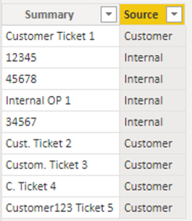
In our table, I now want to find out for each item, whether it comes from the customer table, i.e. something like this:


SummarySource
Customer Ticket 1Customer
12345Internal
45678Internal 
Internal OP 1Internal
34567Internal
Cust. Ticket 2Customer
Custom. Ticket 3Customer
C. Ticket 4Customer
Customer123 Ticket 5Customer


It has to work via comparing the text strings of the Summary fields.


Is there a way to do it? I tried using Containsstring() but failed miserably.


Thanks and kind regards

Marcel

1 ACCEPTED SOLUTION
DataInsights
Super User
Super User

@marcel97,


Try this calculated column in InternalTable:


Source = 
VAR vTable =
    FILTER (
        CustomerTable,
        VAR vCustomerValue = CustomerTable[SummaryCustomer]
        RETURN
            CONTAINSSTRING ( InternalTable[Summary], vCustomerValue )
    )
VAR vResult =
    IF ( COUNTROWS ( vTable ), "Customer", "Internal" )
RETURN
    vResult


DataInsights_0-1657210708579.png


Did I answer your question? Mark my post as a solution!

Proud to be a Super User!


View solution in original post

1 REPLY 1
DataInsights
Super User
Super User

@marcel97,


Try this calculated column in InternalTable:


Source = 
VAR vTable =
    FILTER (
        CustomerTable,
        VAR vCustomerValue = CustomerTable[SummaryCustomer]
        RETURN
            CONTAINSSTRING ( InternalTable[Summary], vCustomerValue )
    )
VAR vResult =
    IF ( COUNTROWS ( vTable ), "Customer", "Internal" )
RETURN
    vResult


DataInsights_0-1657210708579.png


Did I answer your question? Mark my post as a solution!

Proud to be a Super User!


Helpful resources

Announcements
Power BI DataViz World Championships

Power BI Dataviz World Championships

The Power BI Data Visualization World Championships is back! Get ahead of the game and start preparing now!

December 2025 Power BI Update Carousel

Power BI Monthly Update - December 2025

Check out the December 2025 Power BI Holiday Recap!

FabCon Atlanta 2026 carousel

FabCon Atlanta 2026

Join us at FabCon Atlanta, March 16-20, for the ultimate Fabric, Power BI, AI and SQL community-led event. Save $200 with code FABCOMM.

Top Solution Authors