FabCon is coming to Atlanta
Join us at FabCon Atlanta from March 16 - 20, 2026, for the ultimate Fabric, Power BI, AI and SQL community-led event. Save $200 with code FABCOMM.
Register now!- Power BI forums
- Get Help with Power BI
- Desktop
- Service
- Report Server
- Power Query
- Mobile Apps
- Developer
- DAX Commands and Tips
- Custom Visuals Development Discussion
- Health and Life Sciences
- Power BI Spanish forums
- Translated Spanish Desktop
- Training and Consulting
- Instructor Led Training
- Dashboard in a Day for Women, by Women
- Galleries
- Data Stories Gallery
- Themes Gallery
- Contests Gallery
- QuickViz Gallery
- Quick Measures Gallery
- Visual Calculations Gallery
- Notebook Gallery
- Translytical Task Flow Gallery
- TMDL Gallery
- R Script Showcase
- Webinars and Video Gallery
- Ideas
- Custom Visuals Ideas (read-only)
- Issues
- Issues
- Events
- Upcoming Events
The Power BI Data Visualization World Championships is back! Get ahead of the game and start preparing now! Learn more
- Power BI forums
- Forums
- Get Help with Power BI
- Desktop
- Re: Find beginning date/time and end date/time, c...
- Subscribe to RSS Feed
- Mark Topic as New
- Mark Topic as Read
- Float this Topic for Current User
- Bookmark
- Subscribe
- Printer Friendly Page

- Mark as New
- Bookmark
- Subscribe
- Mute
- Subscribe to RSS Feed
- Permalink
- Report Inappropriate Content
Find beginning date/time and end date/time, calculate difference from another column
Hello,
So I am not sure if the title worded it correctly but I have a dataset that takes snapshots of dates in time and also captures other metrics for fuel burn. The problem that I run into is that it is accumulating the fuel burn amount throughout the history of the item.
My goal would be to capture how much fuel was burned for that particular day by taking the beginning date/time and the end date/time and then grab the difference in idle time and idle fuel.
For example, for 12/7 the daily idle time was 20356.88(from module time: 12/7/2018 10:49:53 PM) - 20355(12/7/2018 12:02:54 AM) = 1.88 for Daily Idle Fuel
If anyone could point me in the right direction with a link to a solution or provide me with the correct solution to put in to create this column that would be perfect, thank you all for your help!
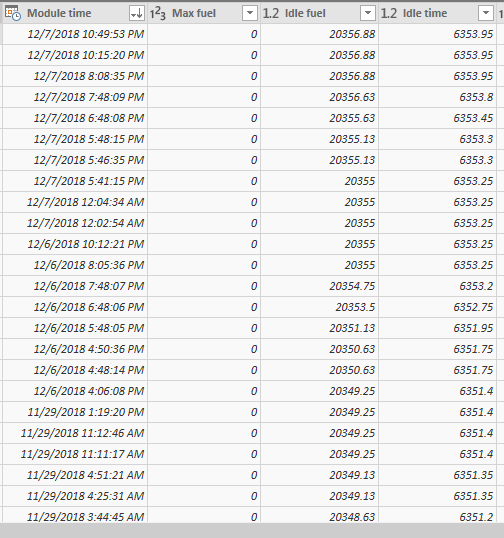
Solved! Go to Solution.


- Mark as New
- Bookmark
- Subscribe
- Mute
- Subscribe to RSS Feed
- Permalink
- Report Inappropriate Content
We need to make two changes.
1. The 'Module Time' column is currently text in your table. It needs to be of the type Date/Time. You can change the type in the query editor when importing the data (I see you're getting the data from an excel file)
2. This is the reviewed code for the column, where I've just added the ALL( ) in red:
FuelDifference =
VAR _CurrentDateValues =
    CALCULATETABLE (
        VALUES ( Table1[Module Time] ),
        FILTER (
            ALL(Table1),
            Table1[Module Time].[Date] = EARLIER ( Table1[Module Time].[Date] )
        )
    )
VAR _EarliestDateTime =
    FIRSTNONBLANK ( _CurrentDateValues, 1 )
VAR _LatestDateTime =
    LASTNONBLANK ( _CurrentDateValues, 1 )
VAR _EarliestFuel =
    LOOKUPVALUE ( Table1[Idle fuel], Table1[Module Time], _EarliestDateTime )
VAR _LatestFuel =
    LOOKUPVALUE ( Table1[Idle fuel], Table1[Module Time], _LatestDateTime )
RETURN
    _LatestFuel - _EarliestFuel
Code formatted with

- Mark as New
- Bookmark
- Subscribe
- Mute
- Subscribe to RSS Feed
- Permalink
- Report Inappropriate Content
Hi @blaferriere
Try this for the fuel calculate column. I'm not sure whether you need the same with the Idle Time as well? If you do, you can just make a minor change to the code below with Table1[Idle time] instead of Table1[Idle fuel]
FuelDifference =
VAR _CurrentDateValues =
    CALCULATETABLE (
        VALUES ( Table1[Module Time] ),
        FILTER (
            Table1,
            Table1[Module Time].[Date] = EARLIER ( Table1[Module Time].[Date] )
        )
    )
VAR _EarliestDateTime =
    FIRSTNONBLANK ( _CurrentDateValues, 1 )
VAR _LatestDateTime =
    LASTNONBLANK ( _CurrentDateValues, 1 )
VAR _EarliestFuel =
    LOOKUPVALUE ( Table1[Idle fuel], Table1[Module Time], _EarliestDateTime )
VAR _LatestFuel =
    LOOKUPVALUE ( Table1[Idle fuel], Table1[Module Time], _LatestDateTime )
RETURN
    _LatestFuel - _EarliestFuel
- Mark as New
- Bookmark
- Subscribe
- Mute
- Subscribe to RSS Feed
- Permalink
- Report Inappropriate Content
- Mark as New
- Bookmark
- Subscribe
- Mute
- Subscribe to RSS Feed
- Permalink
- Report Inappropriate Content
Do you have another calculated column in that table that has a CALCULATE or that uses measures?
Can you share the pbix?
- Mark as New
- Bookmark
- Subscribe
- Mute
- Subscribe to RSS Feed
- Permalink
- Report Inappropriate Content
- Mark as New
- Bookmark
- Subscribe
- Mute
- Subscribe to RSS Feed
- Permalink
- Report Inappropriate Content
We need to make two changes.
1. The 'Module Time' column is currently text in your table. It needs to be of the type Date/Time. You can change the type in the query editor when importing the data (I see you're getting the data from an excel file)
2. This is the reviewed code for the column, where I've just added the ALL( ) in red:
FuelDifference =
VAR _CurrentDateValues =
    CALCULATETABLE (
        VALUES ( Table1[Module Time] ),
        FILTER (
            ALL(Table1),
            Table1[Module Time].[Date] = EARLIER ( Table1[Module Time].[Date] )
        )
    )
VAR _EarliestDateTime =
    FIRSTNONBLANK ( _CurrentDateValues, 1 )
VAR _LatestDateTime =
    LASTNONBLANK ( _CurrentDateValues, 1 )
VAR _EarliestFuel =
    LOOKUPVALUE ( Table1[Idle fuel], Table1[Module Time], _EarliestDateTime )
VAR _LatestFuel =
    LOOKUPVALUE ( Table1[Idle fuel], Table1[Module Time], _LatestDateTime )
RETURN
    _LatestFuel - _EarliestFuel
Code formatted with
- Mark as New
- Bookmark
- Subscribe
- Mute
- Subscribe to RSS Feed
- Permalink
- Report Inappropriate Content
- Mark as New
- Bookmark
- Subscribe
- Mute
- Subscribe to RSS Feed
- Permalink
- Report Inappropriate Content
just edited my previous post. Forgot to mention the required type change
- Mark as New
- Bookmark
- Subscribe
- Mute
- Subscribe to RSS Feed
- Permalink
- Report Inappropriate Content
I am still getting a syntax error. I made the changes to the Module Time to be Date/Time and applied the query. I also added the All to the details, with no luck.
- Mark as New
- Bookmark
- Subscribe
- Mute
- Subscribe to RSS Feed
- Permalink
- Report Inappropriate Content
- Mark as New
- Bookmark
- Subscribe
- Mute
- Subscribe to RSS Feed
- Permalink
- Report Inappropriate Content
It's saying that the following:
The syntax for 'table' is incorrect. (DAX(VAR _CurrentDateValues = CALCULATETABLE ( VALUES ( table[Module Time] ), FILTER ( ALL(table), table[Module Time].[Date] = EARLIER ( table[Module Time].[Date] ) ) )VAR _EarliestDateTime = FIRSTNONBLANK ( _CurrentDateValues, 1 )VAR _LatestDateTime = LASTNONBLANK ( _CurrentDateValues, 1 )VAR _EarliestFuel = LOOKUPVALUE ( table[Idle fuel], table[Module Time], _EarliestDateTime )VAR _LatestFuel = LOOKUPVALUE ( table[Idle fuel], table[Module Time], _LatestDateTime )RETURN _LatestFuel - _EarliestFuel)).
- Mark as New
- Bookmark
- Subscribe
- Mute
- Subscribe to RSS Feed
- Permalink
- Report Inappropriate Content
- Mark as New
- Bookmark
- Subscribe
- Mute
- Subscribe to RSS Feed
- Permalink
- Report Inappropriate Content
- Mark as New
- Bookmark
- Subscribe
- Mute
- Subscribe to RSS Feed
- Permalink
- Report Inappropriate Content
Cool. Perhaps some kudos would be appropriate then after so much back and forth? 

Helpful resources

Power BI Dataviz World Championships
The Power BI Data Visualization World Championships is back! Get ahead of the game and start preparing now!

Power BI Monthly Update - December 2025
Check out the December 2025 Power BI Holiday Recap!

FabCon Atlanta 2026
Join us at FabCon Atlanta, March 16-20, for the ultimate Fabric, Power BI, AI and SQL community-led event. Save $200 with code FABCOMM.

| User | Count |
|---|---|
| 41 | |
| 38 | |
| 36 | |
| 30 | |
| 28 |


| User | Count |
|---|---|
| 128 | |
| 88 | |
| 79 | |
| 67 | |
| 62 |


