Share feedback directly with Fabric product managers, participate in targeted research studies and influence the Fabric roadmap.
Sign up nowGet Fabric certified for FREE! Don't miss your chance! Learn more
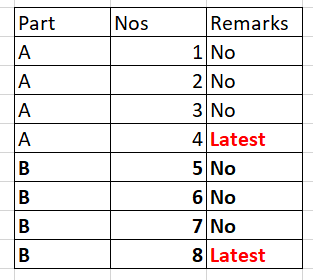
Data looks like below, based on NOs. need output as "latest", "No" with reference Part. Tried below but failed.
REV = MAXX(FILTER(Part_Hist,Part_Hist[REV_NUM]>EARLIER(Part_Hist[REV_NUM])),IF(Part_Hist[Part Name]=EARLIER(Part_Hist[Part Name]),"Yes","No"))
REV = MAXX(FILTER(Table1,Table1[Nos]>EARLIER(Table1[Nos])),IF(Table1[Part]=EARLIER(Table1[Part]),"OLD","Latest"))
Solved! Go to Solution.
@KL718 Please try this as a New Column
Remarks = VAR _Max = CALCULATE(MAX(Test260FlagLatest[Nos]),ALLEXCEPT(Test260FlagLatest,Test260FlagLatest[Part])) RETURN IF(Test260FlagLatest[Nos]=_Max,"Latest","No")
Proud to be a PBI Community Champion
@KL718 Please try this as a New Column
Remarks = VAR _Max = CALCULATE(MAX(Test260FlagLatest[Nos]),ALLEXCEPT(Test260FlagLatest,Test260FlagLatest[Part])) RETURN IF(Test260FlagLatest[Nos]=_Max,"Latest","No")
Proud to be a PBI Community Champion
Thanks & appreciate.
I was also able to find the solution. Sharing another way which can be used to achieve the output.
I wrote DAX>>
If you love stickers, then you will definitely want to check out our Community Sticker Challenge!
Check out the January 2026 Power BI update to learn about new features.
| User | Count |
|---|---|
| 64 | |
| 63 | |
| 49 | |
| 21 | |
| 18 |
| User | Count |
|---|---|
| 122 | |
| 118 | |
| 38 | |
| 36 | |
| 29 |