Join us in Barcelona for FabCon and SQLCon, September 28 - October 1, 2026.
This is best Fabric, Power BI, SQL and AI community event. How do we know? The last event sold out! Save €200 with code FABCMTY200.
Register now- Power BI forums
- Get Help with Power BI
- Desktop
- Service
- Report Server
- Power Query
- Mobile Apps
- Developer
- DAX Commands and Tips
- Custom Visuals Development Discussion
- Health and Life Sciences
- Power BI Spanish forums
- Translated Spanish Desktop
- Training and Consulting
- Instructor Led Training
- Dashboard in a Day for Women, by Women
- Galleries
- Data Stories Gallery
- Themes Gallery
- Contests Gallery
- QuickViz Gallery
- Quick Measures Gallery
- Visual Calculations Gallery
- Fabric Apps Gallery
- Notebook Gallery
- Translytical Task Flow Gallery
- TMDL Gallery
- R Script Showcase
- Webinars and Video Gallery
- Ideas
- Custom Visuals Ideas (read-only)
- Issues
- Issues
- Events
- Upcoming Events
The Fabric community is now in read-only for platform upgrade. Learn more
- Power BI forums
- Forums
- Get Help with Power BI
- Desktop
- Find Difference between Measure Values and Column ...
- Subscribe to RSS Feed
- Mark Topic as New
- Mark Topic as Read
- Float this Topic for Current User
- Bookmark
- Subscribe
- Printer Friendly Page


- Mark as New
- Bookmark
- Subscribe
- Mute
- Subscribe to RSS Feed
- Permalink
Find Difference between Measure Values and Column Values
OK, so I am trying to get some conditional formatting happening, but it is quite difficult.
We have a report which shows as follows
Task Frequency LastDone
Task 1 Yearly 1/1/2018
Task 2 Yearly 1/1/2019
Task 3 Monthly 1/8/2019
Task 4 Monthly 1/6/2019
What I am trying to achieve is highlight the LastDone date field if it is out of range.
I have a measure to get the datediff. elapsed = DATEDIFF(MAX(LASTDONE),TODAY(),DAY)
I have a column which puts the maxdays using SWITCH. MaxDays = SWITCH(FREQUENCY,"Yearly","365","3 Monthly","90","6 Monthly","180","Monthly","30","Weekly","7","Fortnightly","14","Bi Monthly","60","Daily","1")
What I am trying to do is if elapsed is more than MaxDays, then format the LASTDONE field to red background.
Any thoughts on how I can work this with a measure and column?
Or is there another way that I am not seeing?
Solved! Go to Solution.


- Mark as New
- Bookmark
- Subscribe
- Mute
- Subscribe to RSS Feed
- Permalink
Hi kevinsray,
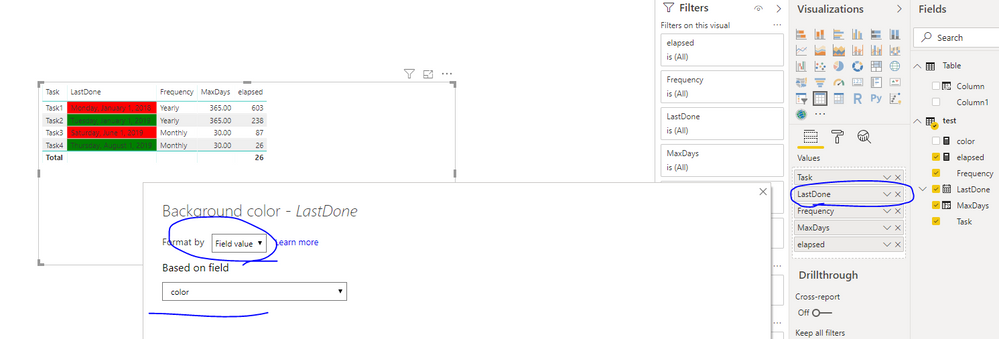
You could try below measures:
color =
IF (
    DATEDIFF ( MAX ( test[LastDone] ), TODAY (), DAY ) > MIN ( test[MaxDays] ),
    "red",
    "green"
)
Best Regards,
Zoe Zhi
If this post helps, then please consider Accept it as the solution to help the other members find it more quickly.
- Mark as New
- Bookmark
- Subscribe
- Mute
- Subscribe to RSS Feed
- Permalink
Hi kevinsray,
You could try below measures:
color =
IF (
    DATEDIFF ( MAX ( test[LastDone] ), TODAY (), DAY ) > MIN ( test[MaxDays] ),
    "red",
    "green"
)
Best Regards,
Zoe Zhi
If this post helps, then please consider Accept it as the solution to help the other members find it more quickly.
- Mark as New
- Bookmark
- Subscribe
- Mute
- Subscribe to RSS Feed
- Permalink
Very nice.
However, when I tried to setup the formatting, it wouldn`t let me select color in the rules
- Mark as New
- Bookmark
- Subscribe
- Mute
- Subscribe to RSS Feed
- Permalink
Hi kevinsray,
You could see I use Field Value when set conditional format, I have set color in measure. If you want to change color you could use "#50C7C7" to replace "red" or "green". You could get color code in color picker(https://htmlcolors.com/google-color-picker)
Best Regards,
Zoe Zhi
If this post helps, then please consider Accept it as the solution to help the other members find it more quickly.
- Mark as New
- Bookmark
- Subscribe
- Mute
- Subscribe to RSS Feed
- Permalink
Hi again.
I figured it out.
I had the data type for the MaxDays as text. doh....
changed to decimal and now it works as expected.
THANK YOU VERY MUCH.
- Mark as New
- Bookmark
- Subscribe
- Mute
- Subscribe to RSS Feed
- Permalink
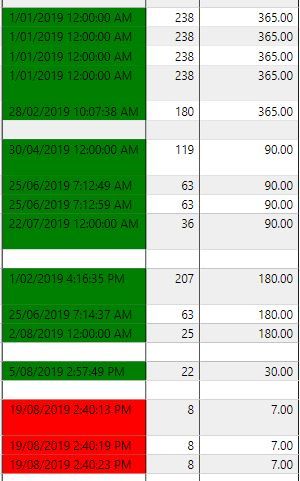
Or at least I thought it worked.
works on some fields, but not others.
- Mark as New
- Bookmark
- Subscribe
- Mute
- Subscribe to RSS Feed
- Permalink
Yes, sorry.
That is what I meant.
Would there be a reason why I could not select the color measure in the field value

Helpful resources

FabCon & SQLCon – Barcelona 2026
Join us in Barcelona for FabCon and SQLCon, the Fabric, Power BI, SQL, and AI community event. Save €200 with code FABCMTY200.

Power BI DataViz World Championships - June 2026
A new Power BI DataViz World Championship is coming this June! Don't miss out on submitting your entry.

| User | Count |
|---|---|
| 23 | |
| 22 | |
| 14 | |
| 14 | |
| 13 |


| User | Count |
|---|---|
| 47 | |
| 39 | |
| 24 | |
| 20 | |
| 20 |


