cancel
Showing results for 
Search instead for 
Did you mean: 

Get Fabric Certified for FREE during Fabric Data Days. Don't miss your chance! Request now

Reply
Anonymous
Not applicable

Filters need to have a sync option like slicers.

Filters need to have a sync option just like slicers so that we could sync it in multiple pages. 

6 REPLIES 6
PaulDBrown
Community Champion
Community Champion

@Anonymous 


There is a workaround, albeit not as simple as your suggestion. You can use the sync slicers option and keep the slicers hidden in all tables.


Did I answer your question? Mark my post as a solution!
In doing so, you are also helping me. Thank you!

Proud to be a Super User!
Paul on Linkedin.


Anonymous
Not applicable

@PaulDBrown: Thanks for your suggestion. We already tried with Slicers and to sync it in multiple pages. But the problem is that the date selection has to be an Advanced Filtering filter in the Filter pane. So the slicer and the filter was not getting sync as and when the date is changed in any of the pages. The slicer value might be changed according to the date filter selection, but as the date filter is applied as 'Filter on this page' it wont be getting sync.

v-qiuyu-msft
Community Support
Community Support

Hi @Anonymous, 


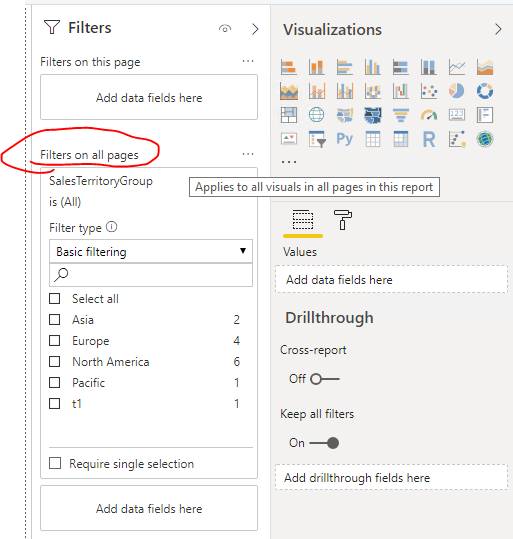
You can drag the column to "Filters on all pages" section within the Filter pane and set desired filter condition. This condition will be applied to all report pages within this report. 


q4.PNG


Reference: 

https://docs.microsoft.com/en-us/power-bi/power-bi-reports-filters-and-highlighting

https://docs.microsoft.com/en-us/power-bi/power-bi-report-filter


Best Regards,
Qiuyun Yu

Community Support Team _ Qiuyun Yu
If this post helps, then please consider Accept it as the solution to help the other members find it more quickly.
Anonymous
Not applicable

@v-qiuyu-msft : Thanks for your reply.


Yes We do have the Filter on all Pages , and Filter on a visual. But my requirement is to apply to a report with 3 pages and apply this filter to 2 pages in the report and not to apply in one page

@Anonymous  Use the 'Filter On This Page' feature. That way u can save multiple filters across pages.


Anonymous
Not applicable

@Arjun_SPThanks for your reply. 'Filter on this page' option wont be sufficient as the filter has to be sync across multiple pages and it is not required to be applied on a single page in the entire report.

Helpful resources

Announcements
November Power BI Update Carousel

Power BI Monthly Update - November 2025

Check out the November 2025 Power BI update to learn about new features.

Fabric Data Days Carousel

Fabric Data Days

Advance your Data & AI career with 50 days of live learning, contests, hands-on challenges, study groups & certifications and more!

FabCon Atlanta 2026 carousel

FabCon Atlanta 2026

Join us at FabCon Atlanta, March 16-20, for the ultimate Fabric, Power BI, AI and SQL community-led event. Save $200 with code FABCOMM.

Top Solution Authors
Top Kudoed Authors