cancel
Showing results for 
Search instead for 
Did you mean: 

The Power BI Data Visualization World Championships is back! Get ahead of the game and start preparing now! Learn more

Reply
samucaeq
New Member

Filters and data tables

I have three data tables with some common columns, mainly descriptive fields.
The other columns have fields with numeric values.
Each table contains data of a particular parameter of a unit.
I did not build the tables, I just want to use them to analise some key aspects.
I want to create a report with three data matrix, each one for a specific parameter, but, for easyness of use, I want to have just one set of filters (the common columns).
How can I set define the relation between the tables' columns? I mean, how can I inform to the system that Column 1 of Table 1 corresponds to Column 2 of Table 2 and column 1 from Table 3, for instance? Is it necessary to declare such relations or are there a better way to build these filtering strategy?
Regards

1 ACCEPTED SOLUTION
BILASolution
Solution Specialist
Solution Specialist

Hi @samucaeq


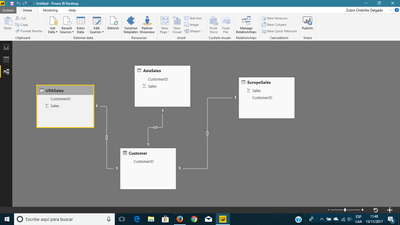
I think you're looking for a separated table. For example, you have three tables with sales and customer by territories (UsaSales, EuropeSales and AsiaSales). Then, you can create a new table only for Customers taken from each table.


Customer = 

DISTINCT
(
	UNION
	(
	    SELECTCOLUMNS(AsiaSales;"CustomerID";AsiaSales[CustomerID]);    
SELECTCOLUMNS(EuropeSales;"CustomerID";EuropeSales[CustomerID]); SELECTCOLUMNS(USASales;"CustomerID";USASales[CustomerID]) ) )


NOTE: You need to create the relationonship between the four tables.


relashion.png


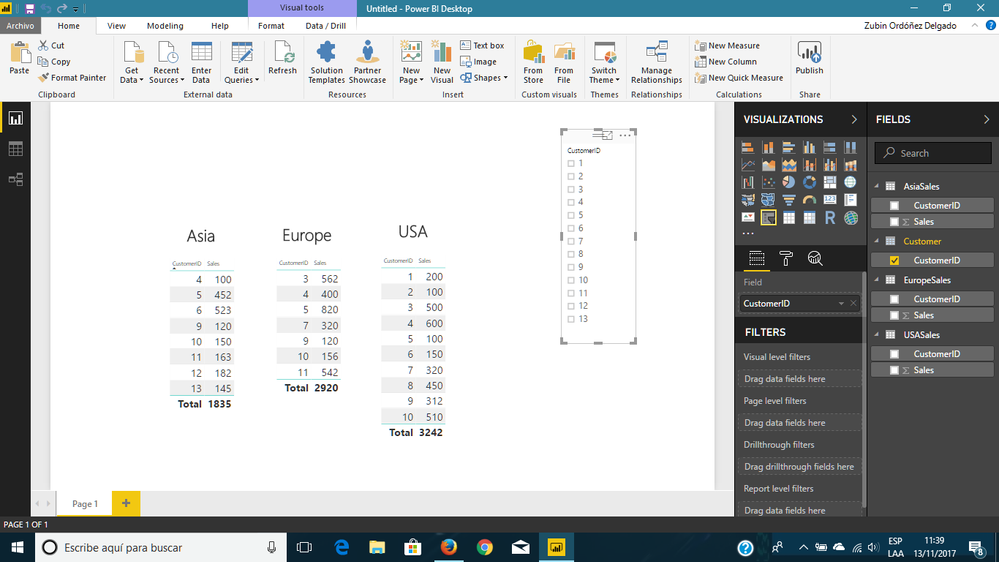
Now, you're able to filter the three tables by The Customer one.


re.png


I hope this helps


Regards

BILASolution

View solution in original post

3 REPLIES 3
v-yulgu-msft
Microsoft Employee
Microsoft Employee

Hi @samucaeq,


To filter multiple table visuals via a single slicer, you should create corresponding relationships between these tables based on common fields. Please see this article: Create and manage relationships in Power BI Desktop


If you still have any question about relationship configuration, please illustrate your requirement or issue with sample data. I need to know your table structure.


Regards,
Yuliana Gu

Community Support Team _ Yuliana Gu
If this post helps, then please consider Accept it as the solution to help the other members find it more quickly.
BILASolution
Solution Specialist
Solution Specialist

Hi @samucaeq


I think you're looking for a separated table. For example, you have three tables with sales and customer by territories (UsaSales, EuropeSales and AsiaSales). Then, you can create a new table only for Customers taken from each table.


Customer = 

DISTINCT
(
	UNION
	(
	    SELECTCOLUMNS(AsiaSales;"CustomerID";AsiaSales[CustomerID]);    
SELECTCOLUMNS(EuropeSales;"CustomerID";EuropeSales[CustomerID]); SELECTCOLUMNS(USASales;"CustomerID";USASales[CustomerID]) ) )


NOTE: You need to create the relationonship between the four tables.


relashion.png


Now, you're able to filter the three tables by The Customer one.


re.png


I hope this helps


Regards

BILASolution

BeemsC
Resolver III
Resolver III

I don't really understand the question.
Are you having trouble creating relationships within Power BI?

Helpful resources

Announcements
Power BI DataViz World Championships

Power BI Dataviz World Championships

The Power BI Data Visualization World Championships is back! Get ahead of the game and start preparing now!

December 2025 Power BI Update Carousel

Power BI Monthly Update - December 2025

Check out the December 2025 Power BI Holiday Recap!

FabCon Atlanta 2026 carousel

FabCon Atlanta 2026

Join us at FabCon Atlanta, March 16-20, for the ultimate Fabric, Power BI, AI and SQL community-led event. Save $200 with code FABCOMM.