Join us at FabCon Atlanta from March 16 - 20, 2026, for the ultimate Fabric, Power BI, AI and SQL community-led event. Save $200 with code FABCOMM.
Register now!The Power BI Data Visualization World Championships is back! Get ahead of the game and start preparing now! Learn more
Hi
I have a 3 column with Consumed ,Date,Product Name
Now based on last 6 months i need to divide the product column in to 3 one should show only first 50 Products consumed on the last 6 months next column should show only from 50 to 150, 3rd coloumn should show only150 to 200 or remaining
How can i make it, i tried using rank function on date but i am not able to divide it in to 3 limited columns like 1 to 50
Any help appreciated.
Solved! Go to Solution.
Hi @JAVED,
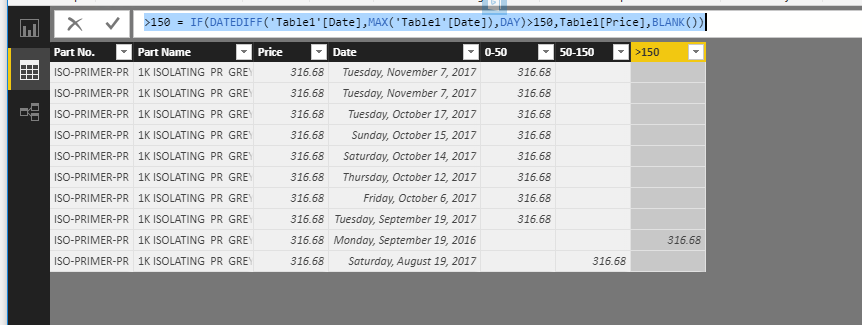
You can create calculated columns below:
0-50 = IF(DATEDIFF('Table1'[Date],MAX('Table1'[Date]),DAY)<=50,Table1[Price],BLANK())
50-150 = IF(DATEDIFF('Table1'[Date],MAX('Table1'[Date]),DAY)<=150 && DATEDIFF('Table1'[Date],MAX('Table1'[Date]),DAY)>50,Table1[Price],BLANK())
>150 = IF(DATEDIFF('Table1'[Date],MAX('Table1'[Date]),DAY)>150,Table1[Price],BLANK())
Best Regards,
Qiuyun Yu
Hi @JAVED,
Would you please share some sample data and clarify corresponding desired results?
Best Regards,
Qiuyun Yu
| Part No. | Part Name | Price | Date |
| ISO-PRIMER-PR | 1K ISOLATING PR GREY | 316.68 | November 07, 2017 |
| ISO-PRIMER-PR | 1K ISOLATING PR GREY | 316.68 | November 07, 2017 |
| ISO-PRIMER-PR | 1K ISOLATING PR GREY | 316.68 | October 17, 2017 |
| ISO-PRIMER-PR | 1K ISOLATING PR GREY | 316.68 | October 15, 2017 |
| ISO-PRIMER-PR | 1K ISOLATING PR GREY | 316.68 | October 14, 2017 |
| ISO-PRIMER-PR | 1K ISOLATING PR GREY | 316.68 | October 12, 2017 |
| ISO-PRIMER-PR | 1K ISOLATING PR GREY | 316.68 | October 06, 2017 |
| ISO-PRIMER-PR | 1K ISOLATING PR GREY | 316.68 | September 19, 2017 |
Dis is sample data,here i have 10 years of data but i need to display only 6 months data. i need to create 3 columns one should display only 1 to 50 days price of part name 2nd column as 50 to 150 days price of partname remaining as one column.Here i gave ranks to date but i am not able to divide the column in to 3 as desired
Hi @JAVED,
You can create calculated columns below:
0-50 = IF(DATEDIFF('Table1'[Date],MAX('Table1'[Date]),DAY)<=50,Table1[Price],BLANK())
50-150 = IF(DATEDIFF('Table1'[Date],MAX('Table1'[Date]),DAY)<=150 && DATEDIFF('Table1'[Date],MAX('Table1'[Date]),DAY)>50,Table1[Price],BLANK())
>150 = IF(DATEDIFF('Table1'[Date],MAX('Table1'[Date]),DAY)>150,Table1[Price],BLANK())
Best Regards,
Qiuyun Yu
I took it as a pie chart like 0-50,50-100,100-150 and i took the table with product name ,product code , price when i click on 0-50 in pie chart the table is not filtering it shows all values i want to see only 0-50 values.
Thanks for your help that works
The Power BI Data Visualization World Championships is back! Get ahead of the game and start preparing now!
| User | Count |
|---|---|
| 40 | |
| 37 | |
| 35 | |
| 34 | |
| 28 |
| User | Count |
|---|---|
| 136 | |
| 99 | |
| 73 | |
| 66 | |
| 65 |