Get Fabric or SQL Certified for Free.
Get certified for free when you join Fabric Data Days 2026 and dive into Fabric, Power BI, SQL, AI, and other essential data skills.
Join now- Power BI forums
- Get Help with Power BI
- Desktop
- Service
- Report Server
- Power Query
- Mobile Apps
- Developer
- DAX Commands and Tips
- Custom Visuals Development Discussion
- Health and Life Sciences
- Power BI Spanish forums
- Translated Spanish Desktop
- Training and Consulting
- Instructor Led Training
- Dashboard in a Day for Women, by Women
- Galleries
- Data Stories Gallery
- Themes Gallery
- Contests Gallery
- QuickViz Gallery
- Quick Measures Gallery
- Visual Calculations Gallery
- Notebook Gallery
- Translytical Task Flow Gallery
- TMDL Gallery
- R Script Showcase
- Webinars and Video Gallery
- Ideas
- Custom Visuals Ideas (read-only)
- Issues
- Issues
- Events
- Upcoming Events
July 7 - July 17 | Round 2 of the Power BI Dataviz World Championships. Don't miss your chance! Learn more
- Power BI forums
- Forums
- Get Help with Power BI
- Desktop
- Filtering
- Subscribe to RSS Feed
- Mark Topic as New
- Mark Topic as Read
- Float this Topic for Current User
- Bookmark
- Subscribe
- Printer Friendly Page


- Mark as New
- Bookmark
- Subscribe
- Mute
- Subscribe to RSS Feed
- Permalink
- Report Inappropriate Content
Filtering
Hi
I have a 3 column with Consumed ,Date,Product Name
Now based on last 6 months i need to divide the product column in to 3 one should show only first 50 Products consumed on the last 6 months next column should show only from 50 to 150, 3rd coloumn should show only150 to 200 or remaining
How can i make it, i tried using rank function on date but i am not able to divide it in to 3 limited columns like 1 to 50
Any help appreciated.
Solved! Go to Solution.


- Mark as New
- Bookmark
- Subscribe
- Mute
- Subscribe to RSS Feed
- Permalink
- Report Inappropriate Content
Hi @JAVED,
You can create calculated columns below:
0-50 = IF(DATEDIFF('Table1'[Date],MAX('Table1'[Date]),DAY)<=50,Table1[Price],BLANK())
50-150 = IF(DATEDIFF('Table1'[Date],MAX('Table1'[Date]),DAY)<=150 && DATEDIFF('Table1'[Date],MAX('Table1'[Date]),DAY)>50,Table1[Price],BLANK())
>150 = IF(DATEDIFF('Table1'[Date],MAX('Table1'[Date]),DAY)>150,Table1[Price],BLANK())
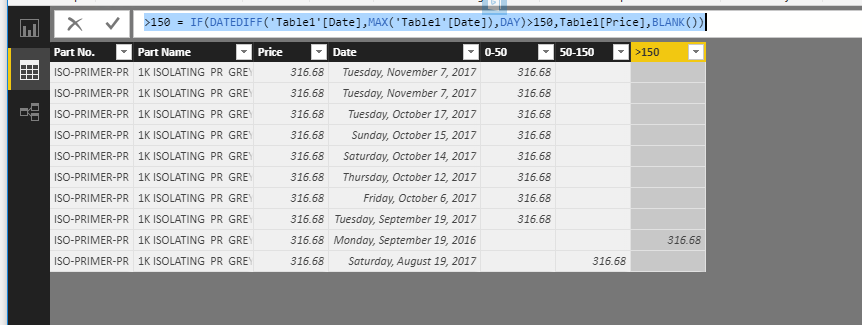
Best Regards,
Qiuyun Yu
If this post helps, then please consider Accept it as the solution to help the other members find it more quickly.
- Mark as New
- Bookmark
- Subscribe
- Mute
- Subscribe to RSS Feed
- Permalink
- Report Inappropriate Content
Hi @JAVED,
Would you please share some sample data and clarify corresponding desired results?
Best Regards,
Qiuyun Yu
If this post helps, then please consider Accept it as the solution to help the other members find it more quickly.
- Mark as New
- Bookmark
- Subscribe
- Mute
- Subscribe to RSS Feed
- Permalink
- Report Inappropriate Content
| Part No. | Part Name | Price | Date |
| ISO-PRIMER-PR | 1K ISOLATING PR GREY | 316.68 | November 07, 2017 |
| ISO-PRIMER-PR | 1K ISOLATING PR GREY | 316.68 | November 07, 2017 |
| ISO-PRIMER-PR | 1K ISOLATING PR GREY | 316.68 | October 17, 2017 |
| ISO-PRIMER-PR | 1K ISOLATING PR GREY | 316.68 | October 15, 2017 |
| ISO-PRIMER-PR | 1K ISOLATING PR GREY | 316.68 | October 14, 2017 |
| ISO-PRIMER-PR | 1K ISOLATING PR GREY | 316.68 | October 12, 2017 |
| ISO-PRIMER-PR | 1K ISOLATING PR GREY | 316.68 | October 06, 2017 |
| ISO-PRIMER-PR | 1K ISOLATING PR GREY | 316.68 | September 19, 2017 |
Dis is sample data,here i have 10 years of data but i need to display only 6 months data. i need to create 3 columns one should display only 1 to 50 days price of part name 2nd column as 50 to 150 days price of partname remaining as one column.Here i gave ranks to date but i am not able to divide the column in to 3 as desired
- Mark as New
- Bookmark
- Subscribe
- Mute
- Subscribe to RSS Feed
- Permalink
- Report Inappropriate Content
Hi @JAVED,
You can create calculated columns below:
0-50 = IF(DATEDIFF('Table1'[Date],MAX('Table1'[Date]),DAY)<=50,Table1[Price],BLANK())
50-150 = IF(DATEDIFF('Table1'[Date],MAX('Table1'[Date]),DAY)<=150 && DATEDIFF('Table1'[Date],MAX('Table1'[Date]),DAY)>50,Table1[Price],BLANK())
>150 = IF(DATEDIFF('Table1'[Date],MAX('Table1'[Date]),DAY)>150,Table1[Price],BLANK())
Best Regards,
Qiuyun Yu
If this post helps, then please consider Accept it as the solution to help the other members find it more quickly.
- Mark as New
- Bookmark
- Subscribe
- Mute
- Subscribe to RSS Feed
- Permalink
- Report Inappropriate Content
I took it as a pie chart like 0-50,50-100,100-150 and i took the table with product name ,product code , price when i click on 0-50 in pie chart the table is not filtering it shows all values i want to see only 0-50 values.
- Mark as New
- Bookmark
- Subscribe
- Mute
- Subscribe to RSS Feed
- Permalink
- Report Inappropriate Content
Thanks for your help that works

Helpful resources

Data Days 2026
Don't miss out on Data Days, June 15 through August 7. Learn Fabric, Power BI, SQL, AI and more.

Power BI DataViz World Championships - June 2026
A new Power BI DataViz World Championship is coming this June! Don't miss out on submitting your entry.

| User | Count |
|---|---|
| 23 | |
| 22 | |
| 20 | |
| 20 | |
| 12 |


| User | Count |
|---|---|
| 63 | |
| 56 | |
| 47 | |
| 44 | |
| 37 |


