Join us in Barcelona for FabCon and SQLCon, September 28 - October 1, 2026.
This is best Fabric, Power BI, SQL and AI community event. How do we know? The last event sold out! Save €200 with code FABCMTY200.
Register now- Power BI forums
- Get Help with Power BI
- Desktop
- Service
- Report Server
- Power Query
- Mobile Apps
- Developer
- DAX Commands and Tips
- Custom Visuals Development Discussion
- Health and Life Sciences
- Power BI Spanish forums
- Translated Spanish Desktop
- Training and Consulting
- Instructor Led Training
- Dashboard in a Day for Women, by Women
- Galleries
- Data Stories Gallery
- Themes Gallery
- Contests Gallery
- QuickViz Gallery
- Quick Measures Gallery
- Visual Calculations Gallery
- Notebook Gallery
- Translytical Task Flow Gallery
- TMDL Gallery
- R Script Showcase
- Webinars and Video Gallery
- Ideas
- Custom Visuals Ideas (read-only)
- Issues
- Issues
- Events
- Upcoming Events
A new Data Days event is coming soon! This time we’re going bigger than ever. Fabric, Power BI, SQL, AI and more. Don't miss out.
- Power BI forums
- Forums
- Get Help with Power BI
- Desktop
- Filtering
- Subscribe to RSS Feed
- Mark Topic as New
- Mark Topic as Read
- Float this Topic for Current User
- Bookmark
- Subscribe
- Printer Friendly Page


- Mark as New
- Bookmark
- Subscribe
- Mute
- Subscribe to RSS Feed
- Permalink
- Report Inappropriate Content
Filtering
Hello Experts,
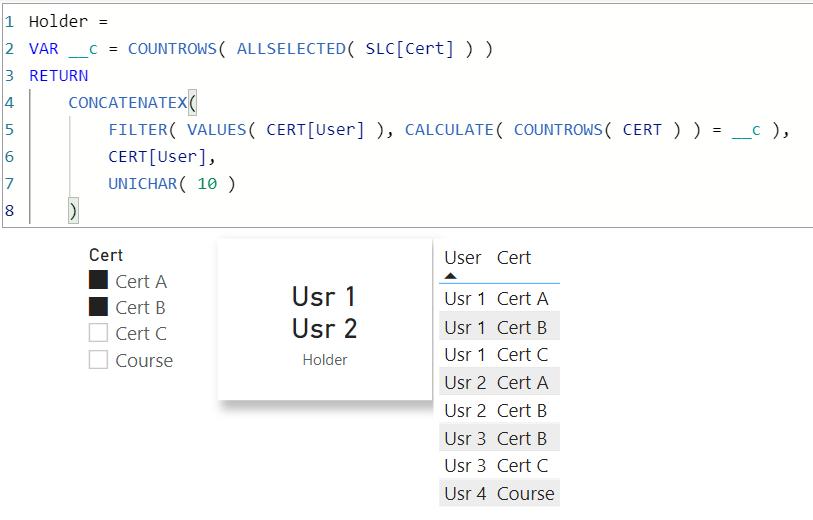
Through the following table, I am looking for 3 tables by DAX.
1- A table that shows all users that have 3 certifications A,B,C (complete certification)
2 A table that shows the users and their certifications and missed certifications
3- A table that shows users that have not any certification.

Solved! Go to Solution.


- Mark as New
- Bookmark
- Subscribe
- Mute
- Subscribe to RSS Feed
- Permalink
- Report Inappropriate Content
@koorosh
Here are table codes
EVALUATE
FILTER (
    VALUES ( Table1[User] ),
    COUNTROWS (
        INTERSECT (
            CALCULATETABLE ( VALUES ( Table1[Certification] ) ),
            { "Cert A", "Cert B", "Cert C" }
        )
    ) = 3
)

EVALUATE
ADDCOLUMNS (
    CROSSJOIN (
        VALUES ( Table1[user] ),
        SELECTCOLUMNS ( { "Cert A", "Cert B", "Cert C" }, "Cert", [Value] )
    ),
    "Status",
        VAR _cert = [Cert]
        RETURN
            IF (
                CALCULATE ( ISEMPTY ( FILTER ( table1, table1[Certification] = _cert ) ) ),
                "Missing",
                "Certified"
            )
)

EVALUATE
FILTER (
    VALUES ( Table1[User] ),
    COUNTROWS (
        INTERSECT (
            CALCULATETABLE ( VALUES ( Table1[Certification] ) ),
            { "Cert A", "Cert B", "Cert C" }
        )
    ) = 0
)
Check the attached file below my signature
⭕ Subscribe and learn Power BI from these videos
⚪ Website ⚪ LinkedIn ⚪ PBI User Group


- Mark as New
- Bookmark
- Subscribe
- Mute
- Subscribe to RSS Feed
- Permalink
- Report Inappropriate Content
| Thanks to the great efforts by MS engineers to simplify syntax of DAX! Most beginners are SUCCESSFULLY MISLED to think that they could easily master DAX; but it turns out that the intricacy of the most frequently used RANKX() is still way beyond their comprehension! |
DAX is simple, but NOT EASY! |
- Mark as New
- Bookmark
- Subscribe
- Mute
- Subscribe to RSS Feed
- Permalink
- Report Inappropriate Content
| Thanks to the great efforts by MS engineers to simplify syntax of DAX! Most beginners are SUCCESSFULLY MISLED to think that they could easily master DAX; but it turns out that the intricacy of the most frequently used RANKX() is still way beyond their comprehension! |
DAX is simple, but NOT EASY! |


- Mark as New
- Bookmark
- Subscribe
- Mute
- Subscribe to RSS Feed
- Permalink
- Report Inappropriate Content
Hi @koorosh ,
Here the third one:

Table3 =
FILTER (
    SUMMARIZE (
        'Table',
        Table[User],
        "NumberOfDistinctCertifications",
        CALCULATE (
            DISTINCTCOUNT ( Table[Certification] ), Table[Certification] in {"Cert A", "Cert B", "Cert C"} ),
        "NumberOfDistinctCourses",
        CALCULATE (
            DISTINCTCOUNT ( Table[Certification] ), Table[Certification] in {"course"} )
    ),
    [NumberOfDistinctCourses] > 0 && [NumberOfDistinctCertifications] < 1
)
Does this help? 🙂
/Tom
https://www.tackytech.blog/
https://www.instagram.com/tackytechtom/
| Did I answer your question❓➡️ Please, mark my post as a solution ✔️ |
| Also happily accepting Kudos 🙂 |
| Feel free to connect with me on LinkedIn! | |
| #proudtobeasuperuser |  |
- Mark as New
- Bookmark
- Subscribe
- Mute
- Subscribe to RSS Feed
- Permalink
- Report Inappropriate Content
@koorosh
Here are table codes
EVALUATE
FILTER (
    VALUES ( Table1[User] ),
    COUNTROWS (
        INTERSECT (
            CALCULATETABLE ( VALUES ( Table1[Certification] ) ),
            { "Cert A", "Cert B", "Cert C" }
        )
    ) = 3
)

EVALUATE
ADDCOLUMNS (
    CROSSJOIN (
        VALUES ( Table1[user] ),
        SELECTCOLUMNS ( { "Cert A", "Cert B", "Cert C" }, "Cert", [Value] )
    ),
    "Status",
        VAR _cert = [Cert]
        RETURN
            IF (
                CALCULATE ( ISEMPTY ( FILTER ( table1, table1[Certification] = _cert ) ) ),
                "Missing",
                "Certified"
            )
)

EVALUATE
FILTER (
    VALUES ( Table1[User] ),
    COUNTROWS (
        INTERSECT (
            CALCULATETABLE ( VALUES ( Table1[Certification] ) ),
            { "Cert A", "Cert B", "Cert C" }
        )
    ) = 0
)
Check the attached file below my signature
⭕ Subscribe and learn Power BI from these videos
⚪ Website ⚪ LinkedIn ⚪ PBI User Group
- Mark as New
- Bookmark
- Subscribe
- Mute
- Subscribe to RSS Feed
- Permalink
- Report Inappropriate Content
Thanks Mohammed, If the excel data source has more columns and I want to include them in the T1 and T2, wherein Dax for T1 and T2, I should bring them? For example name of the company of each user and the date of each certification.
- Mark as New
- Bookmark
- Subscribe
- Mute
- Subscribe to RSS Feed
- Permalink
- Report Inappropriate Content
@koorosh
Yes, you can do it by using these tables as filters in a CALCULATEDTABLE function.
⭕ Subscribe and learn Power BI from these videos
⚪ Website ⚪ LinkedIn ⚪ PBI User Group
- Mark as New
- Bookmark
- Subscribe
- Mute
- Subscribe to RSS Feed
- Permalink
- Report Inappropriate Content
Hi @koorosh ,
Here the first one:

Table1 =
FILTER (
    SUMMARIZE (
        FILTER  ( 'Table', Table20[Certification] in {"Cert A", "Cert B", "Cert C"} ),
        Table[User],
        "NumberOfDistinctCertifications", DISTINCTCOUNT ( Table[Certification] )
    ),
    [NumberOfDistinctCertifications] = 3
)
Does this help? 🙂
/Tom
https://www.tackytech.blog/
https://www.instagram.com/tackytechtom/
| Did I answer your question❓➡️ Please, mark my post as a solution ✔️ |
| Also happily accepting Kudos 🙂 |
| Feel free to connect with me on LinkedIn! | |
| #proudtobeasuperuser | |

Helpful resources

Power BI Monthly Update - May 2026
Check out the May 2026 Power BI update to learn about new features.

Data Days 2026 coming soon!
Sign up to receive a private message when registration opens and key events begin.

New to Fabric Survey
If you have recently started exploring Fabric, we'd love to hear how it's going. Your feedback can help with product improvements.

Power BI DataViz World Championships - June 2026
A new Power BI DataViz World Championship is coming this June! Don't miss out on submitting your entry.

| User | Count |
|---|---|
| 27 | |
| 26 | |
| 22 | |
| 19 | |
| 17 |


| User | Count |
|---|---|
| 45 | |
| 42 | |
| 41 | |
| 21 | |
| 18 |


