Join us at FabCon Atlanta from March 16 - 20, 2026, for the ultimate Fabric, Power BI, AI and SQL community-led event. Save $200 with code FABCOMM.
Register now!Vote for your favorite vizzies from the Power BI Dataviz World Championship submissions. Vote now!
Hi,
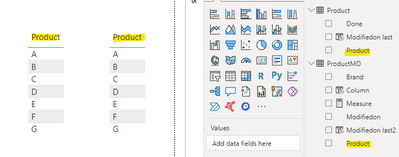
due to complexity of my data modell, two tables with same fields have no relationship.
However in the report, I still want the fields Product of each table to filter each other.
How can this be achieved by creating a new product column that filters the other field of the other table?
Thank you.
Solved! Go to Solution.
@thhmez7 ,
If they do not have any relationship, create a slicer on one table say table 1
so measure for table 1 is
countrows(Table1)
use this in visual with any column of Table 1
Measure for table 2
countrows(Filter(Table2, Table2[product] in values(Table1[product]) ))
Option 2
You need to have a table with all products like
product = distinct(Union(distinct(Table1[product ]), distinct(Table2[product ])) )
Join with both tables and filter
You could create a product Table containing all the items you need to have.
Then add to model and add relationship
@thhmez7 ,
If they do not have any relationship, create a slicer on one table say table 1
so measure for table 1 is
countrows(Table1)
use this in visual with any column of Table 1
Measure for table 2
countrows(Filter(Table2, Table2[product] in values(Table1[product]) ))
Option 2
You need to have a table with all products like
product = distinct(Union(distinct(Table1[product ]), distinct(Table2[product ])) )
Join with both tables and filter
Vote for your favorite vizzies from the Power BI World Championship submissions!
If you love stickers, then you will definitely want to check out our Community Sticker Challenge!
Check out the January 2026 Power BI update to learn about new features.
| User | Count |
|---|---|
| 57 | |
| 53 | |
| 40 | |
| 17 | |
| 16 |
| User | Count |
|---|---|
| 116 | |
| 105 | |
| 41 | |
| 34 | |
| 25 |