cancel
Showing results for 
Search instead for 
Did you mean: 

We've captured the moments from FabCon & SQLCon that everyone is talking about, and we are bringing them to the community, live and on-demand. Starts on April 14th. Register now

Reply
gwright15
Helper I
Helper I

Filtering results

Morning all


i have a basic query, but can't get my head around it.


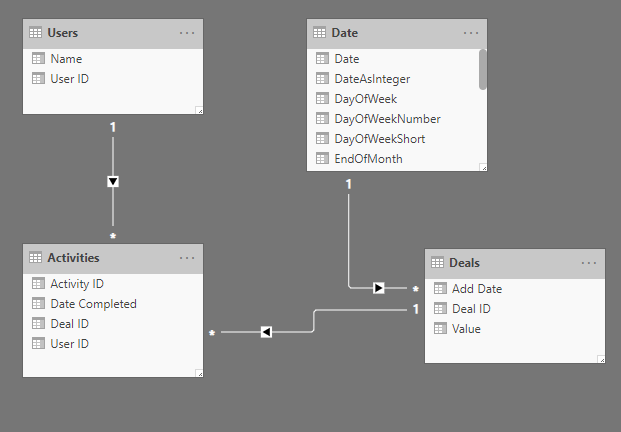
We have 4 four tables - a date table, an activity table, deals table and a user table.


Every activity is linked to a deal.  I would like to calculate the value of deals where an activity has table place.  The table relationships like as follows:

Relationships.png


The result would be a total per user who completed the activity - i.e. example a has x number of deal with a value of y.


Can you help me?

3 REPLIES 3
MattAllington
Community Champion
Community Champion

Firstly, thanks for sharing the model view. Some observations


1. You’re User table does not filter the deals table

2. There is a 1 to many relationship between deals and activities. 


Based on 2, even if you turn relationship 2 to be bidirectional, that will make users filter deals (to get value), but value will be multiplied for each instance of an activity. 


My guess is. 


=calculate(sumx(deals,deals[value]),activities)


but you would have to test it


* Matt is an 8 times Microsoft MVP (Power BI) and author of the Power BI Book Supercharge Power BI.
I will not give you bad advice, even if you unknowingly ask for it.

Thanks Matt!


In may main model, the User table does link to the deal table, but for this particular measure, i don't want to take into account the user allocated to the deal, only who completed the activity.  I understand this will lead to some strange data, as two users could work on the same deal, but this is find for this use case.


The 1 to many relationship seems correct (correct me if i'm wrong), but i think you're right that the relationship needs to be bi-directional.  


One element i didn't mention in the first query is if a single user had two activities for a deal, worth say £1k, i only want to return £1k, rather than £2k.


I've tried your measure, but it seems to come back with any error message " Too many argument" etc.


I have found a formula which seems to work, but not sure if this the best method:


TotalValue = 
Calculate (
    Sum(Deals[Value]),
    Filter(Deals,Deals[Deal ID] In VALUES(Activities[Deal ID]))
)
 

Any helps would be amazing!


In my actual tables, i have multi realationship, and as such, some for inactive.


This formula works.


TotalValue = 
Calculate (
    Sum(Deals[Value]),
    Filter(Deals,Deals[Deal ID] In VALUES(Activities[Deal ID]))
)

But if i make the relationships inactive, and use the "USERELATIOSHIP" formala instead, it stops working - see below.


TotalValue = 
Calculate (
    Sum(Deals[Value]),
    Filter(Deals,Deals[Deal ID] In VALUES(Activities[Deal ID])),
    USERELATIONSHIP(Activities[Deal ID],Deals[Deal ID]),
    USERELATIONSHIP('Date'[Date],Deals[Add Date]),
    USERELATIONSHIP(Activities[User ID],Users[User ID])
)


Helpful resources

Announcements
New to Fabric survey Carousel

New to Fabric Survey

If you have recently started exploring Fabric, we'd love to hear how it's going. Your feedback can help with product improvements.

Power BI DataViz World Championships carousel

Power BI DataViz World Championships - June 2026

A new Power BI DataViz World Championship is coming this June! Don't miss out on submitting your entry.

Join our Fabric User Panel

Join our Fabric User Panel

Share feedback directly with Fabric product managers, participate in targeted research studies and influence the Fabric roadmap.

March Power BI Update Carousel

Power BI Community Update - March 2026

Check out the March 2026 Power BI update to learn about new features.