This is best Fabric, Power BI, SQL and AI community event. How do we know? The last event sold out! Save €200 with code FABCMTY200.
Register nowA new Data Days event is coming soon! This time we’re going bigger than ever. Fabric, Power BI, SQL, AI and more. Don't miss out.
Hello,
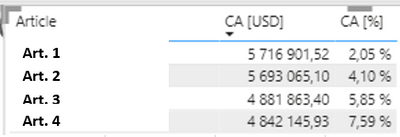
I've a list of sales with a line each time an article is sold, the date and the sell amount. I've created a measure in order to do a Pareto analysis:
Pareto =
VAR CostVar = [Total_Cost]
VAR All_CA = CALCULATE([Total_Cost],ALLSELECTED(Sales))
RETURN
DIVIDE(
SUMX(
FILTER(
SUMMARIZE(ALLSELECTED(Sales),Sales[Article],
"CA", [Total_Cost]),
[CA] >= CostVar),
[CA]),
Total_CA,0)The result I obtain at the end is something like this:
The only problem I have now it's that I cannot apply a filter on the CA[%].
Is there any way to apply a filter on this column up to a certain value ?
@capko , Try like
Power BI Window: Pareto Analysis Again, 80% of sales, Order by Measure when REL position is used: https://youtu.be/GpoITi_tRIw
Thanks for you support !
I'm trying to replicate the video but I'm facing several problems. The most important one: 'WINDOW' is not recognised as a function, as well as 'ORDERBY' (it recognize 'ORDER BY') 😕
Am I doing something wrong ?
Well, I've checked and the 'WINDOW' function seems to be a new one included in another version of Power BI than the one I'm allow to use at work... There is any other way of doing exactly the same using the version of Power BI 2.107 ?
Check out the May 2026 Power BI update to learn about new features.
Sign up to receive a private message when registration opens and key events begin.
If you have recently started exploring Fabric, we'd love to hear how it's going. Your feedback can help with product improvements.
| User | Count |
|---|---|
| 27 | |
| 25 | |
| 25 | |
| 21 | |
| 14 |
| User | Count |
|---|---|
| 50 | |
| 44 | |
| 20 | |
| 18 | |
| 18 |