FabCon is coming to Atlanta
Join us at FabCon Atlanta from March 16 - 20, 2026, for the ultimate Fabric, Power BI, AI and SQL community-led event. Save $200 with code FABCOMM.
Register now!- Power BI forums
- Get Help with Power BI
- Desktop
- Service
- Report Server
- Power Query
- Mobile Apps
- Developer
- DAX Commands and Tips
- Custom Visuals Development Discussion
- Health and Life Sciences
- Power BI Spanish forums
- Translated Spanish Desktop
- Training and Consulting
- Instructor Led Training
- Dashboard in a Day for Women, by Women
- Galleries
- Data Stories Gallery
- Themes Gallery
- Contests Gallery
- QuickViz Gallery
- Quick Measures Gallery
- Visual Calculations Gallery
- Notebook Gallery
- Translytical Task Flow Gallery
- TMDL Gallery
- R Script Showcase
- Webinars and Video Gallery
- Ideas
- Custom Visuals Ideas (read-only)
- Issues
- Issues
- Events
- Upcoming Events
The Power BI Data Visualization World Championships is back! Get ahead of the game and start preparing now! Learn more
- Power BI forums
- Forums
- Get Help with Power BI
- Desktop
- Filtering out 'non responses'
- Subscribe to RSS Feed
- Mark Topic as New
- Mark Topic as Read
- Float this Topic for Current User
- Bookmark
- Subscribe
- Printer Friendly Page


- Mark as New
- Bookmark
- Subscribe
- Mute
- Subscribe to RSS Feed
- Permalink
- Report Inappropriate Content
Filtering out 'non responses'
Hi all,
Im struggling to find a way to see a list of customers who havent submitted any survey responses. Im sure there must be a way but Im struggling to find one that works.
I send out a survey (forms pro) to collect NPS feedback and the data gets written back into Dynamics via automate.
We survey 1:10 so if a client is 10 users, they get 1 survey to a contact and if they are 100 users they get 10 surveys to 10 contacts. We generally get a response rate of about 50% so account managers will chase up people who havent answered.
I have a table that shows all those who have responded and another of those outstanding which is a help but what I really need is a table that shows the companies that havent responded at all i.e we have had nothing back from anyone.
If a 100 user company who had 10 surveys sent had 2 people answer, im less inclined to spend time chase the 8 missing ones and would rather the account managers chased the companies who have submitted zero.
As below screen shot, by sorting the data by client name, I can visually see the red item has gone to 1 person and had no response (last column) and the green customer has had 2 of the 5 contacts submit feedback. So I want this list to just show the clients where there has been no response. Ideally, I want to filter out the green company because there is at least one response received.
It's more important for time to target the red one who has returned no feedback than chase the 3 on the green one who has had 2 surveys returned by 2 contacts already.
Hope that makes sense.

Solved! Go to Solution.


- Mark as New
- Bookmark
- Subscribe
- Mute
- Subscribe to RSS Feed
- Permalink
- Report Inappropriate Content
Yes. [Score] is correct (my bad). Also, since that must be a numeric column, the "" isn't working. You can replace that part with >0 (or >-1, if you expect 0 Scores in the data) in place of the <>"".
If this works for you, please mark it as the solution. Kudos are appreciated too. Please let me know if not.
Regards,
Pat
Did I answer your question? Mark my post as a solution! Kudos are also appreciated!
To learn more about Power BI, follow me on Twitter or subscribe on YouTube.
@mahoneypa HoosierBI on YouTube
- Mark as New
- Bookmark
- Subscribe
- Mute
- Subscribe to RSS Feed
- Permalink
- Report Inappropriate Content
You could try a measure like this, which would work on a table visual with a Client Name column (w/ or w/o ContactName):
Company Needs Follow Up = var currentclient = selectedvalue(Table[ClientName])
var clientresponsecount = calculate(countrows(Table), all(Table), Table[ClientName]=currentclient, Table[Description]="")+0
return if(clientresponsecount = 0, "Y", "N")
If this works for you, please mark it as the solution. Kudos are appreciated too. Please let me know if not.
Regards,
Pat
Did I answer your question? Mark my post as a solution! Kudos are also appreciated!
To learn more about Power BI, follow me on Twitter or subscribe on YouTube.
@mahoneypa HoosierBI on YouTube
- Mark as New
- Bookmark
- Subscribe
- Mute
- Subscribe to RSS Feed
- Permalink
- Report Inappropriate Content
Hi @mahoneypat ,
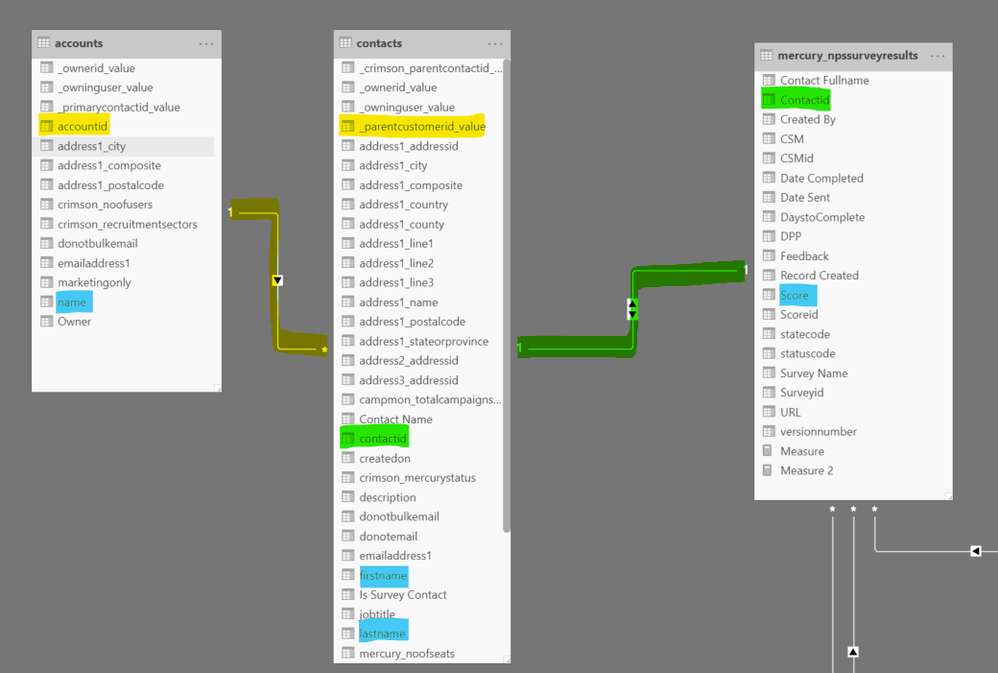
Many thanks for your help. I tried this and it isnt right for me, I think due to the relationships. I dont have the account name and identifier for a response (score) in the same table.
In the Dynamics npssurveyresults entity, everyone who has been sent a survey has a new record created and the score only has a value if its been returned so if score = blank, no survey returned
Is there a way to do this by cross referencing the measure between accounts to look at client names in the accounts table and if they have returned a response [score] from the npssurveyresults table?
Thanks
- Mark as New
- Bookmark
- Subscribe
- Mute
- Subscribe to RSS Feed
- Permalink
- Report Inappropriate Content
Thanks for providing the diagram. Since there is a 1:1 between Contacts and surveys, you could try this measure:
Needs Follow Up = var countofresponses= calculate(countrows(mercury_npssurveyresults), mercury_nspsurveyresults[Response]<>"")
return if(isblank(countofresponses), "Y", "N")
This assumes you'll have a Table visual with the Name column from the Accounts table.
If this works for you, please mark it as the solution. Kudos are appreciated too. Please let me know if not.
Regards,
Pat
Did I answer your question? Mark my post as a solution! Kudos are also appreciated!
To learn more about Power BI, follow me on Twitter or subscribe on YouTube.
@mahoneypa HoosierBI on YouTube
- Mark as New
- Bookmark
- Subscribe
- Mute
- Subscribe to RSS Feed
- Permalink
- Report Inappropriate Content
Hi @mahoneypat ,
Thanks for the revised suggestion. I don't have a field called response. I have one called Score which is either null if no response or has the given numner (1-10) if they have responded. Assuming that was the one you meant?
I have swapped response for score and tested but get an error
Error Message:
MdxScript(Model) (4, 115) Calculation error in measure 'mercury_npssurveyresults'[Measure 2]: DAX comparison operations do not support comparing values of type Integer with values of type Text. Consider using the VALUE or FORMAT function to convert one of the values.
Thanks
Rich
- Mark as New
- Bookmark
- Subscribe
- Mute
- Subscribe to RSS Feed
- Permalink
- Report Inappropriate Content
Yes. [Score] is correct (my bad). Also, since that must be a numeric column, the "" isn't working. You can replace that part with >0 (or >-1, if you expect 0 Scores in the data) in place of the <>"".
If this works for you, please mark it as the solution. Kudos are appreciated too. Please let me know if not.
Regards,
Pat
Did I answer your question? Mark my post as a solution! Kudos are also appreciated!
To learn more about Power BI, follow me on Twitter or subscribe on YouTube.
@mahoneypa HoosierBI on YouTube
- Mark as New
- Bookmark
- Subscribe
- Mute
- Subscribe to RSS Feed
- Permalink
- Report Inappropriate Content


- Mark as New
- Bookmark
- Subscribe
- Mute
- Subscribe to RSS Feed
- Permalink
- Report Inappropriate Content
Hi @richrich123 ,
You can try to create a calculated column or measure and apply it to the visual level filter.
Measure = IF(CALCULATE(HASONEVALUE('Table'[Description]),ALLEXCEPT('Table','Table'[Client Name])),1,0)
I created test pbix based on the screenshot you provided.
Best Regards,
Liang
If this post helps, then please consider Accept it as the solution to help the other members find it more quickly.
- Mark as New
- Bookmark
- Subscribe
- Mute
- Subscribe to RSS Feed
- Permalink
- Report Inappropriate Content
Hi @V-lianl-msft ,
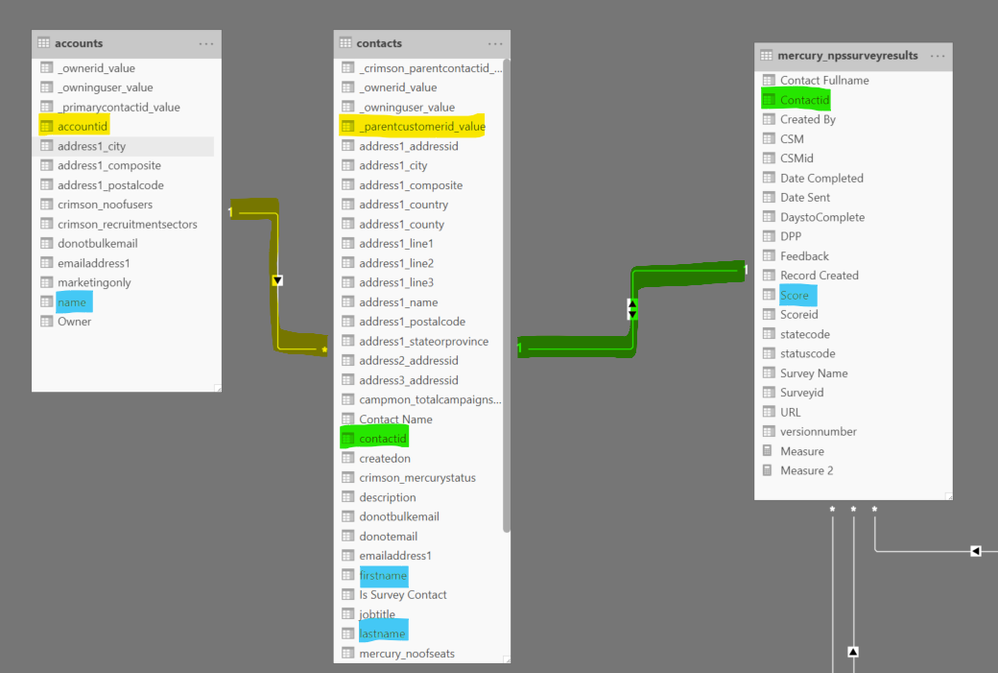
Many thanks for your help. I tried this and it isnt right. I dont have the account name and identifier for a response (score) in the same table. Your .pbx example does exactly what I am after but the measure isnt working for me, I think due to the relationships.
In the Dynamics npssurveyresults entity, everyone who has been sent a survey has a new record created and the score only has a value if its been returned so if score = blank, no survey returned
Is there a way to do this by ross referencing the measure bewteen accouns to look at client names and scorees from the npssurveyresults table?
Many thanks

Helpful resources

Power BI Dataviz World Championships
The Power BI Data Visualization World Championships is back! Get ahead of the game and start preparing now!

Power BI Monthly Update - December 2025
Check out the December 2025 Power BI Holiday Recap!

FabCon Atlanta 2026
Join us at FabCon Atlanta, March 16-20, for the ultimate Fabric, Power BI, AI and SQL community-led event. Save $200 with code FABCOMM.

| User | Count |
|---|---|
| 38 | |
| 37 | |
| 33 | |
| 32 | |
| 29 |


| User | Count |
|---|---|
| 132 | |
| 88 | |
| 82 | |
| 68 | |
| 64 |


