Forum Discussion

alicewang96's avatar
alicewang96
Icon for Helper I rankHelper I
6 years ago
Solved

Power BI Matrix data not in same order as Query Editor or datasheet view

I have a file that I've loaded into Power BI, which I intend to create a matrix with. The columns of the matrix should be sorted by month (i.e. Jan, Feb, Mar). 


The data that I have loaded in is sorted in this exact order. This is also the order I see in both Query Editor and Datasheet view. It seems like the month column is automatically being sorted alphabetically (Feb, Jan, Mar), for some reason. 


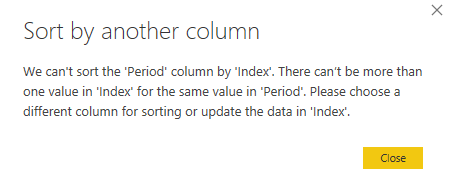
I've tried to create an Index column and then sorting the month column by index. However, I get the error seen below:

  • edhans's avatar
    edhans
    6 years ago

    Can you add a column? 

    Click on the table icon:

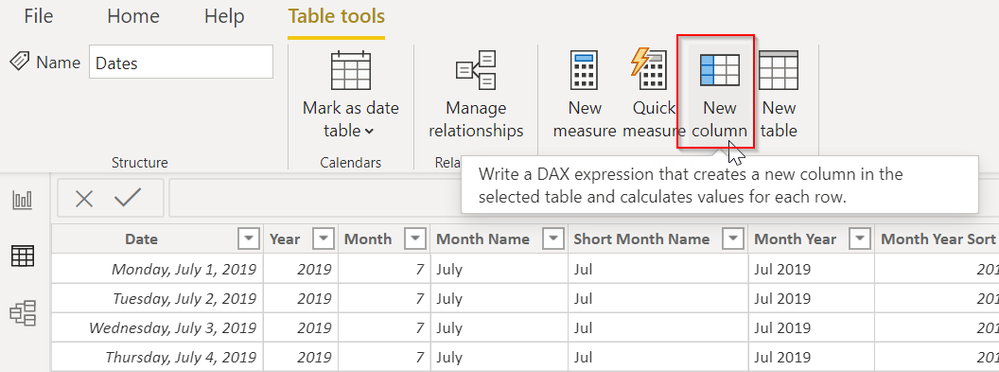
    Then New Column:


    Then use the following formula:


    Month Sort = MONTH(Dates[Date])


    Change what is inside of MONTH() to be your date table name and the date column name.


    If there is no table icon, then they have loaded data directly into the tablular model and the R-Script will have to be modified to add this column for you.


    EDIT: On second thought, surely this table already has a MONTH number column in it. It would be odd to have a date table that does not. Sort your month names by that.

3 Replies

  • edhans's avatar
    edhans
    Icon for Community Champion rankCommunity Champion

    Your sorting column has to be a the same granualarity as your column you want to sort. So if you have month names, the month name sort column must only be 1-12. It cannot be 1-365 or anything else. You can do this two ways.

    If your date table was generated in DAX, use =MONTH(Dates[Date]) as a calculated column and sort by that.

    If your date table was generated in Power Query, use Date.Month([Date]) as a custom column and format it as an integer.


    See below for the start of a date table in Power Query that has a sorting column for a Month/Year (Jan 20, Feb 20, Mar 20) for example.

    Creating a Dynamic Date Table in Power Query

    • alicewang96's avatar
      alicewang96
      Icon for Helper I rankHelper I

      Thanks for your quick response! This table wasn't created in Power BI. It was generated from an R script that was then loaded in.

      • edhans's avatar
        edhans
        Icon for Community Champion rankCommunity Champion

        Can you add a column? 

        Click on the table icon:

        Then New Column:


        Then use the following formula:


        Month Sort = MONTH(Dates[Date])


        Change what is inside of MONTH() to be your date table name and the date column name.


        If there is no table icon, then they have loaded data directly into the tablular model and the R-Script will have to be modified to add this column for you.


        EDIT: On second thought, surely this table already has a MONTH number column in it. It would be odd to have a date table that does not. Sort your month names by that.