FabCon is coming to Atlanta
Join us at FabCon Atlanta from March 16 - 20, 2026, for the ultimate Fabric, Power BI, AI and SQL community-led event. Save $200 with code FABCOMM.
Register now!- Power BI forums
- Get Help with Power BI
- Desktop
- Service
- Report Server
- Power Query
- Mobile Apps
- Developer
- DAX Commands and Tips
- Custom Visuals Development Discussion
- Health and Life Sciences
- Power BI Spanish forums
- Translated Spanish Desktop
- Training and Consulting
- Instructor Led Training
- Dashboard in a Day for Women, by Women
- Galleries
- Data Stories Gallery
- Themes Gallery
- Contests Gallery
- QuickViz Gallery
- Quick Measures Gallery
- Visual Calculations Gallery
- Notebook Gallery
- Translytical Task Flow Gallery
- TMDL Gallery
- R Script Showcase
- Webinars and Video Gallery
- Ideas
- Custom Visuals Ideas (read-only)
- Issues
- Issues
- Events
- Upcoming Events
The Power BI Data Visualization World Championships is back! Get ahead of the game and start preparing now! Learn more
- Power BI forums
- Forums
- Get Help with Power BI
- Desktop
- Re: Filtering out duplicates
- Subscribe to RSS Feed
- Mark Topic as New
- Mark Topic as Read
- Float this Topic for Current User
- Bookmark
- Subscribe
- Printer Friendly Page


- Mark as New
- Bookmark
- Subscribe
- Mute
- Subscribe to RSS Feed
- Permalink
- Report Inappropriate Content
Filtering out duplicates
So, this ought to be easy, but one of the caveats in the online training is that filters are not something a newbie like me will understand first time through.
So here's the setup - I have some facilities. The facilities are in counties, and the counties are in larger regions. Some counties have one facility, some have two or three. I am mapping the number of cases in the area of each facility by using the county total. That's useful for the map...for example, if you look at the tooltip for any one of the three facilities in a county, you will see the county total.
The problem comes when I try to aggregate to show the total by region...It wants to take the county total for each of the three facilities in that county and sum them...I only need one of those three added into the regional total.I don't see a way to attach a file, or I would attach an example file I built.
Solved! Go to Solution.


- Mark as New
- Bookmark
- Subscribe
- Mute
- Subscribe to RSS Feed
- Permalink
- Report Inappropriate Content
Hi @ripstaur ,
Create a measure like so:
Measure =
VAR t =
    SUMMARIZE (
        'Table',
        'Table'[Region],
        'Table'[County],
        "Total_", MAX ( 'Table'[County total cases] )
    )
RETURN
    SUMX ( t, [Total_] )
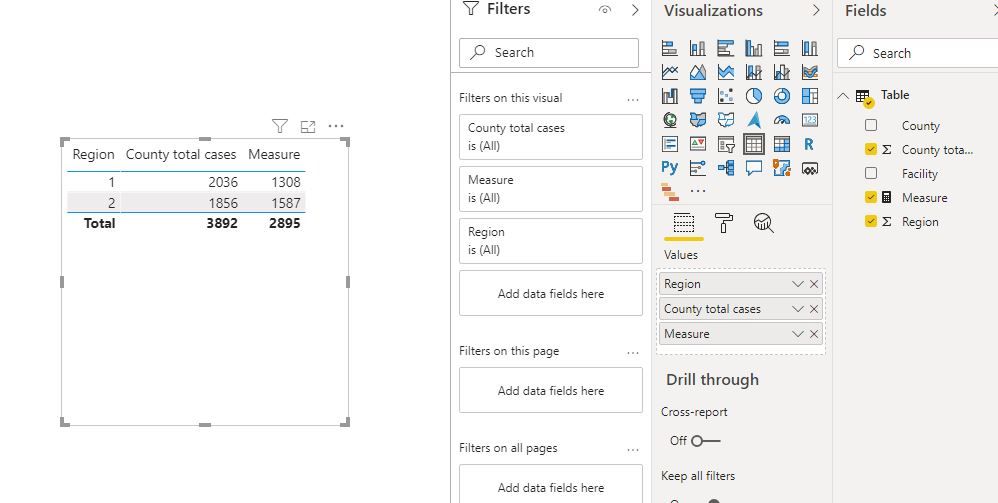
BTW, .pbix file attached.
Best Regards,
Icey
If this post helps, then please consider Accept it as the solution to help the other members find it more quickly.
- Mark as New
- Bookmark
- Subscribe
- Mute
- Subscribe to RSS Feed
- Permalink
- Report Inappropriate Content
Hi @ripstaur ,
Create a measure like so:
Measure =
VAR t =
    SUMMARIZE (
        'Table',
        'Table'[Region],
        'Table'[County],
        "Total_", MAX ( 'Table'[County total cases] )
    )
RETURN
    SUMX ( t, [Total_] )
BTW, .pbix file attached.
Best Regards,
Icey
If this post helps, then please consider Accept it as the solution to help the other members find it more quickly.
- Mark as New
- Bookmark
- Subscribe
- Mute
- Subscribe to RSS Feed
- Permalink
- Report Inappropriate Content
Thanks so much. Both of these worked, but the DAX code was the way to go. I'm sorry I was unable to accept it right after you posted it, but for some reason I could not log into the Forum for a couple of weeks.

- Mark as New
- Bookmark
- Subscribe
- Mute
- Subscribe to RSS Feed
- Permalink
- Report Inappropriate Content
Unless I am misunderstanding, what you may be able to do is this:
Duplicate the table, and in the new table, select the column that has your duplicate entries, then in "Remove rows" select "Remove duplicates".
Then create a one-to-many relationship with your original and duplicate table.
Then do your query where you got it to sum up the values for each county for their individual totals. May need to incorporate the RELATEDTABLE function into it.
This way you can retain your original data while also having a table that has the cumulative totals for the different counties.
Delete/change the columns for the separate tables as needed.


- Mark as New
- Bookmark
- Subscribe
- Mute
- Subscribe to RSS Feed
- Permalink
- Report Inappropriate Content
@ripstaur , Not very clear. But isinscope should help
https://www.kasperonbi.com/use-isinscope-to-get-the-right-hierarchy-level-in-dax/
example
if(isinscope ([Table[country]), calculate([measure], filter(Table,Table[region]="Region")), [measure], )

- Mark as New
- Bookmark
- Subscribe
- Mute
- Subscribe to RSS Feed
- Permalink
- Report Inappropriate Content
Hi @ripstaur, Can you try pasting the excel sample data table in as a reply. That should work
Thanks,
Namish B
- Mark as New
- Bookmark
- Subscribe
- Mute
- Subscribe to RSS Feed
- Permalink
- Report Inappropriate Content
| 1 | C | Wonderful | 364 | 1308 | 1 | 2305 |
| 1 | B | Wonderful | 364 | 1587 | 2 | 1856 |
| 1 | A | Wonderful | 364 | |||
| 1 | D | Eagle | 160 | |||
| 1 | F | Mockingbird | 96 | |||
| 1 | E | Robinette | 83 | |||
| 1 | G | Cowpie | 60 | |||
| 1 | H | Georgeana | 90 | |||
| 1 | I | Draggit | 149 | |||
| 1 | J | Lackett | 152 | |||
| 1 | K | Pickit | 154 | |||
| 2 | L | Simpson | 269 | |||
| 2 | M | Simpson | 269 | |||
| 2 | N | Ronson | 190 | |||
| 2 | O | Johnson | 129 | |||
| 2 | P | Albemarle | 120 | |||
| 2 | Q | Johannesburg | 177 | |||
| 2 | R | Kimtown | 168 | |||
| 2 | S | Popular | 132 | |||
| 2 | T | Wilherm | 190 | |||
| 2 | U | Sampson | 101 | |||
| 2 | V | Fuchness | 111 | |||
- Mark as New
- Bookmark
- Subscribe
- Mute
- Subscribe to RSS Feed
- Permalink
- Report Inappropriate Content
Now I see that the column headers didn't paste in...column A is Region, B is Facility, C is County D is County total cases, E contains the regional totals I want, F is region titles and G is the totals I'm getting now because of the duplicates. I have tried just specifying county totals, but since there are three entries for Wonderful County it adds them all together.
- Mark as New
- Bookmark
- Subscribe
- Mute
- Subscribe to RSS Feed
- Permalink
- Report Inappropriate Content
Namish,
What I want to be able to do is calculate a total by region. You can see that the values for facilities C, B and A are all the same (Because they each take on the value for “Wonderful County.” I need to be able to get the total by region without the duplicates.
What I’m looking for is the two totals in cells E2 and EE3; what I am currently getting is the totals in G2 and G3.
Thanks for your help!
Best regards,
Rip
Helpful resources

Power BI Dataviz World Championships
The Power BI Data Visualization World Championships is back! Get ahead of the game and start preparing now!

Power BI Monthly Update - December 2025
Check out the December 2025 Power BI Holiday Recap!

FabCon Atlanta 2026
Join us at FabCon Atlanta, March 16-20, for the ultimate Fabric, Power BI, AI and SQL community-led event. Save $200 with code FABCOMM.

| User | Count |
|---|---|
| 40 | |
| 35 | |
| 34 | |
| 31 | |
| 28 |


| User | Count |
|---|---|
| 136 | |
| 102 | |
| 68 | |
| 66 | |
| 58 |


