Join us at FabCon Atlanta from March 16 - 20, 2026, for the ultimate Fabric, Power BI, AI and SQL community-led event. Save $200 with code FABCOMM.
Register now!The Power BI Data Visualization World Championships is back! Get ahead of the game and start preparing now! Learn more
Hi All,
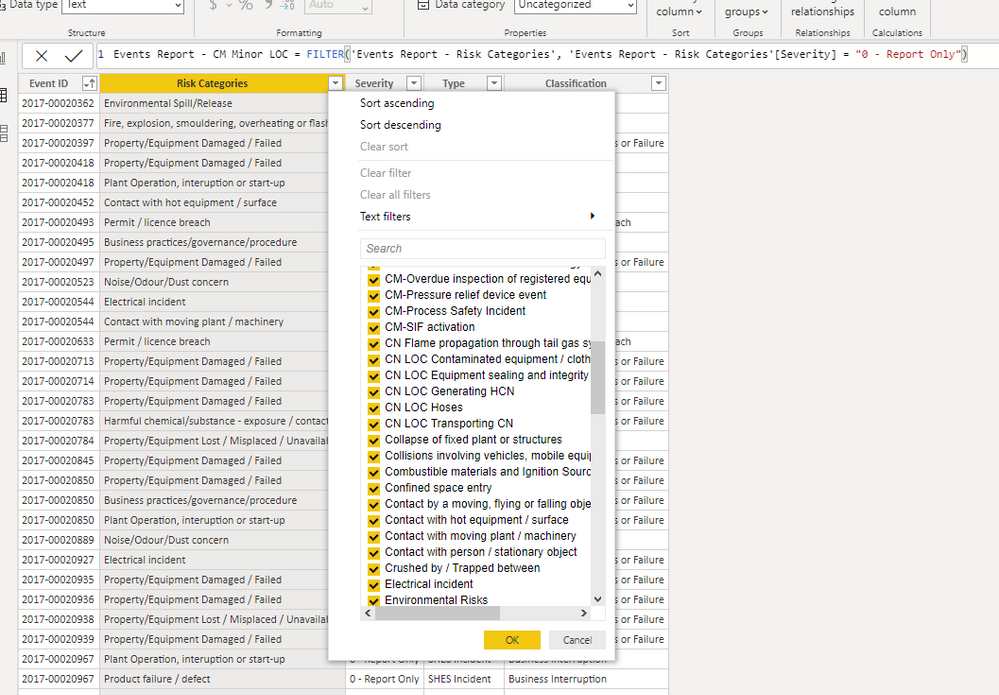
How can I filter all the rows that contain text LOC in the Risk Categories column as shown in a table below? I have tried using ? or * as wildcards text but they did not work.
Solved! Go to Solution.
@MelbourneBadger Ohhhhhh... I did not get that from your original post, I was misled by the picture and just thought you were trying to filter the data view. OK, in that case you need to use FIND, SEARCH or CONTAINSTRING. So, something like:
New Table = FILTER('Old Table',FIND("LOC ",[Column],,0) <>0)
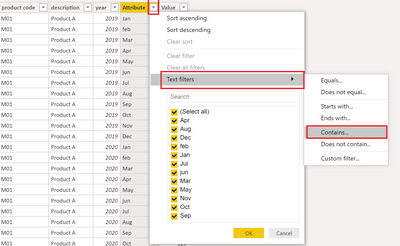
@MelbourneBadger - Use the Text filters fly-out and use Contains.
Thank you for your response @Greg_Deckler
What did you mean by "uset the Text filters fly-out"? Sorry I'm new to DAX. Thank you before-hand.
@MelbourneBadger - Sorry, did the pic not post, I'll try again, this is not DAX:
Thank you @Greg_Deckler
I am actually trying to create new table with DAX expression based on data in another larger table using Filter function based on multiple boolean expressions
@MelbourneBadger Ohhhhhh... I did not get that from your original post, I was misled by the picture and just thought you were trying to filter the data view. OK, in that case you need to use FIND, SEARCH or CONTAINSTRING. So, something like:
New Table = FILTER('Old Table',FIND("LOC ",[Column],,0) <>0)
The Power BI Data Visualization World Championships is back! Get ahead of the game and start preparing now!
| User | Count |
|---|---|
| 40 | |
| 37 | |
| 33 | |
| 29 | |
| 27 |
| User | Count |
|---|---|
| 133 | |
| 104 | |
| 61 | |
| 59 | |
| 55 |