Get Fabric certified for FREE!
Don't miss your chance to take the Fabric Data Engineer (DP-600) exam for FREE! Find out how by attending the DP-600 session on April 23rd (pacific time), live or on-demand.
Learn more- Power BI forums
- Get Help with Power BI
- Desktop
- Service
- Report Server
- Power Query
- Mobile Apps
- Developer
- DAX Commands and Tips
- Custom Visuals Development Discussion
- Health and Life Sciences
- Power BI Spanish forums
- Translated Spanish Desktop
- Training and Consulting
- Instructor Led Training
- Dashboard in a Day for Women, by Women
- Galleries
- Data Stories Gallery
- Themes Gallery
- Contests Gallery
- QuickViz Gallery
- Quick Measures Gallery
- Visual Calculations Gallery
- Notebook Gallery
- Translytical Task Flow Gallery
- TMDL Gallery
- R Script Showcase
- Webinars and Video Gallery
- Ideas
- Custom Visuals Ideas (read-only)
- Issues
- Issues
- Events
- Upcoming Events
Next up in the FabCon + SQLCon recap series: The roadmap for Microsoft SQL and Maximizing Developer experiences in Fabric. All sessions are available on-demand after the live show. Register now
- Power BI forums
- Forums
- Get Help with Power BI
- Desktop
- Filtering multiple columns in the table by one sli...
- Subscribe to RSS Feed
- Mark Topic as New
- Mark Topic as Read
- Float this Topic for Current User
- Bookmark
- Subscribe
- Printer Friendly Page


- Mark as New
- Bookmark
- Subscribe
- Mute
- Subscribe to RSS Feed
- Permalink
- Report Inappropriate Content
Filtering multiple columns by the same values
Hi Everyone,
I am struglling with one thing and not able to find out any solution.
I have a data , which are a simple column, example below:
| Application | Strategy 2019 | Strategy 2020 | Strategy 2021 | Strategy 2022 | Strategy 2023 |
| App 1 | Buy | Buy | Hold | Hold | Hold |
| App 2 | Buy | Buy | Buy | Buy | Buy |
| App 3 | Sell | Sell | Sell | Sell | Sell |
| App 4 | Decomm | ||||
| App 5 | Buy | Buy | Sell | Sell | Sell |
| App 6 | Buy | Buy | Buy | Buy | Buy |
And I would like to have one filter with Buy, Sell, Hold, Decomm, which will filter all 5 columns.
Eg, when filterred by BUY, the outcoume should be:
| Application | Strategy 2019 | Strategy 2020 | Strategy 2021 | Strategy 2022 | Strategy 2023 |
| App 1 | Buy | Buy | Hold | Hold | Hold |
| App 2 | Buy | Buy | Buy | Buy | Buy |
| App 5 | Buy | Buy | Sell | Sell | Sell |
| App 6 | Buy | Buy | Buy | Buy | Buy |
Thanks in advance!
Solved! Go to Solution.


- Mark as New
- Bookmark
- Subscribe
- Mute
- Subscribe to RSS Feed
- Permalink
- Report Inappropriate Content
Hi @Kopek ,
First of all, we need create a calculated table with all the possible value, it does not need to have relation with fact table.
FilterTable =
DISTINCT (
    UNION (
        DISTINCT ( 'Table'[Strategy 2019] ),
        DISTINCT ( 'Table'[Strategy 2020] ),
        DISTINCT ( 'Table'[Strategy 2021] ),
        DISTINCT ( 'Table'[Strategy 2022] ),
        DISTINCT ( 'Table'[Strategy 2023] )
    )
)
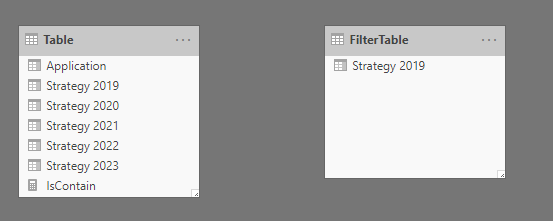
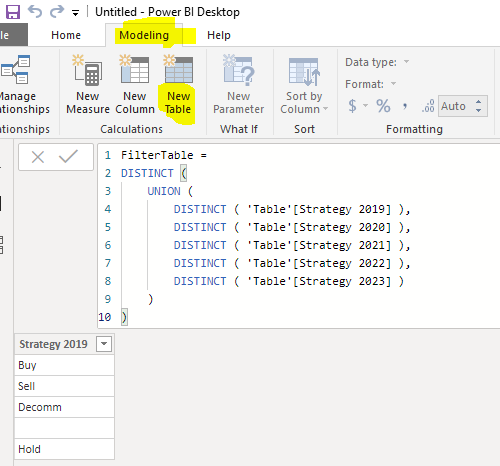
Then we can create a measure and use it in the visual filter
IsContain =
VAR t =
    FILTERS ( 'FilterTable'[Strategy 2019] )
RETURN
    CALCULATE (
        COUNTROWS ( 'Table' ),
        FILTER (
            'Table',
            'Table'[Strategy 2019] IN t
                || 'Table'[Strategy 2020] IN t
                || 'Table'[Strategy 2021] IN t
                || 'Table'[Strategy 2022] IN t
                || 'Table'[Strategy 2023] IN t
        )
    )
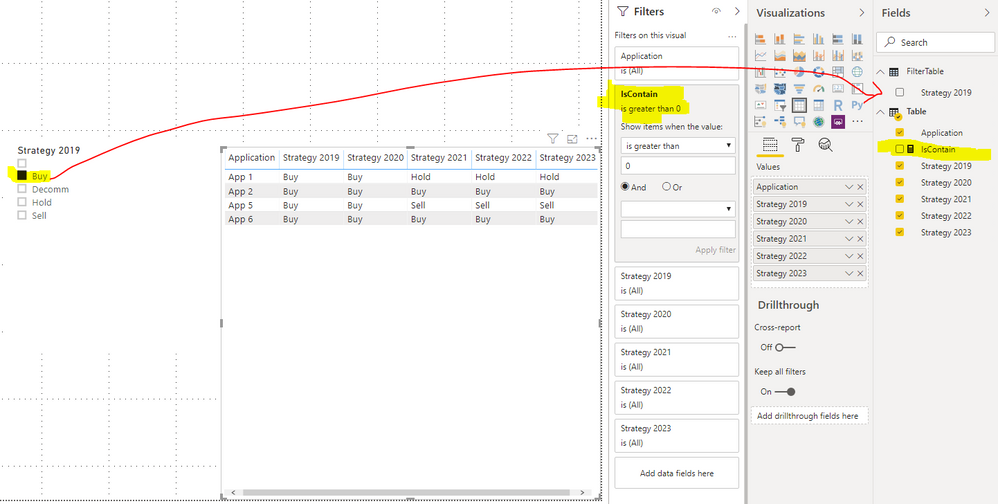
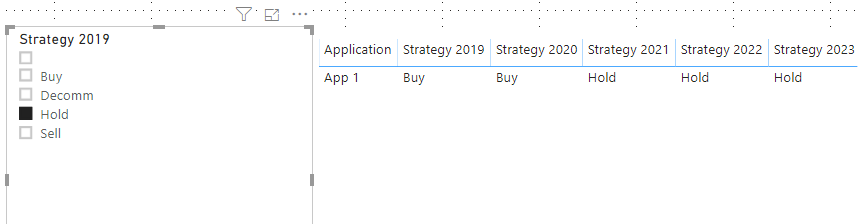
Best regards,
If this post helps, then please consider Accept it as the solution to help the other members find it more quickly.
- Mark as New
- Bookmark
- Subscribe
- Mute
- Subscribe to RSS Feed
- Permalink
- Report Inappropriate Content
- Mark as New
- Bookmark
- Subscribe
- Mute
- Subscribe to RSS Feed
- Permalink
- Report Inappropriate Content
Hi, I got stuck...
I have a below data set:
| Aplication Name | Strategy 2019 | Strategy 2020 | Strategy 2021 | Strategy 2022 | Strategy 2023 |
| App 1 | Sell | Buy | Buy | Buy | Buy |
| App 2 | Buy | Buy | Buy | Buy | Buy |
| App 3 | Sell | Sell | Sell | Sell | Sell |
| App 4 | Decomm | ||||
| App 5 | Sell | Sell | Sell | Sell | Sell |
| App 6 | Buy | Buy | Buy | Buy | Buy |
| App 7 | Buy | Buy | Hold | Hold | Hold |
| App 8 | Buy | Buy | Buy | Buy | Buy |
| App 9 | Buy | Buy | Buy | Buy | Buy |
| App 10 | Buy | Buy | Buy | Buy | Buy |
| App 11 | N/A | Buy | Buy | Buy | Buy |
And I would like to set up a one Buy/ Hold/ Sell/ Decomm/ N/A Filter which will filter all 5 Strategy columns.
e.g. When filter by BUY i would have a below outcome:
| Aplication Name | Strategy 2019 | Strategy 2020 | Strategy 2021 | Strategy 2022 | Strategy 2023 |
| App 1 | Sell | Buy | Buy | Buy | Buy |
| App 2 | Buy | Buy | Buy | Buy | Buy |
| App 6 | Buy | Buy | Buy | Buy | Buy |
| App 7 | Buy | Buy | Hold | Hold | Hold |
| App 8 | Buy | Buy | Buy | Buy | Buy |
| App 9 | Buy | Buy | Buy | Buy | Buy |
| App 10 | Buy | Buy | Buy | Buy | Buy |
| App 11 | N/A | Buy | Buy | Buy | Buy |
Is it achievable ?
I thought it's fairly easy, but apparently it is not...
Thanks!


- Mark as New
- Bookmark
- Subscribe
- Mute
- Subscribe to RSS Feed
- Permalink
- Report Inappropriate Content
@Kopek ,
Please take Slicer from Visual Pane and add "Strategy 2019" field in that slicer.
Please Give KUDOS to this post and Accept this as a solution so other member can take help from it.
Please take a quick glance at newly created dashboards : Restaurant Management Dashboard , HR Analytics Report , Hotel Management Report, Sales Analysis Report , Fortune 500 Companies Analysis , Revenue Tracking Dashboard
- Mark as New
- Bookmark
- Subscribe
- Mute
- Subscribe to RSS Feed
- Permalink
- Report Inappropriate Content
Hi ,
Hi , it will not work for me unfortunately.
That slicer you proposed will filter the entire table only based on the values from the Strategy 2019 coumn.
So if i filter by HOLD, my table will be empty.
Whereas when filterring by hold i would like to see below outcome:
| Application | Strategy 2019 | Strategy 2020 | Strategy 2021 | Strategy 2022 | Strategy 2023 |
| App 1 | Buy | Buy | Hold | Hold | Hold |
I would like to create kind of universal filter which will filter the entire table.
So if filterred by hold i would like to see all rows containing HOLD value, when filterred by BUY i would like to see all rows containing BUY value...
Hope it makes sense..
I tried to create a mapping tab, but i relalized I can have only one relationship beetwen 2 tables, so it does not work either.
- Mark as New
- Bookmark
- Subscribe
- Mute
- Subscribe to RSS Feed
- Permalink
- Report Inappropriate Content
Hi @Kopek ,
First of all, we need create a calculated table with all the possible value, it does not need to have relation with fact table.
FilterTable =
DISTINCT (
    UNION (
        DISTINCT ( 'Table'[Strategy 2019] ),
        DISTINCT ( 'Table'[Strategy 2020] ),
        DISTINCT ( 'Table'[Strategy 2021] ),
        DISTINCT ( 'Table'[Strategy 2022] ),
        DISTINCT ( 'Table'[Strategy 2023] )
    )
)
Then we can create a measure and use it in the visual filter
IsContain =
VAR t =
    FILTERS ( 'FilterTable'[Strategy 2019] )
RETURN
    CALCULATE (
        COUNTROWS ( 'Table' ),
        FILTER (
            'Table',
            'Table'[Strategy 2019] IN t
                || 'Table'[Strategy 2020] IN t
                || 'Table'[Strategy 2021] IN t
                || 'Table'[Strategy 2022] IN t
                || 'Table'[Strategy 2023] IN t
        )
    )
Best regards,
If this post helps, then please consider Accept it as the solution to help the other members find it more quickly.

- Mark as New
- Bookmark
- Subscribe
- Mute
- Subscribe to RSS Feed
- Permalink
- Report Inappropriate Content
@v-lid-msft this was great info!
I'm curious as to why you use COUNTROWS in the calculated Meassure?
- Mark as New
- Bookmark
- Subscribe
- Mute
- Subscribe to RSS Feed
- Permalink
- Report Inappropriate Content
Hi @kararandle2710 ,
We can use COUNTROWS to caluculate is there any rows in filtered table that match the condition, we can also use && to test all the condition and return 1 or 0.
Best regards,
If this post helps, then please consider Accept it as the solution to help the other members find it more quickly.
- Mark as New
- Bookmark
- Subscribe
- Mute
- Subscribe to RSS Feed
- Permalink
- Report Inappropriate Content

Helpful resources

New to Fabric Survey
If you have recently started exploring Fabric, we'd love to hear how it's going. Your feedback can help with product improvements.

Power BI DataViz World Championships - June 2026
A new Power BI DataViz World Championship is coming this June! Don't miss out on submitting your entry.

Join our Fabric User Panel
Share feedback directly with Fabric product managers, participate in targeted research studies and influence the Fabric roadmap.

Power BI Community Update - March 2026
Check out the March 2026 Power BI update to learn about new features.

| User | Count |
|---|---|
| 48 | |
| 45 | |
| 41 | |
| 20 | |
| 17 |


| User | Count |
|---|---|
| 69 | |
| 63 | |
| 32 | |
| 31 | |
| 25 |


