Join us at FabCon Atlanta from March 16 - 20, 2026, for the ultimate Fabric, Power BI, AI and SQL community-led event. Save $200 with code FABCOMM.
Register now!The Power BI Data Visualization World Championships is back! It's time to submit your entry. Live now!
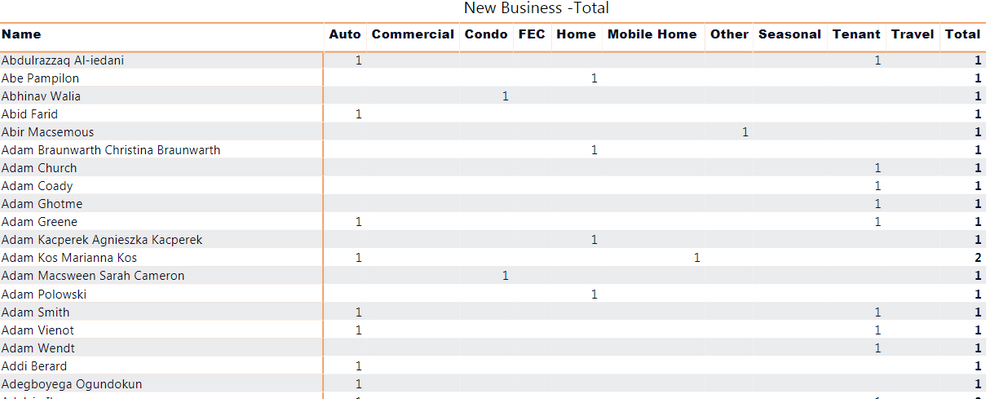
I created a matrix with client names and colums of different policy types. the measure in the matrix, is the count of distinct plicy numbers. I want to be able to only filter the # of clients who had nonblanks in atleast 2 of my column categories ( the type of policy), in other words they have more than one policy type.
So it looks like in your example data, each person has 1 policy number, but can have different types of policy under that same policy number? What happens when you use COUNT of policy number instead of DISTINCTCOUNT?
I would use a count of the category column insetad of distinct policy numbers, so that the total comes out correct. You may have to use a measure like this to create a visual level filter or slicer:
NumberOfCategories = COUNT(Policies[Type])
and then filter on that where it's greater or equal to 2.
Could you share how you have your table(s) structured? It would help us give you a better answer
I could misunderstand your question, but you can use the filter of the visual to set conditions of the returned rows.
I cant because the policy categories always has a value, i want to be able to count for each row, if there is more than 1 policy type. which means i need to filter my policy categories (columns) to show me if there is atleast 2 non blanks.
The Power BI Data Visualization World Championships is back! It's time to submit your entry.
Check out the January 2026 Power BI update to learn about new features.
| User | Count |
|---|---|
| 61 | |
| 48 | |
| 35 | |
| 25 | |
| 23 |
| User | Count |
|---|---|
| 134 | |
| 110 | |
| 59 | |
| 39 | |
| 32 |