cancel
Showing results for 
Search instead for 
Did you mean: 

Did you hear? There's a new SQL AI Developer certification (DP-800). Start preparing now and be one of the first to get certified. Register now

Reply
laurenkliever
Regular Visitor

Filtering matrix rows by a column value

Can anyone help me with a solution to this? We have built an AR Aging report but need to filter rows based on the value of a column in a matrix.


Example:

Table of values:

Customer Name

Amount

Bucket

Customer 1

 $5

Current

Customer 1

 $10

30

Customer 1

 $25

60

Customer 1

 $30

90

Customer 1

 $35

120+

Customer 2

 $15

30

Customer 2

 $40

90

Customer 3

 $20

Current

Customer 3

 $45

30

Customer 4

 $50

60

Customer 4

 $55

90

Customer 4

 $60

120+

Customer 5

 $65

120+


Matrix:

Customer

Current

30

60

90

120+

Grand Total

Customer 1

 $5

 $10

 $25

 $30

 $35

 $105

Customer 2


 $15


 $40


 $55

Customer 3

 $20

 $45


 $65

Customer 4


 $50

 $55

 $60

 $165

Customer 5


 $65

 $65


I want to filter and see only customers that have something in the 90 bucket and still see the other buckets but filter out customers without a value in the 90 bucket.


Result: 


Customer

Current

30

60

90

120+

Grand Total

Customer 1

 $5

 $10

 $25

 $30

 $35

 $105

Customer 2


 $15


 $40


 $55

Customer 4


 $50

 $55

 $60

 $165

1 ACCEPTED SOLUTION

I've solved this with the help of @Phil_Seamark comment above. Instead of using the bucket field in the columns section of the matrix, I've created a measure for each bucket using the below formulas and put that in the values:


Current = calculate(sum(Table1[$Amount]),Table1[Bucket]="Current")

30= calculate(sum(Table1[$Amount]),Table1[Bucket]="30")


etc...


Then used the Has 90 day Value filter, Has 30 day Value filter, etc. and created a tab for each bucket filter: Current filter, 30 filter, etc.

View solution in original post

6 REPLIES 6
Phil_Seamark
Microsoft Employee
Microsoft Employee

Hi @laurenkliever


I had some success by creating the following measure :


Has 90 day Value = CALCULATE(
						SUM('Table1'[Amount]),
						ALLEXCEPT(
							Table1,
							Table1[Customer Name]
							),
						Table1[Bucket]="90")

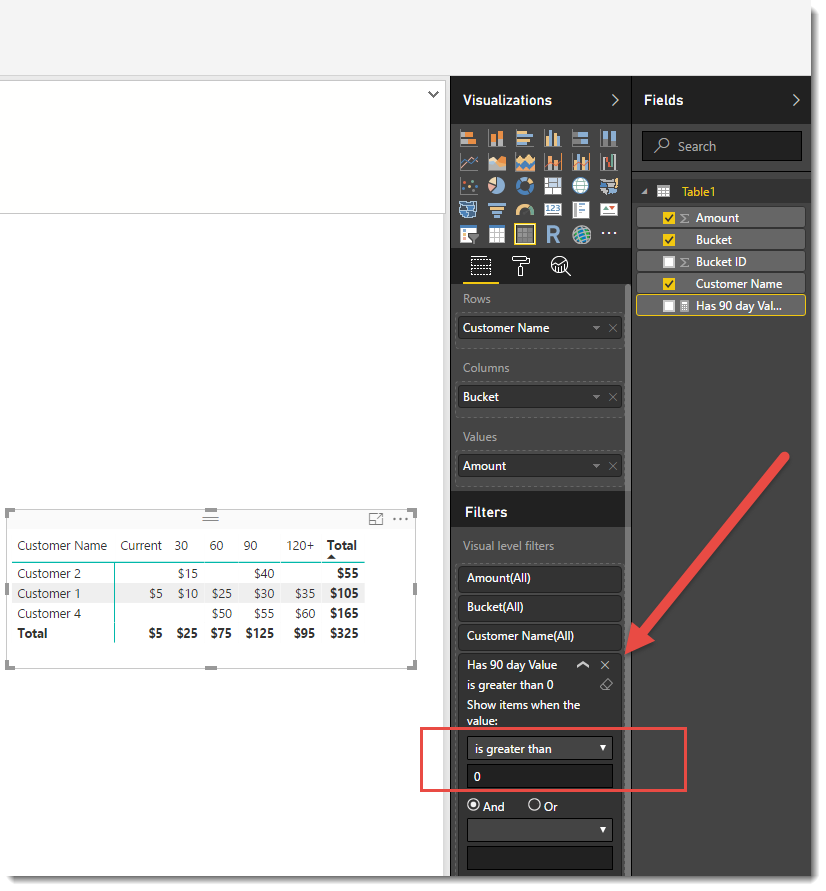
But not adding it to the matrix.  I just added it as a Visual level filter as below


greater than 90.png


To learn more about DAX visit : aka.ms/practicalDAX

Proud to be a Datanaut!

hi @Phil_Seamark,


The only thing I would like to be able to do at this point is to include that measure to the report as a slicer for the end user to use instead of having to do it "behind the scenes". This gets me the closest I have been so far though and I can create separate tabs for each filter option until a different solution comes along. Thank you for your help!

Well, after talking with the end user, the other thing I need is to be able to sort by a column in a matrix...I've seen a lot of forum posts about this and have voted for ideas on this so I'll just wait until it's something that is available to us.

I've solved this with the help of @Phil_Seamark comment above. Instead of using the bucket field in the columns section of the matrix, I've created a measure for each bucket using the below formulas and put that in the values:


Current = calculate(sum(Table1[$Amount]),Table1[Bucket]="Current")

30= calculate(sum(Table1[$Amount]),Table1[Bucket]="30")


etc...


Then used the Has 90 day Value filter, Has 30 day Value filter, etc. and created a tab for each bucket filter: Current filter, 30 filter, etc.

Anonymous
Not applicable

This worked well for me, thank you so much, wish I would have tried that earlier.

Nice Work! 😄


To learn more about DAX visit : aka.ms/practicalDAX

Proud to be a Datanaut!

Helpful resources

Announcements
April Power BI Update Carousel

Power BI Monthly Update - April 2026

Check out the April 2026 Power BI update to learn about new features.

Fabric SQL PBI Data Days

Data Days 2026 coming soon!

Sign up to receive a private message when registration opens and key events begin.

New to Fabric survey Carousel

New to Fabric Survey

If you have recently started exploring Fabric, we'd love to hear how it's going. Your feedback can help with product improvements.

Power BI DataViz World Championships carousel

Power BI DataViz World Championships - June 2026

A new Power BI DataViz World Championship is coming this June! Don't miss out on submitting your entry.