Don't miss your chance to take the Fabric Data Engineer (DP-600) exam for FREE! Find out how by watching the DP-600 session on-demand now through April 28th.
Learn moreJoin the FabCon + SQLCon recap series. Up next: Power BI, Real-Time Intelligence, IQ and AI, and Data Factory take center stage. All sessions are available on-demand after the live show. Register now
Hey,
Might be a simple question but can't seem to get it right.
I have two sql Queries including measurement of products and orderlines.
I need to filter out the orders with a specific measurement.
Example:
Order: XXX
Product: A = Ok
Product: B = Too big
Action: Don't Show Order XXX
As for now I've only figured out how to filter the products per say but seeing as an order can have a both accepted and not accepted product I need to filter so that if an order have "Not allowed product" it shouldn't be counted even if it has products on it that's fine.
Hi @MagnusLarsson94 ,
What's the relationship between Order and Product? Can you show some sample data?
How-to-Get-Your-Question-Answered-Quickly .
Best Regards,
Jay
@MagnusLarsson94 ,The information you have provided is not making the problem clear to me. Can you please explain with an example.
Can you share sample data and sample output in table format? Or a sample pbix after removing sensitive data.
Appreciate your Kudos.
Yea, might have been abit of on my explanation.
Basically:
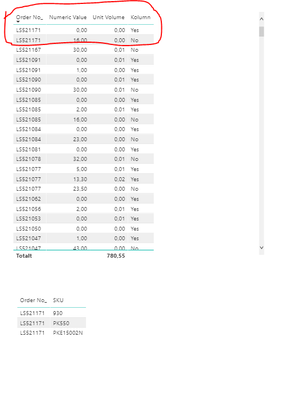
We're in the need of filtering all orders from last year - sold on a specific channel, get the CBM of the orders and exclude orders with products that have a height larger than "Numeric Value 14".
Added Column to make it somewhat clearer:
Yes = Product with numeric value lower than 14
No = Product with numeric value higher than 14
If the order Contains Yes = Show
If the order Contains Yes & No = Don't Show
If the order Contains No = Don't Show.
Orders usually have 3+ products meaning that more often than not they have 2-3 numeric values (1 per product). If just one of these producs have the numeric value of higher than 14 => Don't show the order.
Added a picture as following:
Hope this makes it somewhat easier to understand - Thanks.
Check out the April 2026 Power BI update to learn about new features.
If you have recently started exploring Fabric, we'd love to hear how it's going. Your feedback can help with product improvements.
A new Power BI DataViz World Championship is coming this June! Don't miss out on submitting your entry.
| User | Count |
|---|---|
| 45 | |
| 38 | |
| 34 | |
| 21 | |
| 17 |
| User | Count |
|---|---|
| 66 | |
| 64 | |
| 31 | |
| 26 | |
| 26 |