FabCon is coming to Atlanta
Join us at FabCon Atlanta from March 16 - 20, 2026, for the ultimate Fabric, Power BI, AI and SQL community-led event. Save $200 with code FABCOMM.
Register now!- Power BI forums
- Get Help with Power BI
- Desktop
- Service
- Report Server
- Power Query
- Mobile Apps
- Developer
- DAX Commands and Tips
- Custom Visuals Development Discussion
- Health and Life Sciences
- Power BI Spanish forums
- Translated Spanish Desktop
- Training and Consulting
- Instructor Led Training
- Dashboard in a Day for Women, by Women
- Galleries
- Data Stories Gallery
- Themes Gallery
- Contests Gallery
- QuickViz Gallery
- Quick Measures Gallery
- Visual Calculations Gallery
- Notebook Gallery
- Translytical Task Flow Gallery
- TMDL Gallery
- R Script Showcase
- Webinars and Video Gallery
- Ideas
- Custom Visuals Ideas (read-only)
- Issues
- Issues
- Events
- Upcoming Events
Vote for your favorite vizzies from the Power BI Dataviz World Championship submissions. Vote now!
- Power BI forums
- Forums
- Get Help with Power BI
- Desktop
- Re: Filtering data with conditions
- Subscribe to RSS Feed
- Mark Topic as New
- Mark Topic as Read
- Float this Topic for Current User
- Bookmark
- Subscribe
- Printer Friendly Page

- Mark as New
- Bookmark
- Subscribe
- Mute
- Subscribe to RSS Feed
- Permalink
- Report Inappropriate Content
Filtering data with conditions
I have a simple dataset
| Item | Item 2 | Order# |
| apple | pear | 1 |
| pear | apple | 1 |
| orange | banana | 2 |
| banana | orange | 2 |
| pear | orange | 3 |
| orange | pear | 3 |
| banana | orange | 3 |
| orange | banana | 3 |
| banana | pear | 3 |
| pear | banana | 3 |
as you can see, some lines are almost duplicated, so I need to get a different look of the table
I don't want to show row#2, it is enough to show row#1.
How to show the values I need?
| Item | Item 2 | Order# |
| apple | pear | 1 |
| orange | banana | 2 |
| pear | orange | 3 |
| banana | orange | 3 |
| banana | pear | 3 |
Someone can help?
Solved! Go to Solution.


- Mark as New
- Bookmark
- Subscribe
- Mute
- Subscribe to RSS Feed
- Permalink
- Report Inappropriate Content
Hello @Anonymous
try like this,
M code:
let
    Source = Table.FromRows(Json.Document(Binary.Decompress(Binary.FromText("i45WSiwoyElV0lEqSE0sAlKGSrE60TAOTA4imF+UmJcO4iYl5gEhkGEEFodz4QqMkA2BixqjmgKVNsZhhjEOO9HUo5gC5SCrjQUA", BinaryEncoding.Base64), Compression.Deflate)), let _t = ((type text) meta [Serialized.Text = true]) in type table [Item = _t, #"Item 2" = _t, #"Order#" = _t]),
    ChangedType = Table.TransformColumnTypes(Source,{{"Item", type text}, {"Item 2", type text}, {"Order#", Int64.Type}}),
    RemovedDuplicates = Table.Distinct(ChangedType),
    AddedIndex = Table.AddIndexColumn(RemovedDuplicates, "Index", 1, 1),
    Join = Table.NestedJoin(AddedIndex, {"Item", "Item 2", "Order#"}, AddedIndex, {"Item 2", "Item", "Order#"}, "Dupes", JoinKind.LeftOuter),
    ExpandedDupes = Table.ExpandTableColumn(Join, "Dupes", {"Index"}, {"Index2"}),
    Distinct = Table.SelectRows(ExpandedDupes, each [Index] < [Index2]),
    RemovedOtherColumns = Table.SelectColumns(Distinct,{"Item", "Item 2", "Order#"})
in
    RemovedOtherColumns
Did I answer your question correctly? Mark my answer as a solution!
Proud to be a Datanaut!


- Mark as New
- Bookmark
- Subscribe
- Mute
- Subscribe to RSS Feed
- Permalink
- Report Inappropriate Content
Hi @Anonymous
I imagine it would be more convenient to do this in the query editor but if you want to do it in DAX, create a calculated table:
Table2 =
VAR _ResTable =
    FILTER (
        Table1;
        VAR _AuxTable =
            FILTER (
                Table1;
                Table1[Order#] = EARLIER ( Table1[Order#] )
                    && Table1[Item] = EARLIER ( Table1[Item 2] )
                    && Table1[Item 2] = EARLIER ( Table1[Item] )
            )
        RETURN
            IF (
                (
                    COUNTROWS ( _AuxTable ) <> 0
                        && Table1[Item] < Table1[Item 2]
                )
                    || COUNTROWS ( _AuxTable ) = 0;
                TRUE ();
                FALSE ()
            )
    )
RETURN
    _ResTable
- Mark as New
- Bookmark
- Subscribe
- Mute
- Subscribe to RSS Feed
- Permalink
- Report Inappropriate Content
Hello @Anonymous
try like this,
M code:
let
    Source = Table.FromRows(Json.Document(Binary.Decompress(Binary.FromText("i45WSiwoyElV0lEqSE0sAlKGSrE60TAOTA4imF+UmJcO4iYl5gEhkGEEFodz4QqMkA2BixqjmgKVNsZhhjEOO9HUo5gC5SCrjQUA", BinaryEncoding.Base64), Compression.Deflate)), let _t = ((type text) meta [Serialized.Text = true]) in type table [Item = _t, #"Item 2" = _t, #"Order#" = _t]),
    ChangedType = Table.TransformColumnTypes(Source,{{"Item", type text}, {"Item 2", type text}, {"Order#", Int64.Type}}),
    RemovedDuplicates = Table.Distinct(ChangedType),
    AddedIndex = Table.AddIndexColumn(RemovedDuplicates, "Index", 1, 1),
    Join = Table.NestedJoin(AddedIndex, {"Item", "Item 2", "Order#"}, AddedIndex, {"Item 2", "Item", "Order#"}, "Dupes", JoinKind.LeftOuter),
    ExpandedDupes = Table.ExpandTableColumn(Join, "Dupes", {"Index"}, {"Index2"}),
    Distinct = Table.SelectRows(ExpandedDupes, each [Index] < [Index2]),
    RemovedOtherColumns = Table.SelectColumns(Distinct,{"Item", "Item 2", "Order#"})
in
    RemovedOtherColumns
Did I answer your question correctly? Mark my answer as a solution!
Proud to be a Datanaut!
- Mark as New
- Bookmark
- Subscribe
- Mute
- Subscribe to RSS Feed
- Permalink
- Report Inappropriate Content
Hi @LivioLanzo,
I checked your code and have to say - it doesn't work correctly. Or I made some mistakes...
Unfortunately, I have something like that:
| Item | Item 2 | Order# | Index | Index2 |
| apple | pear | 1 | 1 | 2 |
| pear | apple | 1 | 2 | 1 |
| orange | banana | 2 | 3 | 4 |
| banana | orange | 2 | 4 | 3 |
| pear | orange | 3 | 5 | 6 |
| orange | pear | 3 | 6 | 5 |
| banana | orange | 3 | 7 | 8 |
| orange | banana | 3 | 8 | 7 |
| banana | pear | 3 | 9 | 10 |
| pear | banana | 3 | 10 | 9 |
And the condition
Table.SelectRows(ExpandedDupes, each [Index] < [Index2]),
works correctly but without the result that I need.
Anyway, Thanks a lot for your help!
- Mark as New
- Bookmark
- Subscribe
- Mute
- Subscribe to RSS Feed
- Permalink
- Report Inappropriate Content
hI @Anonymous
this is weird because when i run it on my side this is what I see as a result:
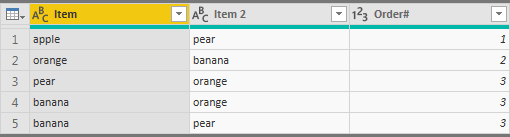
Did I answer your question correctly? Mark my answer as a solution!
Proud to be a Datanaut!
- Mark as New
- Bookmark
- Subscribe
- Mute
- Subscribe to RSS Feed
- Permalink
- Report Inappropriate Content
- Mark as New
- Bookmark
- Subscribe
- Mute
- Subscribe to RSS Feed
- Permalink
- Report Inappropriate Content
@Anonymous, no problem! 🙂 I was actually curious why you'd get wrong results on your side
by the way, are you extracting the data from a database? If so, you can do this even faster directly with SQL, you would need to change the name of the database table which I have put in red:
WITH
C1 AS
( SELECT
	f.item,
	f.item2,
	f.orderid,
	ROW_NUMBER() OVER(PARTITION BY f.orderid ORDER BY (SELECT NULL)) AS Indx
   FROM fruits AS f ),
C2 AS
(select
	f1.Item,
	f1.Item2,
	f1.ORDERID,
	f1.Indx,
	f2.Indx AS Indx2
FROM C1 AS f1
     LEFT JOIN C1 AS f2
     ON f1.Item = f2.Item2 AND f1.Item2 = f2.Item AND f1.ORDERID = f2.ORDERID)
SELECT
	C2.Item,
	C2.Item2,
	C2.ORDERID
FROM C2
WHERE (C2.Indx < C2.Indx2) OR (C2.Indx2 IS NULL)
Did I answer your question correctly? Mark my answer as a solution!
Proud to be a Datanaut!
- Mark as New
- Bookmark
- Subscribe
- Mute
- Subscribe to RSS Feed
- Permalink
- Report Inappropriate Content
@LivioLanzo Hello,
I am so sorry, you were right and I had a mistake...
your code
   ExpandedDupes = Table.ExpandTableColumn(Join, "Dupes", {"Index"}, {"Index2"}),
    Distinct = Table.SelectRows(ExpandedDupes, each [Index] < [Index2]),
and my
Distinct = Table.SelectRows(ExpandedDupes, each "Index" < "Index2"),
About SQL, query it is much easier but I can't use a direct query, have to use data model )
Thanks @LivioLanzo
Have a nice day!
- Mark as New
- Bookmark
- Subscribe
- Mute
- Subscribe to RSS Feed
- Permalink
- Report Inappropriate Content
Hi @Anonymous
I imagine it would be more convenient to do this in the query editor but if you want to do it in DAX, create a calculated table:
Table2 =
VAR _ResTable =
    FILTER (
        Table1;
        VAR _AuxTable =
            FILTER (
                Table1;
                Table1[Order#] = EARLIER ( Table1[Order#] )
                    && Table1[Item] = EARLIER ( Table1[Item 2] )
                    && Table1[Item 2] = EARLIER ( Table1[Item] )
            )
        RETURN
            IF (
                (
                    COUNTROWS ( _AuxTable ) <> 0
                        && Table1[Item] < Table1[Item 2]
                )
                    || COUNTROWS ( _AuxTable ) = 0;
                TRUE ();
                FALSE ()
            )
    )
RETURN
    _ResTable
- Mark as New
- Bookmark
- Subscribe
- Mute
- Subscribe to RSS Feed
- Permalink
- Report Inappropriate Content
Thanks, @AlB,
It works!
You are right it would be better to make this in the query editor, but all I tried - did not work correctly.
Your DAX is too difficult but I try to understand and will use your solution.
Thanks a lot!
Helpful resources

Power BI Dataviz World Championships
Vote for your favorite vizzies from the Power BI World Championship submissions!

Join our Community Sticker Challenge 2026
If you love stickers, then you will definitely want to check out our Community Sticker Challenge!

Power BI Monthly Update - January 2026
Check out the January 2026 Power BI update to learn about new features.

FabCon Atlanta 2026
Join us at FabCon Atlanta, March 16-20, for the ultimate Fabric, Power BI, AI and SQL community-led event. Save $200 with code FABCOMM.

| User | Count |
|---|---|
| 64 | |
| 51 | |
| 46 | |
| 23 | |
| 19 |


| User | Count |
|---|---|
| 135 | |
| 110 | |
| 50 | |
| 31 | |
| 29 |


