Join us at FabCon Atlanta from March 16 - 20, 2026, for the ultimate Fabric, Power BI, AI and SQL community-led event. Save $200 with code FABCOMM.
Register now!The Power BI Data Visualization World Championships is back! It's time to submit your entry. Live now!
Hi there.
I?m actually courious to kown if I can filter data simply selecting a column of a graph.
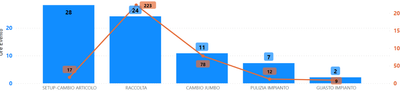
I have 2 graphs, one with events name in X-axis, and double values:
-Duration of events in columns
-numbers of events in a row.
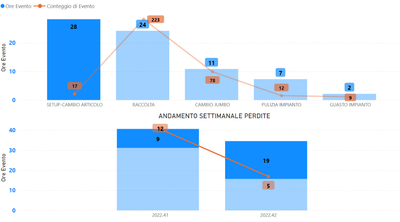
In the second one, I have the same informations but with weeks in X-axis.
Actually, if I select a event in the first graph, this is what happens: as you can see, it actually filter the data but not in the way that I need:
What I need, by selecting a column, is this (in the second graph):
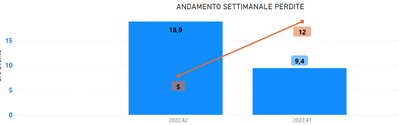
Now i just use a filter view to do the job, but will be easier with column selection.
Is that possible?
Solved! Go to Solution.
Hi @andreazambon,
In your case, the interactions between the visuals are set to highlight. You can use columns as filter by going to Format->Edit Interactions and changing the interaction type to Filter.
Did I answer your question? Mark this post as a solution if I did!
Consider taking a look at my blog: How to Export Telemetry Data from Azure IoT Central into Power BI
Hi @andreazambon,
In your case, the interactions between the visuals are set to highlight. You can use columns as filter by going to Format->Edit Interactions and changing the interaction type to Filter.
Did I answer your question? Mark this post as a solution if I did!
Consider taking a look at my blog: How to Export Telemetry Data from Azure IoT Central into Power BI
The Power BI Data Visualization World Championships is back! It's time to submit your entry.
| User | Count |
|---|---|
| 50 | |
| 43 | |
| 36 | |
| 33 | |
| 30 |
| User | Count |
|---|---|
| 138 | |
| 125 | |
| 60 | |
| 59 | |
| 56 |