
Join us at FabCon Atlanta from March 16 - 20, 2026, for the ultimate Fabric, Power BI, AI and SQL community-led event. Save $200 with code FABCOMM.
Register now!The Power BI Data Visualization World Championships is back! Get ahead of the game and start preparing now! Learn more
Hi All,
I have stock data
| Date | Stock |
| 2 Jan 2023 | 1000 |
| 1 Feb 2023 | 2000 |
| 1 March 2023 | 4000 |
| 10 April 2023 | 300 |
| 17 April 2023 | 200 |
| 24 April 2023 | 400 |
| 31 April 2023 | 500 |
| 14 May 2023 | 400 |
| 22 May 2023 | 200 |
| 29 May 2023 | 500 |
But I only need 1 data per month. If 1 month only has 1 data, show it. But if 1 month has more than 1 data, show the last week's data of that month
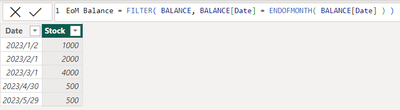
Expected result
| Date | Stock |
| 2 Jan 2023 | 1000 |
| 1 Feb 2023 | 2000 |
| 1 March 2023 | 4000 |
| 31 April 2023 | 500 |
| 29 May 2023 | 500 |
Please help me find Dax in Power BI or I can filter the data in Power Query
Both ways are easy enough,
DAX
PQ
let
Source = Table.FromRows(Json.Document(Binary.Decompress(Binary.FromText("i45WMlLwSsxTMDIwMlbSUTI0MDBQitWJVjJUcEtNgokaIUR9E4uSM2DiJnBxAwXHgqLMHJiEMUzcHFXcCCpuZIIqbgIVN0YzxxRmjgnQ4kp01UZGyKJwsy2RRcEmxAIA", BinaryEncoding.Base64), Compression.Deflate)), let _t = ((type nullable text) meta [Serialized.Text = true]) in type table [Date = _t, Stock = _t]),
#"Changed Type" = Table.TransformColumnTypes(Source,{{"Date", type date}, {"Stock", Int64.Type}}),
Grouped = Table.FromRecords(Table.Group(#"Changed Type", "Date", {"grp", Table.Last}, 0, (x,y) => Byte.From(Date.Month(x)<>Date.Month(y)))[grp])
in
Grouped
Expertise = List.Accumulate( {Days as from Today}, {Skills and Knowledge}, (Current, Everyday) => Current & Day.LearnAndPractise(Everyday) ) |
Hi @Mars3442 ,
This problem is solved in one of the past discussions here:
You can either filter the data in power query or create a calculated column to filter only the desired rows. Unfortunately, there won't be any easy way to filter rows via DAX.
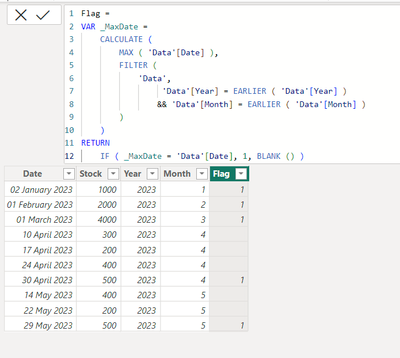
I would suggest to add a calculated column to your table as suggested by Shishir.
Flag =
VAR _MaxDate =
CALCULATE (
MAX ( 'Data'[Date] ),
FILTER (
'Data',
'Data'[Year] = EARLIER ( 'Data'[Year] )
&& 'Data'[Month] = EARLIER ( 'Data'[Month] )
)
)
RETURN
IF ( _MaxDate = 'Data'[Date], 1, BLANK () )
Please mark it as answer if it resolves your issue. Kudos are also appreciated.
Regards
Vibhor
The Power BI Data Visualization World Championships is back! Get ahead of the game and start preparing now!
Check out the November 2025 Power BI update to learn about new features.
| User | Count |
|---|---|
| 59 | |
| 43 | |
| 42 | |
| 23 | |
| 17 |
| User | Count |
|---|---|
| 190 | |
| 122 | |
| 96 | |
| 66 | |
| 47 |