cancel
Showing results for 
Search instead for 
Did you mean: 

Level up your Power BI skills this month - build one visual each week and tell better stories with data! Get started

Reply
oconorj_86
Frequent Visitor

Filtering data on import from ElasticSearch

Hi,


For a new project we are trying to pull data from ElasticSearch into Power Bi. The import is going very slow (I believe thanks to the VPN) and after a couple of hours we get a time-out error (roughly when we het 10M+ records)


As the table in ElasticSearch is holding roughly 18M records I was thinking of filtering out the records older than 6 months from this table as I don't see myself spending hours every week refreshing the datasource. As you can see me coming .. wondering if there is a way to connect to ElasticSearch via the ODBC and filter before we start importing like we can do with a SQL statement.


Any suggestion welcome here 🙂

1 ACCEPTED SOLUTION
v-chenwuz-msft
Community Support
Community Support

Hi @oconorj_86 ,


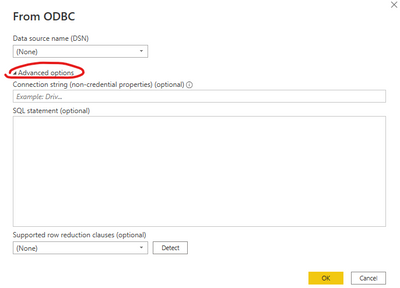
Can you try to use advanced options when you use the ODBC connector.

vchenwuzmsft_0-1653630326573.png


Or check out this article to see if it's helpful to you.

Connect Elasticsearch to Power BI: An Easy Guide 


Best Regards

Community Support Team _ chenwu zhu


If this post helps, then please consider Accept it as the solution to help the other members find it more quickly.

View solution in original post

2 REPLIES 2
v-chenwuz-msft
Community Support
Community Support

Hi @oconorj_86 ,


Can you try to use advanced options when you use the ODBC connector.

vchenwuzmsft_0-1653630326573.png


Or check out this article to see if it's helpful to you.

Connect Elasticsearch to Power BI: An Easy Guide 


Best Regards

Community Support Team _ chenwu zhu


If this post helps, then please consider Accept it as the solution to help the other members find it more quickly.

Hi,


I tried this a week or so ago and kept giving me errors as the ElasticSearch didn't accept the SQL language.
I mentioned this to the tech team and they looked into this. looks like they needed to do something their end to accept the SQL query. Fast forward to this morning and I was able to filter the data when importing 🙂


Marked this as the solution. If people get same error as me, get in contact with the ElasticSearch team in your company and ask them to enable the SQL Query DSL.


Thanks 🙂

Helpful resources

Announcements
April Power BI Update Carousel

Power BI Monthly Update - April 2026

Check out the April 2026 Power BI update to learn about new features.

Fabric SQL PBI Data Days

Data Days 2026 coming soon!

Sign up to receive a private message when registration opens and key events begin.

New to Fabric survey Carousel

New to Fabric Survey

If you have recently started exploring Fabric, we'd love to hear how it's going. Your feedback can help with product improvements.

Power BI DataViz World Championships carousel

Power BI DataViz World Championships - June 2026

A new Power BI DataViz World Championship is coming this June! Don't miss out on submitting your entry.