cancel
Showing results for 
Search instead for 
Did you mean: 

The Power BI Data Visualization World Championships is back! Get ahead of the game and start preparing now! Learn more

Reply
Anonymous
Not applicable

Filtering data in Slicers (Not through Report/Page level filters)

Hi,

I have a SalesFact table ranging data from 2009 Q1 and data will be added every Quarter.

But I wanted to display values only from 2019.Q1 in Slicer. But when I select Snapshot_Year, it is displaying from 2009.


I do not want to use Page/Report level filters as these reports are 3-year, 10-Year and Trend reports means if a user selects 2019.Q1, we use data from 2009.Q1 for 10-year avergae reports.


we are using Power BI Report Server Jan 2019 version.


Thanks,

Kumar


1 ACCEPTED SOLUTION
Anonymous
Not applicable

Sorry for not marking answer.

I have added another Date Slicer  and selected 'After' option to select From date range and hided in SELECTION pane.

While calculating LYTotals am ignoring the slicer and it worked.


Thank you again.

View solution in original post

3 REPLIES 3
v-diye-msft
Community Support
Community Support

Hi @Anonymous 


Could you tell me if your problem has been solved? If it is, kindly mark the helpful answer as a solution. if not, please share more details about your question, we'd like to provide further support. thanks!
If you've fixed by your own, it would be much appreciated if you can share your solution here. 


Community Support Team _ Dina Ye
If this post helps, then please consider Accept it as the solution to help the other members find it more
quickly.
Anonymous
Not applicable

Sorry for not marking answer.

I have added another Date Slicer  and selected 'After' option to select From date range and hided in SELECTION pane.

While calculating LYTotals am ignoring the slicer and it worked.


Thank you again.

v-diye-msft
Community Support
Community Support

Hi @Anonymous ,


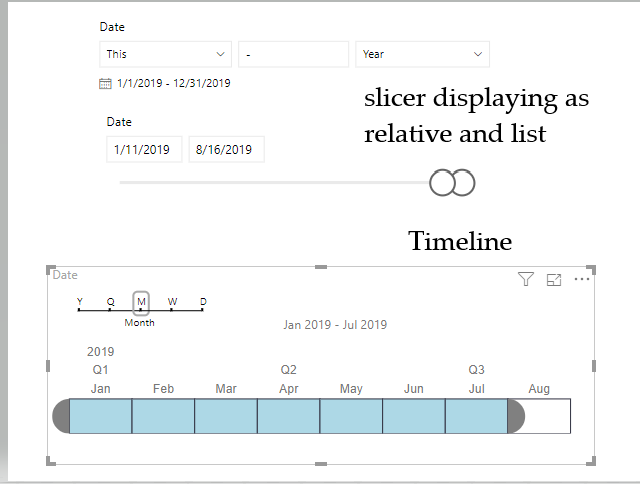
Not sure if you'd like to use the slicer to filter the data from 2019 Q1 until now, if yes, you can try below default slicer and the custom slicer (Timeline)

0002.PNG


Community Support Team _ Dina Ye
If this post helps, then please consider Accept it as the solution to help the other members find it more
quickly.

Helpful resources

Announcements
November Power BI Update Carousel

Power BI Monthly Update - November 2025

Check out the November 2025 Power BI update to learn about new features.

Fabric Data Days Carousel

Fabric Data Days

Advance your Data & AI career with 50 days of live learning, contests, hands-on challenges, study groups & certifications and more!

FabCon Atlanta 2026 carousel

FabCon Atlanta 2026

Join us at FabCon Atlanta, March 16-20, for the ultimate Fabric, Power BI, AI and SQL community-led event. Save $200 with code FABCOMM.